Partially closing positions in the MetaTrader trading platform without installing additional scripts
If you've opened a stock exchange trade and after a while it starts to generate profit, you're faced with the question of whether to close the position or hold on to it in hopes of making even more money

But the trend can change at any moment, and a profitable order can turn into a losing one. How can this situation be avoided? Currently, there are two options for preserving your earnings.
The first is to set a trailing stop order , thereby fixing the existing profit amount; the second is to partially close the position.
Depending on the situation, you should choose the most appropriate option; today we will talk about how to partially close a position.
This operation is possible in both versions 4 and 5 of the MetaTrader trading platform.
An example of partial closing of a stock exchange position
The easiest way to understand the entire mechanism is with a specific example. We already have an open order to buy Bitcoin for 1 lot.
To perform a partial closure, simply select the desired order in the “Trade” tab and right-click:
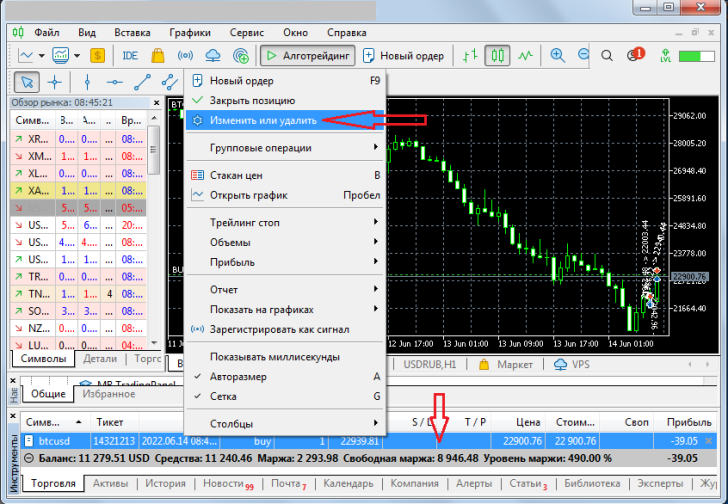
After this, from the submenu that opens, select “Change or delete,” click and proceed to modifying the order.
This will open a position management window. By default, it is configured only to change stop-loss and take-profit parameters, but if you select "market execution," a close button will appear at the bottom, indicating the volume:
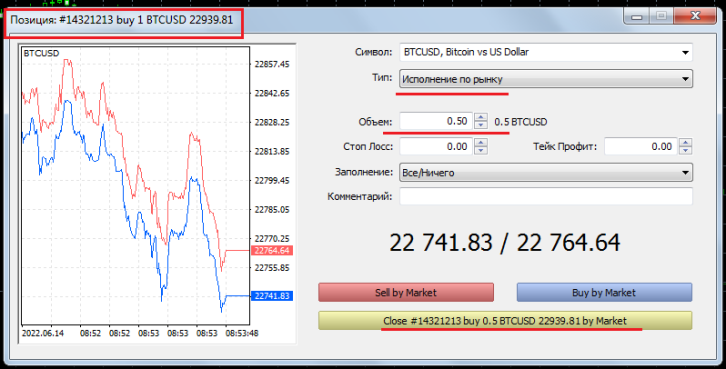
Next, we enter the volume we want to reduce our transaction by; in our case, it will be 0.5 lots. This value will immediately be displayed on the close button at the bottom of the order management window.
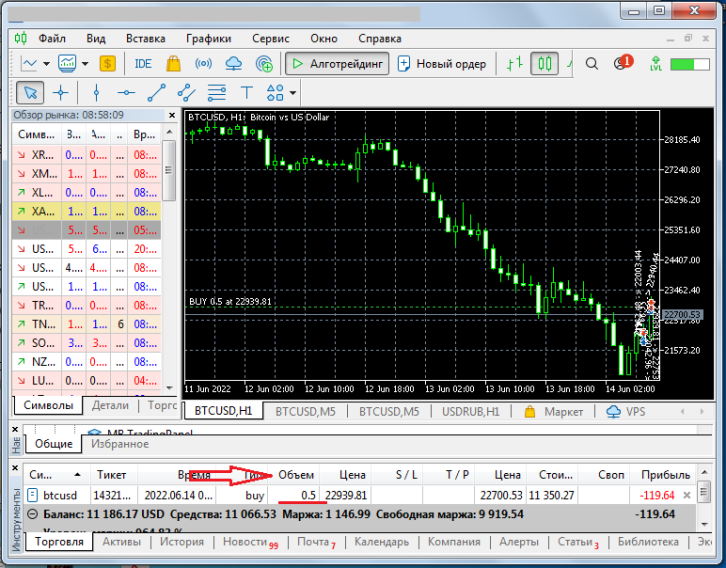
After clicking this button, we see a partial closing of the position in the "Trade" tab at the bottom of the trading platform. Now, in the "Volume" window, we see 0.5 lots instead of 1:
As you can see, everything is extremely simple; the operation is completed in literally a few seconds. The main thing before doing it is to decide precisely whether to partially close the position or to set a trailing stop.
I prefer the trailing stop option, although it is often difficult to select its parameter in relation to the magnitude of the existing trend correction.

