Two brokers in one trading platform
Working with MetaTrader, you never cease to be amazed by its functionality and technical analysis capabilities.
The developers of the trading platform have truly done everything to make traders' lives easier.
Even after several years of use, you continually discover new features and capabilities.
Some features were simply overlooked before, while others have only recently appeared thanks to software updates.
One such feature is the ability to trade multiple accounts from different brokers on a single trading platform.
But often traders have open accounts with other brokerage companies, so they have to download their trading platforms as well.
It turns out that this is not necessary at all; most brokers allow trading from an account opened with them and in someone else's terminal.
That is, in order to use an account opened, for example, Alpari enough in MetaTrader from RoboForex open a new account:
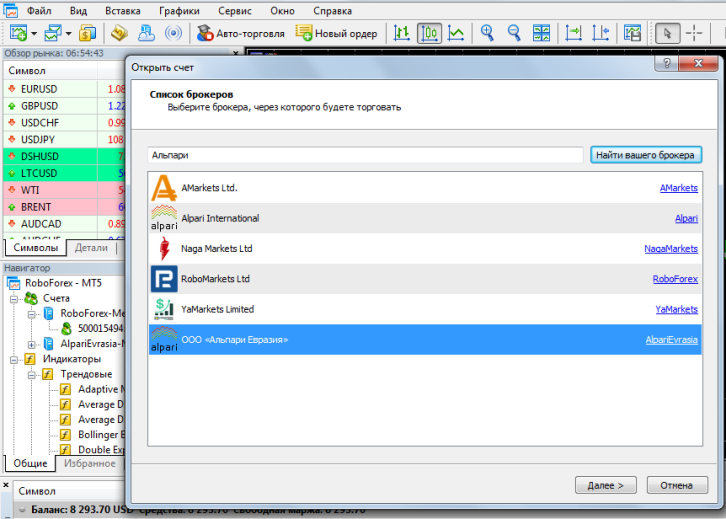
After that, enter your broker's name in the search bar and select "Connect to existing accounts" or "Open a demo account." Fill in all the required information.
The new account we just opened will now appear in the "Accounts" section of the browser window:
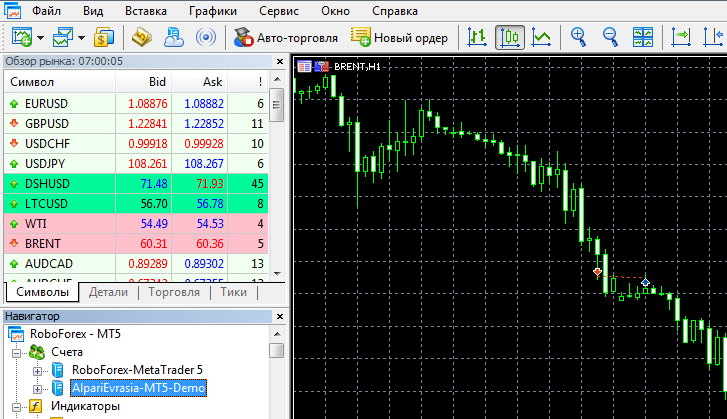
This solution allows you to work within a single trading platform, switching only between accounts rather than between multiple programs.
However, to be fair, it should be noted that for some reason this scheme doesn't always work; some brokers work exclusively through their own platforms.

