How to connect multiple monitors for trading
You've probably seen professionals working on two or more monitors while reviewing analytics or the news.  Scientific research has shown that working on two or more monitors increases efficiency and productivity by an average of 33 percent.
This is especially true for creative individuals and those in engineering professions. Just imagine: something as simple as an additional monitor can dramatically increase your productivity.
When it comes to trading, having two or more monitors allows you to monitor the market situation more closely.
Just remember yourself switching from one currency pair to another every five to ten minutes, losing concentration and composure in search of a market signal.
How to connect two monitors for Forex.
The ability to connect two monitors depends solely on the hardware you're using. Modern video cards almost always have two monitor outputs. The first output is called VGA, and the second is DVI. If you've already purchased a new monitor, you'll notice that it always comes with a VGA connector.
Despite this, developers most often combine these two inputs, so in most cases the video card has both VGA and DVI.
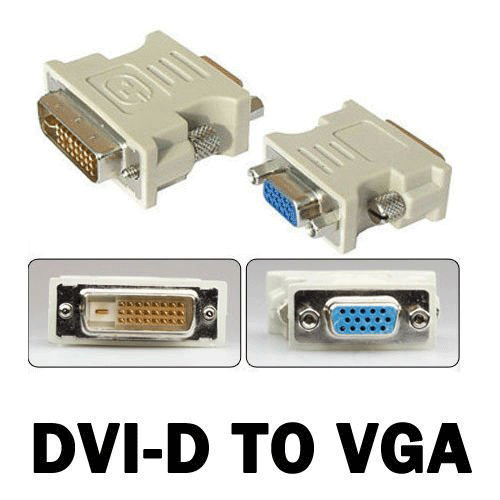 So, if you have two VGA inputs, you can simply connect two monitors with cables. If you have VGA and DVI, go to the store and buy a DVI-to-VGA adapter and make a regular connection. After you've connected all the cables to your computer, go to the Properties and switch to the "Settings" tab.
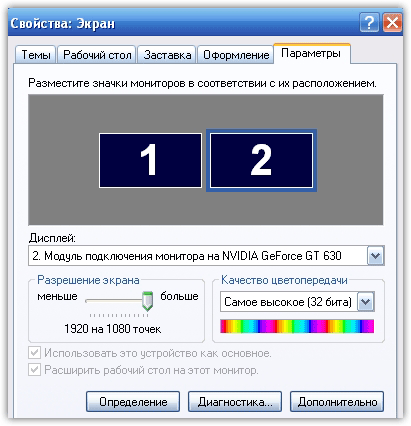 After some simple settings manipulation, you'll need to select your primary monitor. Once selected, all desktop icons will appear on it. It's crucial to determine which monitor is your primary one, as if you do this incorrectly, your mouse cursor will switch between the two monitors, not in the middle, but somewhere far away.
Connecting 4-6 monitors
While almost everyone can connect two monitors with the first option, connecting four or more requires modification and upgrading the computer. Some traders buy various adapters and splitters, but for obvious reasons, the video card fails, simply unable to handle that many monitors.
So, to connect multiple monitors, your motherboard must first have at least two video card slots. You should clearly understand that you can connect no more than two monitors to one video card. Next, go to the store and tell them you need to connect one additional video card (for four monitors) or two (for six monitors).
Unlike you, the seller is more knowledgeable and will select hardware that won't conflict with other components. Don't hesitate to tell them what you're using, as instead of different components, they might build a system to increase the performance of your main graphics card.
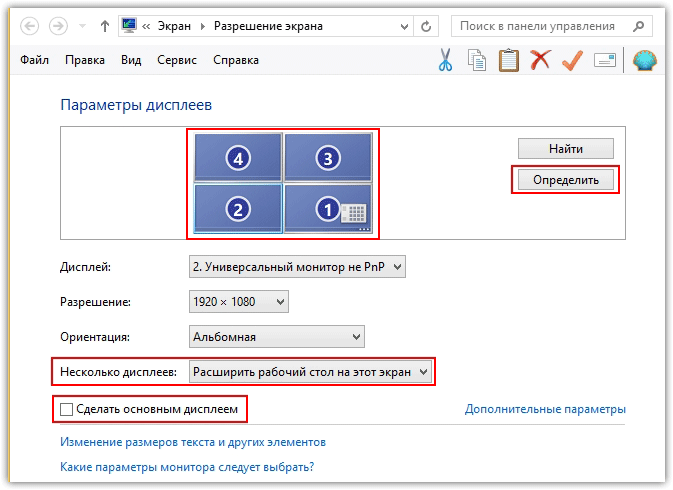
After you've upgraded your iron horse, the connection procedure is the same as described above. Go to the "Screen Resolution" menu (for Windows 7) and click "Detect." The system will automatically detect the number of connected inputs, after which you need to select "Extend to Desktop" (this screen) in the "Multiple Displays" menu.
What should I do if I don't have 2-3 video card slots on my motherboard?
Many would probably say to go buy a new motherboard. However, replacing the motherboard means you'll have to rebuild almost the entire computer, so the easiest way is to buy a new, fresh system unit or have it assembled by a professional.
Remember, your profits don't depend on the number of monitors, but on the trading tactics (http://time-forex.com/taktik) you employ. Having an additional monitor is a luxury you can easily do without in the early stages of your development.

