Non-standard timeframe in MT4
Every trader at the beginning of their development is faced with the problem of choosing a specific asset and time frame.

While choosing an asset is fairly straightforward—you only need to trade an instrument whose movement structure you understand and can explain—the choice of timeframe largely depends on the trader's preferences.
I'm sure everyone has encountered this situation: we don't have much time for trading, so we work on higher timeframes. When we have free time, we all switch to five-minute timeframes and try to extract as much profit as possible from the market.
Unfortunately, this kind of back-and-forth creates enormous chaos in our trading, and our results are typically significantly lower in this chaos.
Reasons for switching to non-standard timeframes
Traders often use the terms standard and non-standard timeframes in their lingo. First, you should clearly understand that a timeframe is the time interval during which one candlestick or bar.
By introducing a unit of time into price movement, traders have achieved greater informational clarity, as candlesticks clearly show when and where the market is practically motionless, something impossible to do with Renko and Kagi charts, for example.
The concept of standard and non-standard timeframes originated with the developers of the software we use to trade. It's no secret that the vast majority of forex traders use the MT4 trading platform , which offers nine different timeframes, commonly referred to as standard.
Other platforms, such as MT5, offer a much wider range of chart intervals. A logical question arises: why are traders interested in non-standard timeframes?
The answer is that the effectiveness of market analysis and a given technical analysis tool often depends on the timeframe. For example, if a trader is trading on a five-minute chart, trend confirmation on a fifteen-minute chart may seem too large, while an M10 would be just right.
Scalpers trading on minute charts also encounter a similar situation when looking for confirmation of trade direction on five-minute charts, although the optimal value would be M3. Traders also encounter a situation when using a certain indicator where signals are lagging, and on a lower time frame, there are many false signals.
To resolve this situation without modifying the code, non-standard time frames are an excellent solution.
Non-standard time frames in MT4
. By default, a trader can only use nine standard time frames. To display a non-standard time frame on a chart, a standard time frame must be converted to a non-standard one using a special script.
To do this, download the script at the end of this article and place it in the "scripts" folder in the terminal's root directory, which you can access from the "File" menu. After restarting the platform, it should appear in the list of scripts.
Once you have installed it, drag it onto the chart of the currency pair on which you want to get a non-standard timeframe:
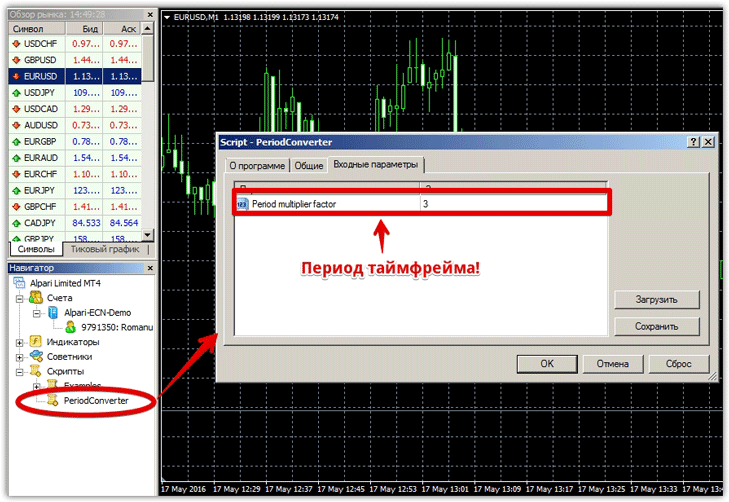
In the script settings window that appears, in the "Period multiplier factor" line, set the time frame. In my case, it's a three-minute chart. After you've set the custom time frame, click OK.
Next, go to the "File" menu and select "Open Offline." A list of time frames will appear in a table:
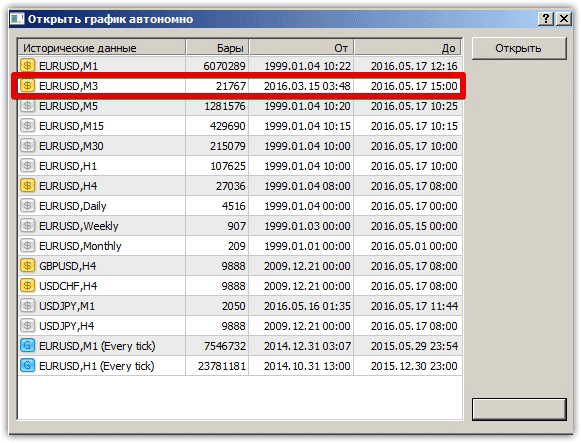
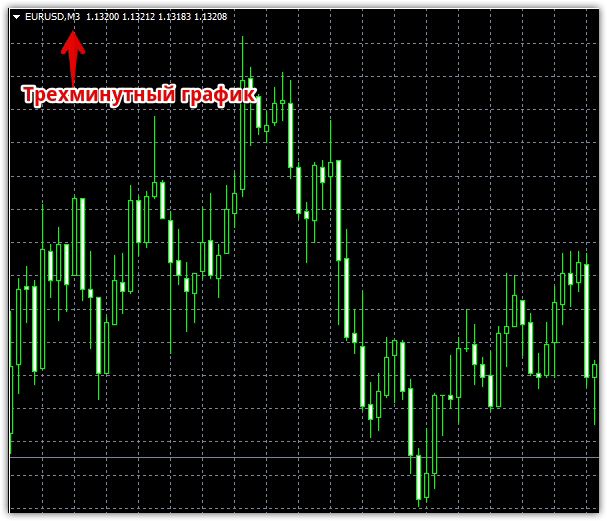
In the table that appears, find your timeframe and launch it. A tab labeled "Offline" will open. Don't be alarmed, as quotes will update live as long as the chart tab containing the script is open.
In conclusion, I would like to note that at this stage there are a very large number of scripts and various indicators that allow you to display a non-standard timeframe, but this particular option under consideration allows you to create Renko charts and use Forex advisors.

