Profitable hedging advisor, minimize trading risks
The path to success in the stock market lies not in the pursuit of profit, but in maximizing the preservation of already earned capital, while additional profit becomes just a pleasant bonus.

Hedging is one of the most popular order management techniques for minimizing risk.
While institutional investors use hedging simply for insurance, more experienced traders use it to build strategies that demonstrate the highest returns.
In this article, you'll learn about a Forex expert advisor that uses hedging as a fundamental basis for profitability.
The OverHedgeV2 advisor is a trading robot designed for the fifth version of the MetaTrader trading terminal (MT5).
Its basic foundation was an excellent symbiosis of an entry strategy based on technical indicators, as well as a risk hedging system with a pyramidal structure for increasing trading volumes using the martingale method.
A hedging advisor is a multi-currency trading expert advisor that, with the proper parameters, can effectively trade any currency pair or time frame.
Thus, virtually any trader can tailor OverHedgeV2 to the market, based on their desired profitability and acceptable risks.
Installing a hedging advisor
OverHedgeV2 is a free, open-source product released in 2018, making it available to the public and customizable.
Since the hedging advisor is part of the official MT5 developer library, you can install it in two ways.
The fastest way to install OverHedgeV2, without any additional downloads, is through the built-in library in your MT5 trading terminal.
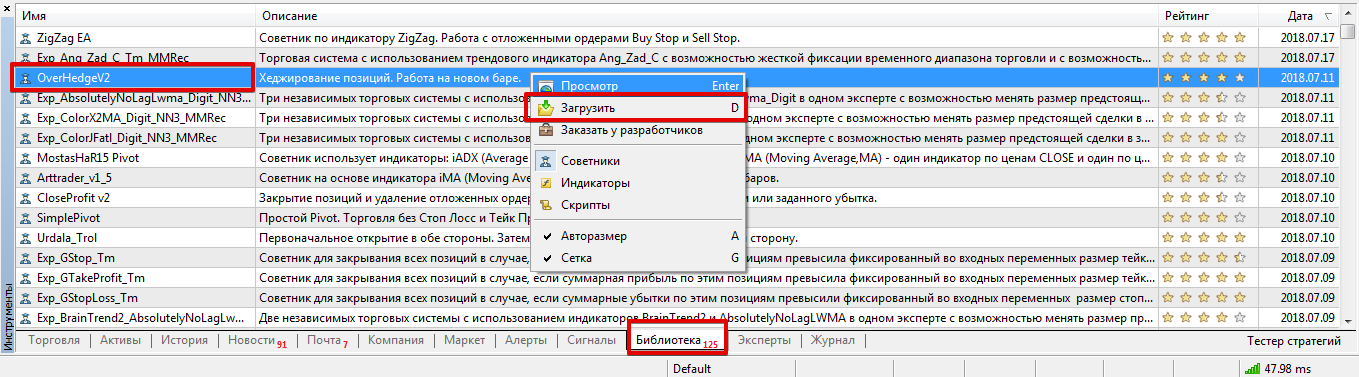
Open the trading platform and navigate to the bottom panel labeled "Tools," where you can also see your balance.
Open the "Library" tab and perform a simple sorting of the downloaded files to display only advisors.
In the updated list, find OverHedgeV2 and download it using the additional menu, following the instructions in the image below.
You can also use the second installation method, which involves downloading the hedging advisor (see the end of this article) and then moving it to the Expert folder, which is located within the data directory.
To use the robot after installation, you must restart MT5 or update it.
Strategy. Settings.
The key role in the advisor is not the entry point itself, but the hedging process. To determine the direction of the trade, OverHedgeV2 analyzes data from two moving averages with fast and slow periods.
When the fast moving average crosses above the slow one, the robot opens a buy trade, and vice versa.
After the advisor opens, the robot waits for a new signal in the opposite direction and begins hedging risks. The robot opens a series of trades with a large lot, pyramidally increasing the volume in line with the trend until the total profit covers all losses.
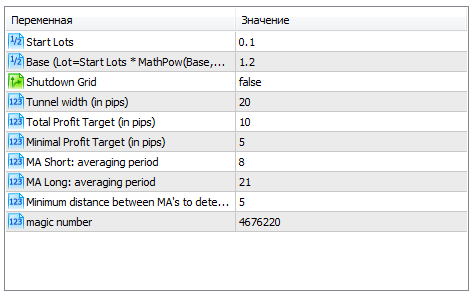
The Start Lots variable controls the position volume of the first order before hedging is triggered.
The Base line controls the multiplier used by the EA to calculate the position volumes of each subsequent order after hedging is enabled.
The Shutdown Grid function forces the entire grid of orders to close without waiting for profit. The Total Profit Target variable allows you to change the potential total profit, upon reaching which all trades are closed.
The Minimal Profit Target, in turn, controls the minimum profit for each position. The MA Short: averaging period and MA Long: averaging period variables also allow you to set custom values for the moving averages.
Tests
To demonstrate the functionality and potential applications of this robot, we conducted a preliminary optimization and test for 2017 for the EUR/USD pair. Final results of the preliminary test:
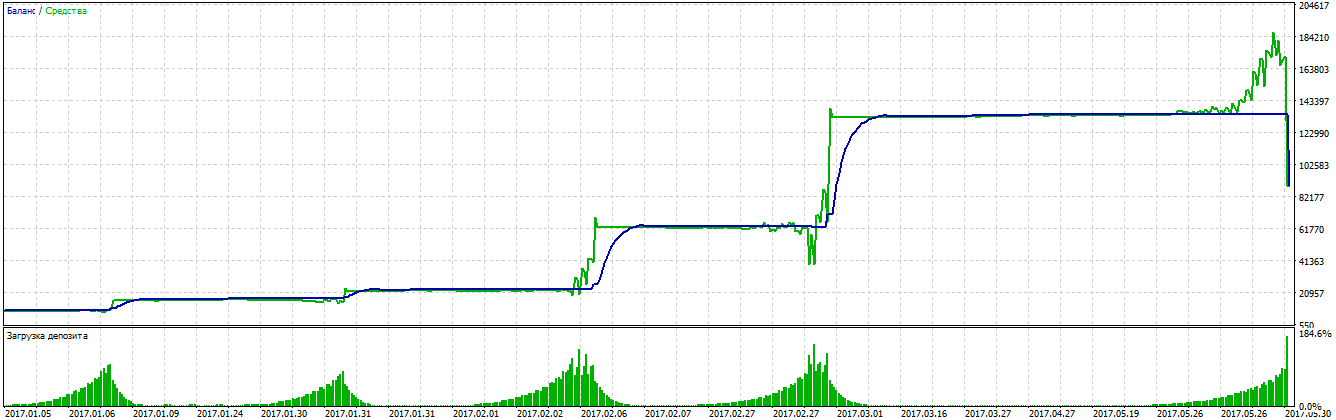
Of course, the OverHedgeV2 advisor can't be considered completely secure, as it can be configured to even increase the deposit.
However, the advisor is versatile and flexible, requiring traders to optimize it more thoroughly and adapt it to market conditions.
Download the hedging advisor.

