Advisor monetizer
The Monetizer Advisor is a unique development that made a splash in 2014. Developed by our own  programmers, it immediately inspired confidence. This expert advisor uses a unique trend-following strategy and enters the market during strong price movements. It is designed for trading the EUR/USD, GBP/USD, AUD/USD, and NZD/USD currency pairs.
The advisor only works on these four currency pairs; don't even try it on others. The developers claim that the strategy only produced the best results on a fifteen-minute chart. Therefore, the advisor was designed for trading on a fifteen-minute chart.
One of the EA's clear advantages is that it doesn't use dangerous money management methods such as martingale, grid trading, or locking. Another significant advantage is that it reliably passed the 2012 testing and didn't lose any money. Before writing this review, I combed through a ton of resources and forums and found only positive reviews about the EA.
Many resources monitor it, so we will soon launch a test on a cent account.
Installing the Expert Advisor shouldn't be difficult. Download the Expert Advisor file and unzip it. In the running terminal, go to the File menu and open the data folder. In the data folder, find the Libraries folder and place the file from the Libraries folder there. Place the Expert Advisor in the Expert folder, and the indicator in the Indicators folder. Then, restart the terminal. To use it, find it in the list of Expert Advisors and simply drag it onto the screen with the 15-minute chart. Enable trading.
The EA's author didn't reveal much about the settings. The LotSize line controls the trading lot size. The Magic line ensures that the EA doesn't touch orders opened manually by you or another trading expert. You can enter a comment for the order in the BotComment line. The SL settings function controls the fixed stop order in points. The EA also includes a settings block for the built-in indicator, which the EA uses to enter a position. The entrySigma line is the value of the built-in indicator's parameter. The limitDelta line refers to the Delta parameter of the built-in indicator.
The Expert Advisor uses two strategies. The limitDeltaPos1 and limitDeltaPos2 lines indicate the pip increment for calculating position openings for the first and second strategies.
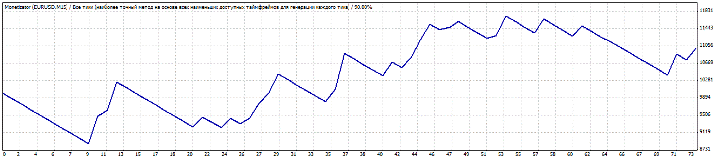
I decided to test the EUR/USD pair with default settings on a 15-minute chart. I selected the test period from January 1, 2015, to May 14, 2015. The test results are shown in the image below:
The second test was conducted on the GBP/USD pair. I decided to keep the trading period and conditions the same. The expert advisor test results are shown in the image:
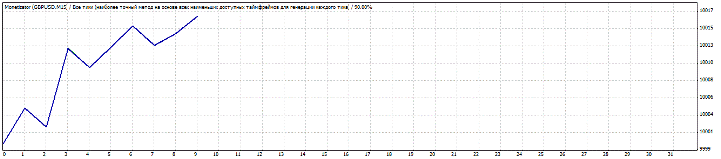
As you can see from the chart, the profitability is quite high and stable. Judging by the chart, the profit is three times higher than the stop order, making the strategy virtually indestructible.
The author promised a second version of this expert advisor will be released soon. If you don't mind spending money, I recommend purchasing this robot from the developer. Otherwise, simply use the previous version of the expert advisor from our website. Thank you for your attention, and good luck!

