Indicator-free Forex strategy
This option is suitable for those who do not trust the technical tools installed in the trader's trading terminal.

Or he uses a web terminal, which does not always allow him to use the required indicator due to limited functionality.
It is based on the use of pending orders and is so simple that even a novice trader can use it.
The indicator-free strategy is based on visual analysis of the trend and the determination of certain price levels, based on which market entry points are calculated.
Trading is based on opening trades after a certain price level is broken. This means that your order is triggered when the price level that was used as a benchmark for choosing the market entry point is broken.
It's most successful when the market is weakly volatile or flat, moving more horizontally than vertically and fluctuating within a few pips. In this situation, there's a chance that a significant event will trigger a sharp trend shift in one direction or another.
Preparatory moments.
1. Instrument selection – basically, any trader doesn't care what they trade, as long as the chosen instrument is profitable. In our case, the primary criterion for choosing a suitable currency pair is the broker's spread.
Your task is to select several pairs with the smallest spread, usually the most liquid currency pairs, and then move on to the next step.
2. Trading time – one of the mistakes many players make is that they trade when it is convenient for them, and not when they can make money.
To begin trading, identify a currency pair that's flat, meaning its rate remains virtually unchanged for several hours. If no such pairs are currently visible, postpone trading for a couple of hours.
Once you have selected your trading instrument, we proceed to opening a trade.
Opening trades without an indicator strategy.
As noted earlier, we will trade using pending orders. To do this, click on the “New Order” tab and in the window that opens, select – Type – pending order – Buy stop or Sell stop.
You can place orders in both directions or, depending on the market situation, only for buying (Buy stop) or selling (Sell stop).
First, we plot support and resistance lines on our flat area. The easiest way to do this is by adding trend lines in the MetaTrader terminal - Insert - Objects - Trend Line.
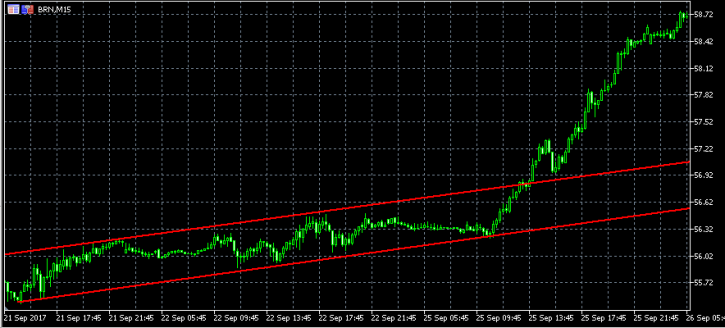
The lines will serve as a reference point beyond which we will set a Buy stop or Sell stop. You can set the installation locations by looking at a specific chart. If I imagine that the price is still in the price channel, I would set a Buy stop at 57.30 and a Sell stop at 56.20.
When placing an order, you should focus on how much the price moves in approximately one day.
In this case, it is better to limit the existence of the order to 12 hours; this parameter is set on the Expiration tab - date and time.
A non-indicator Forex strategy is designed for trading on medium-term timeframes, and it's even better to limit position maintenance to just one day.
Additionally, an indicator-free strategy can also be implemented using news - http://time-forex.com/strategy/torgovlya-na-novostyakh - when news from the trader's calendar serves as signals to open a new trade. News trading also doesn't require the use of additional scripts.

