The "Traffic Light" trading strategy is a trading classic.
Greetings, dear visitors. Today I'd like to introduce you to one of the most popular trading  strategies, one that most beginners eagerly begin their journey with.
Traffic Light is a multi-currency indicator trading system for trading on four-hour and daily charts.
There are many variations of this system online, as each trader begins to find some flaws and tries to patch them, but the framework and core of the strategy remains unchanged.
I've seen many examples of how "Traffic Light" is used on smaller time frames, but I can't say it's been very successful, since scalping on a five-minute chart requires changing the indicator settings.
Before you begin, you need to install the indicators and template in your Meta Trader 4. To do this, download the archive with the template and indicators at the end of this article. Launch your trading terminal, go to the File tab, and open your terminal's data directory.
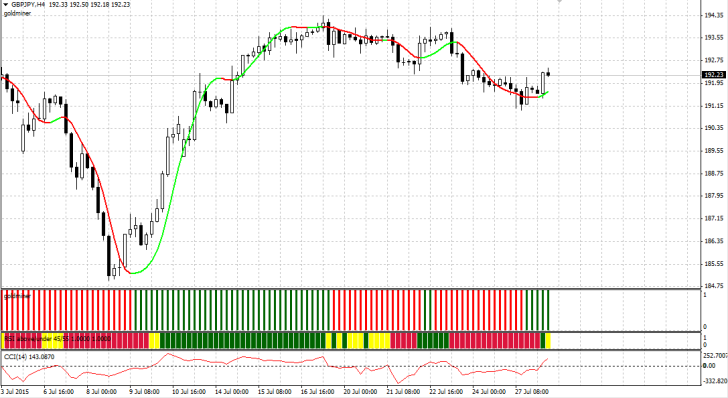
Place the indicators in the Indicators folder and the template in the template folder, then restart the terminal. Once launched, open the templates folder and launch "Traffic Light." If you installed all the files correctly, the terminal workspace will look like this:
Although this strategy is used by beginners, its author is clearly an experienced trader, as this is a fully balanced system that includes both an oscillator as a signal indicator and a trend indicator that filters the trend.
The system itself consists of four indicators, three of which are oscillators and one is a trend follower. Now let's briefly review the indicators to understand what could be improved and what should be emphasized.
Indicators for the Traffic Light strategy.
• HMA Color – displayed as a red and green line on the chart. This indicator is a standard modification of a moving average, so you can easily adjust and optimize its parameters by changing the indicator period, just like with a moving average. In the strategy, it acts as a trend filter. A green line indicates a bullish trend, while a red line indicates a bearish trend.
• Goldminer – the indicator is located in the first additional window and appears as red and green bars. I don't know the exact basis of this tool, but you can also optimize the indicator period. The strategy uses the trend as a filter. If the bar is red, we only enter short positions, and if it's green, we only enter long positions.
• RSI Costume – the indicator is located in a second additional window and displays red, yellow, and green bars. This indicator is based on the well-known RSI oscillator. If you enter the indicator settings, you can change the RSI indicator period, as well as the levels used to determine the bar color. It works as follows: If the indicator line is above level 55, a green bar is displayed. If the indicator line is below level 45, the bar is displayed red. If the indicator line is between 45 and 55, the bar is yellow.
• CCI is a standard oscillator that is included in your trading terminal by default. You can optimize the indicator's period. In the strategy, it is responsible for entering a position when level 0 is crossed.
In general, all components of the strategy have been discussed, so if you decide to apply the strategy on lower time frames, you will need to reduce the periods of the corresponding indicators.
Signals of the Traffic Light trading strategy
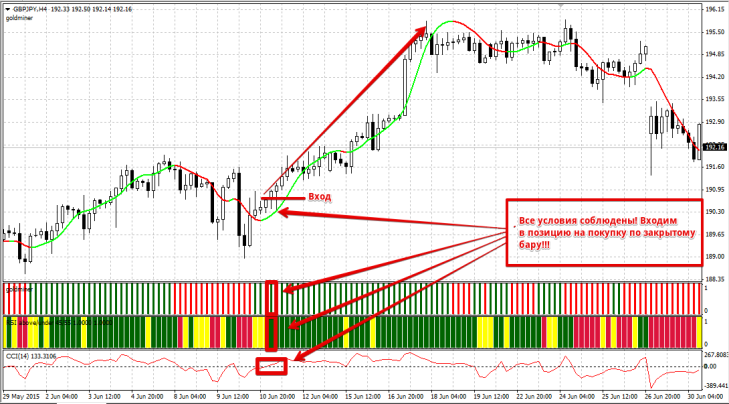
We enter a buy position when a number of the following conditions are met:
1. The HMA Color indicator line is green.
2. The Goldminer indicator bar is green.
3. The RSI Costume indicator bar is green.
4. The CCI indicator has crossed level 0 from below or is currently crossing it.
We only enter positions on a closed bar, as oscillators can repaint. An example of a buy entry is shown in the image below:
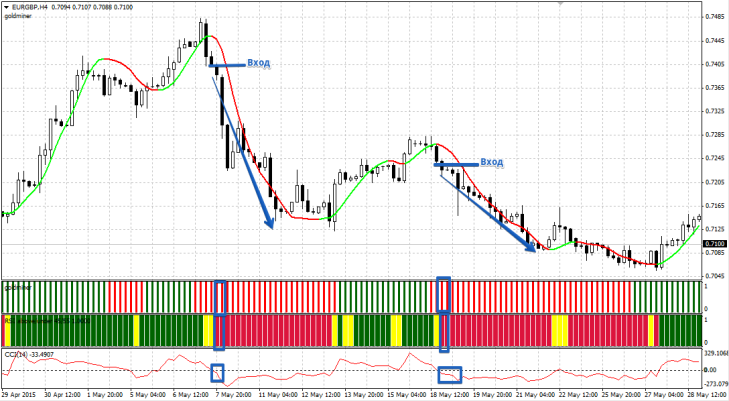
We enter a sell position when a number of the following conditions are met:
1. The HMA Color indicator line is colored red.
2. The Goldminer indicator bar is colored red.
3. The RSI Costume indicator bar is colored red.
4. The CCI indicator has crossed level 0 from top to bottom or is currently crossing it.
We only enter positions on a closed bar, as oscillators can repaint. An example of a sell entry is shown in the image below:
The position is exited when the HMA Color indicator line changes color. Stop orders should be placed at local highs and lows. If you have difficulty finding them, simply use a level indicator or a fractal. An example of exiting a position and placing a stop order is shown in the image below:
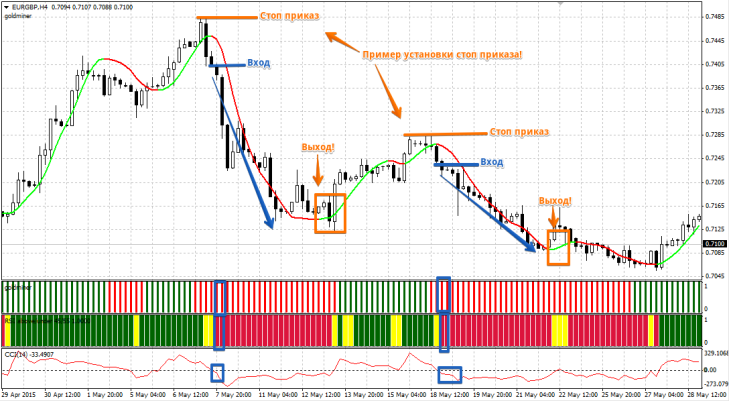
Speaking from a personal perspective, the Traffic Light strategy has clear entry and exit points, as well as rules for setting stop orders. The only responsibility is proper money management and correct lot size calculation. The strategy is easily optimized, so you won't have any trouble adapting it to your trading style.
Download indicators for the strategy.

