Xprofuter Indicator. A Foreteller of the Future
Technical analysis tools, and especially technical Forex indicators, have always been divided into groups depending on the specific property of the price asset the tool works with and, most importantly, on what principle.

Indicators were conventionally divided into oscillators, trend-following indicators, volume indicators, and informational indicators. However, in recent years, a new category of tools has emerged: so-called predictors.
The emergence of these types of indicators stems from the fact that traders and technical analysts have always wanted to make their forecasts and those of simple indicators more specific, visualize the forecast, and set specific time frames.
Standard technical analysis tools and forex indicators from the above-mentioned groups simply weren't up to the task, as they typically react to changes in the current market environment but don't predict the future.
However, technical analysis has advanced so much in recent years that the emergence of such predictive tools is no longer surprising.
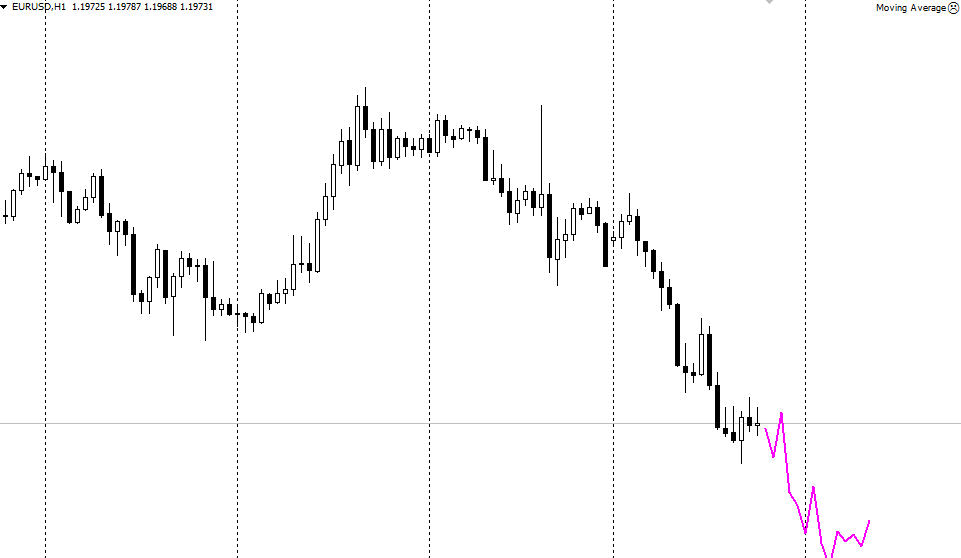
This tool, unlike other indicators, not only indicates the current state of the market, but also outlines on the chart the likely price movement in the near future.
The indicator itself is universal, as it can be used on absolutely all known trading instruments present in the MT4 trading terminal.
The indicator can also be used on absolutely all time frames without exception, since the forecast is formed based on price bars, and not specific time intervals.
Installing Xprofuter in MT4
The Xprofuter indicator was a commercial product for quite a long time and was sold for a symbolic price of $25.
However, the project itself was eventually shut down, and the tool became publicly available. Consequently, the Xprofuter indicator is now completely free to use. Simply download and install the steps listed at the end of this article.
The procedure for installing Xprofuter in MT4 follows a standard procedure and is no different from installing any other custom indicator or script.
Specifically, you'll need to download the indicator file at the end of the article, then copy the downloaded indicator to the appropriate folder in the terminal's data directory. By the way, a detailed procedure for installing indicators is available at this link: http://time-forex.com/praktika/ustanovka-indikatora-ili-sovetnika.
After installation, you only need to update your MT4 trading terminal in the "Navigator" panel or restart it.
After restarting the platform, Xprofuter will appear in the list of custom indicators. To start trading, simply drag the instrument's name onto the chart. The indicator appears on the chart:
Operating Principle. Practical Application and Settings.
All predictive indicators, including Xprofuter, are based on past price behavior and the so-called Spearman rank correlation coefficient.
Xprofuter identifies similar past scenarios and, if they repeatedly occur, applies them to the future, making a forecast.
After downloading the file at the end of this article, you will see two versions of the indicator. The first version plots future price behavior on a chart, while the second allows you to plot future events in a separate window as an oscillator.
Another striking difference between the versions is that XprofuterDD is based on a moving average and has more flexible settings, but a more primitive logic.
In practical terms, Xprofuter can serve as both a signal tool and a filter. The signal function is quite simple: if the indicator line moves downward, open a sell position, and if it moves upward, open a buy position.
I would like to point out that it is necessary to pay attention to the general direction of the line and not try to work out potential bends or rollbacks.
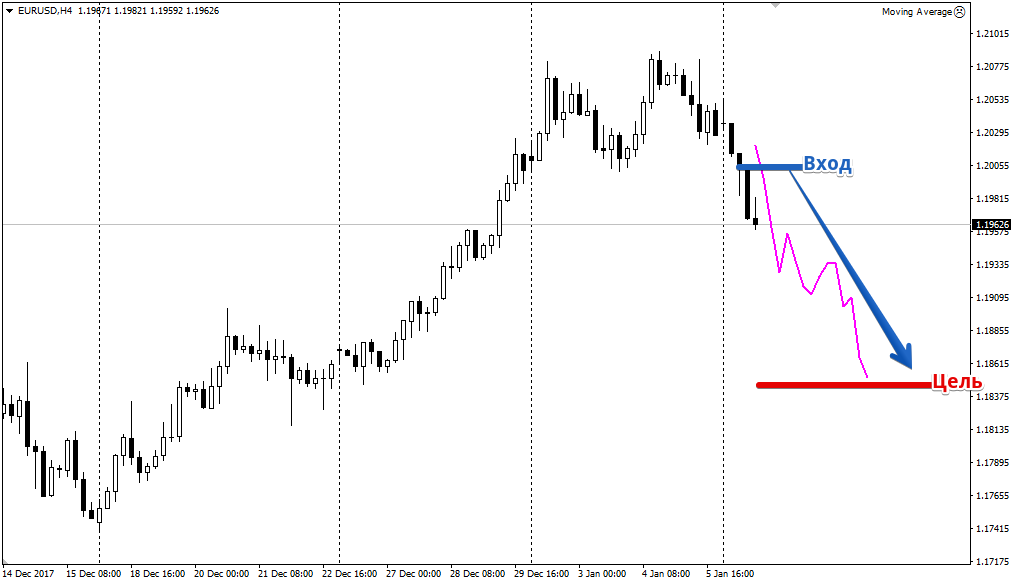
Speaking of the filter function, the forecasting tool allows you to compare your main strategy's signal with the Xprofuter indicator's forecast direction.
If the strategy's signal is in the same direction as the Xprofuter indicator's forecast, the probability of its success increases significantly.
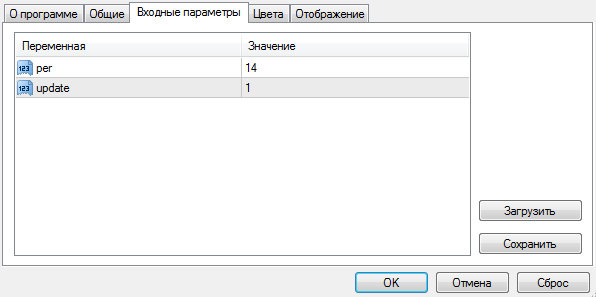
Regarding the settings, in the Per line you can specify the indicator's calculation period, which is also the number of candles in the future forecast. The Update variable allows you to set the forecast update frequency.
Finally, it's worth noting that Xprofuter, like other predictive indicators, has received some mixed reviews. Perhaps the negative reaction to the tool stems from its use alone, which is not recommended for any trading indicator.
Download the Xprofuter indicator

