GapDetector Pro is an indicator of price gaps on any timeframe
Price gaps are areas on a chart where the opening price of a new candle differs significantly from the closing price of the previous one, leaving an empty space between them.
Such situations often arise after weekends, during important news releases, or during periods of low liquidity.
Gaps are considered strong market signals that can be used both for entering the market and for confirming the current trend.
There are two most popular strategies for working with gaps:
Gap Filling — trading on the price return to the gap area;
Gap Breakout — trading in the direction of movement if the gap is confirmed by volume and volatility.
Previously, traders had to manually monitor such moments, but now this can be automated thanks to the GapDetector Pro indicator, available for MetaTrader 4 and 5.
What does the GapDetector Pro price gap indicator do?
Once the price gap indicator is installed on a currency pair chart, it will generate signals using multi-colored circles:
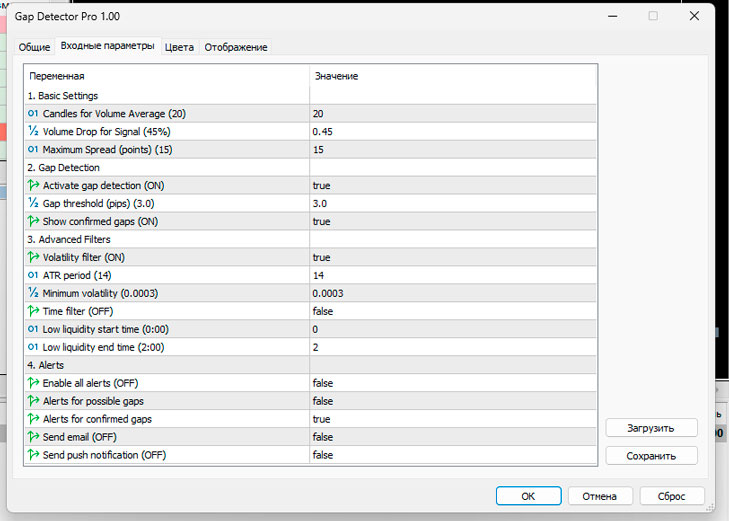
The indicator automatically analyzes the chart and identifies two types of gaps:
Potential Gap - A yellow marker appears if there is a decrease in volume, a widening spread, or activity during a period of low liquidity.
Confirmed Gap - A white marker signals a true price gap if there is a gap between the candles without overlapping and all filters are met.
GapDetector Pro can work on any timeframe and is suitable for analyzing any instrument—from currency pairs to metals and stock indices.
Flexible indicator settings
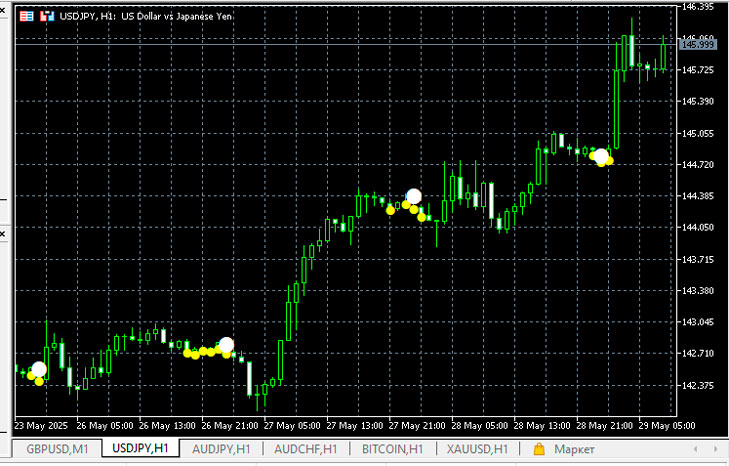
All parameters are grouped into categories, making it easy to customize and adapt to a trader's personal strategy.
- Basic Settings
Bars for volume average — the number of bars for calculating the average volume
Volume drop threshold (%) — the percentage of volume drop at which a signal is possible
Max Spread (points) — the maximum allowed spread
- Gap Detection
Enable Gap Detection — enables/disables gap detection
Gap Threshold (pips) — minimum gap size in pips
Show confirmed gaps only — display only confirmed gaps
- Advanced Filters
Enable Volatility Filter – volatility filter based on ATR
ATR Period — ATR calculation period
Minimum Volatility (ATR%) — minimum volatility level (as a percentage of ATR)
Enable Session Filter — filter by trading sessions
Low liquidity start hour / end hour — hours of the beginning and end of the low liquidity period
- Alerts
Enable Alerts - enabling the notification system
Alert on potential gap
Alert on confirmed gap
Send Email Alert – email notification
Send Push Notification — push notification to a mobile terminal
All signals are displayed on the chart and accompanied by visual and audio alerts. This is convenient for both scalpers and medium-term traders.
How to use GapDetector Pro in trading
Working with the indicator is simple: after installing it on the chart, you will see two types of signals - yellow (possible gap) and white (confirmed gap).
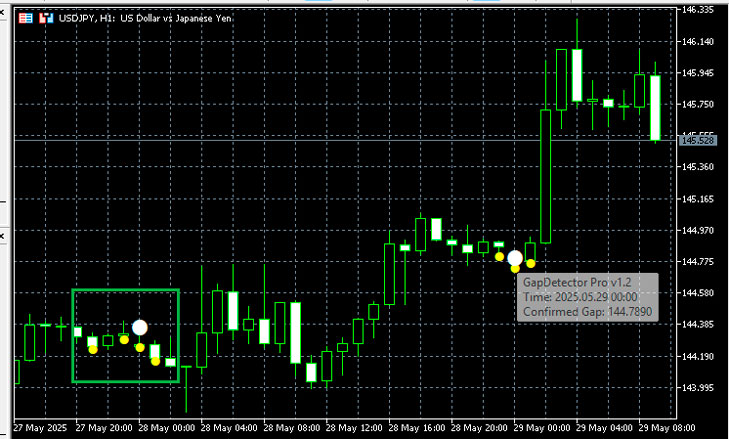
In practice, this allows you to use the following simple and effective strategy:
A yellow signal indicates that conditions for a price gap are emerging in the market. At this point, it's worth closely monitoring the instrument, but don't rush into an entry.
A white signal is a confirmed gap between candlesticks. This is the moment when a market entry is possible.
You can:
enter in the direction of the gap if the gap occurred in an active market (for example, in the European or American session);
wait for a return to the closing level of the previous candle if the gap occurred in low volatility conditions - and trade for a "fill.".
The indicator automatically filters out weak signals—if volumes are too low or volatility doesn't meet the specified parameters, the signal simply won't appear. This is especially important at night or before weekends.
GapDetector Pro is ideal for both intraday trading and more relaxed medium-term approaches. Most importantly, it eliminates the need for traders to manually search for gaps, allowing them to focus solely on key entry points.
Download GapDetector Pro in MQL5
The indicator was tested on the RoboForex broker's

