Stochastic indicator
Stochastic is one of the most popular indicators used in technical analysis of the Forex market, so this tool deserves special attention.
Despite its ease of use and configuration, it provides fairly accurate market entry signals in most cases.
This script is typically included in the indicator set of any trader's trading terminal, but if you don't have it, you can download the file via a direct link.
Download the stochastic indicator.
The program installation follows the standard procedure described in the article "How to install the indicator.".
Operating principles.
The instrument operates on supply and demand, or more precisely, on overbought and oversold zones that form during the forex market.
Any commodity, including currency, has a specific price, which is influenced by the number of people willing to sell it (supply) and the number of potential buyers. In forex, these two factors are expressed by placed buy and sell orders.
When the price rises, an uptrend, based on a predominance of buy orders over supply of currency. Gradually, a point arrives when, due to the high price, the trend enters the oversold zone.
It is at this point that the likelihood of a trend reversal increases, and the price peaks and then declines.
Now, the opposite occurs: the market enters a downtrend, which continues until the price enters the oversold zone and then reverses upward.
Setting up the Stochastic indicator and its features
The Stochastic indicator works well with the default settings, but you can still customize its parameters if desired.
The %K period is set to 5 by default, the number of periods used to calculate the stochastic.
Slowdown adjusts smoothness; the default setting is 3; decreasing the parameter speeds up the speed, while increasing it slows it down.
The %D period is set to 3 by default and displays the moving average period along the %K line.
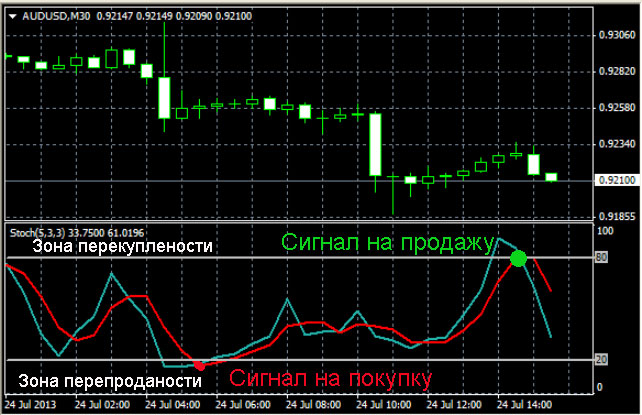
The first level corresponds to the oversold zone and is set to 20.
The second level limits the overbought zone, set to 80.
The only parameters that need to be adjusted in the stochastic settings are the last two levels; they can be moved to 10 and 90, which will reduce the number of false entry signals when trading.
Stochastic Trading
Trading using this oscillator is quite simple. The signals to open a trade are:
Buy – the blue line (main line) crosses the red line (signal line) from below upward, and both lines begin to exit the oversold zone.
Sell – the blue line crosses the red line from above downward and moves downward.
For more information on trading using this oscillator, see the article "Strategy Using the Stochastic Indicator" - https://time-forex.com/strategy/strategiy-stohastik

