End of Trend Indicator in Forex
The movement of any price asset is cyclical in nature, as any trend eventually ends, only to resume with greater or lesser force. Therefore, in addition to standard indicators, there are also end-of-trend indicators for Forex. 
The most interesting thing is that traders, aware of the cyclical nature of the market, never consider the end of a trend.
Indeed, any price movement is nothing more than a projection of the actions of exchange participants.
Consequently, when the majority of players achieve their goals, for example, buying back an asset at a certain price, the price movement ends.
Thus, by predicting the end of a trend, a trader can avoid losses on existing positions.
The End of Trend Indicator is a proprietary technical analysisthat allows for a more in-depth analysis of emerging price impulses that can be considered micro trends.
It's worth noting that the author of this tool posits that there are no global trends in the market worth paying attention to.
Instead, he suggests considering all microtrends without exception, and his tool, in turn, allows for the timely identification of trend endpoints with a high probability.
It's important to understand that this tool serves only an auxiliary function, as the trader is responsible for constructing the lines themselves.
The end-of-trend indicator is applicable to any currency pair, even timeframes, as it technically demonstrates the potential for movement in a selected segment of the price impulse.
Installing the End of Trend Indicator in MT4
The concept of this tool first emerged back in 2013, when an active Forex forum participant shared his market vision and included screenshots of his trading methodology.
Since then, the tool has been improved year after year, and the latest version was released in the official MT4 Developer Library at the end of 2017.
Therefore, the End of Trend indicator was originally a non-commercial product and was distributed completely free of charge. After being added to the library, you can install it without any additional downloads.
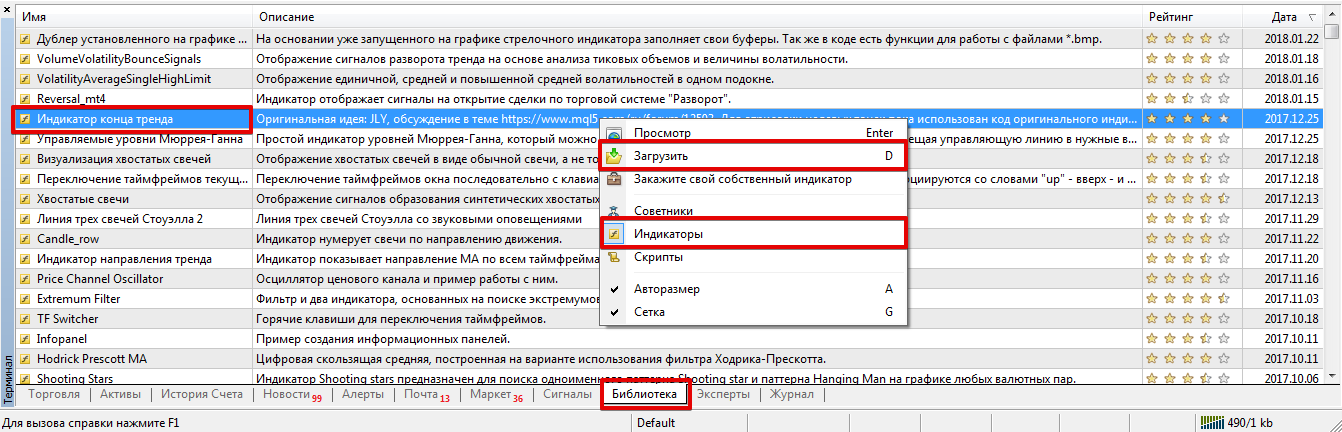
Installation via the platform is very simple. Open the trading terminal and scroll to the very bottom of the platform, where you monitor your balance almost daily.
The next step is to open the Library tab and sort the list so that only technical indicators are displayed.
Find the End of Trend indicator and, using the additional menu, download it exactly as shown in the image:
 If, for unknown reasons, the indicator is removed from the library, you can use the standard method.
Scroll to the very bottom of this article and download the indicator file directly. The next step after downloading is the standard installation, which simply requires dropping it into the "Indicators" folder via the data directory.
Restart the platform or update it in the navigator panel, otherwise the End of Trend indicator will not appear in the list of custom indicators.
How to use it. Working with the tool.
As we already noted, the End of Trend indicator is only an auxiliary tool and operates solely based on the trader's markup, which is created independently.
It is important to understand that the markup should be created by drawing trend lines for micro movements. To do this, draw lines along the indicator's fractal arrows in the same direction.
After drawing the line, make sure it is named "TrEnd," as this is the prefix used to create the indicator's markup.
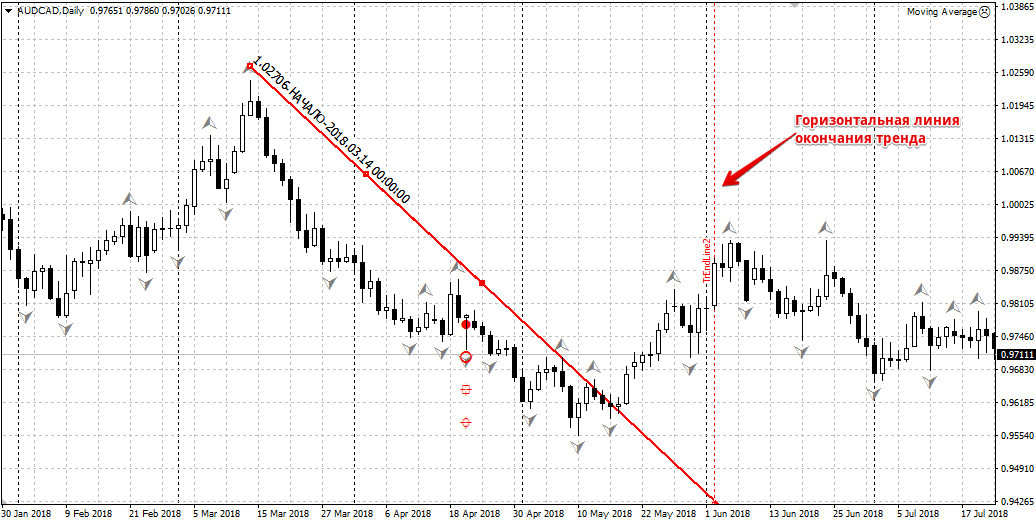
The dotted line on the chart shows a potential endpoint for the trend. The dots on the chart, shaped like a crosshair and a circle, are potential targets if the price rebounds from the drawn trend line.
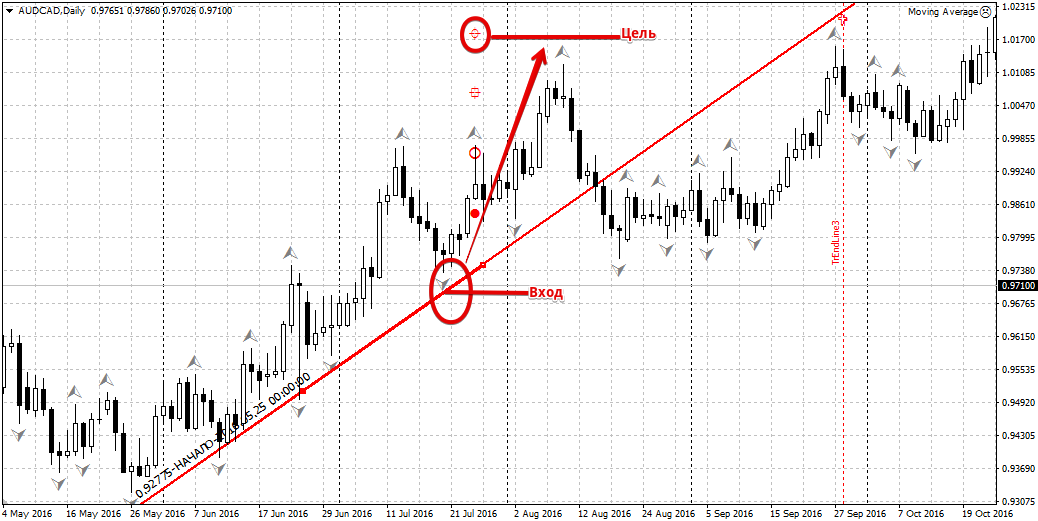
It's also worth noting that a trend line can be drawn based on local extremes and even the extremes of technical indicators. The principle of using it to find entry points is no different from trading trend lines:
The settings allow you to set the color of the lines for rebounds and breakouts, the window number for drawing (if you're using a technical indicator, you need to specify the number of the additional window).
You can also enable the display of certain lines on the chart and technical symbols. All menu items are in Russian, so setting them up shouldn't cause any problems.
The end-of-trend indicator is nothing more than the realization of one specific trader's idea, who views market movement principles from their own perspective. Of course, not all trend ending points indicated by this indicator are always true.
However, its data can also serve as an excellent argument in favor of one or another decision.
Download the end-of-trend indicator.
You can find other reversal indicators at http://time-forex.com/tehanaliz/razvorot-indikator

