ProfitLine indicator: finding the breakeven level
When trading, every novice trader, and even experienced ones, sooner or later encounters a situation where, after opening a profitable trade, the price reverses and moves against the trader, closing the trade on a stop order.
To prevent this from happening, it is necessary to always move the stop order to a break-even point.
However, while everything is perfectly clear with a single market transaction, since it is enough to move the stop order after a certain period of time to the point where the transaction was opened, when working with a series of orders, things become more problematic.
This problem is especially critical for traders who use it in their trading averaging strategies and elements of martingale.
What happens if a trader uses a grid strategy and has orders open in different directions at the same time?
The ProfitLine indicator is an auxiliary technical analysis tool for the MT4 trading terminal that allows you to see the breakeven point for a series of open orders.
A notable feature of the ProfitLine indicator is the fact that the tool is able to determine the breakeven level for a series of open orders that may have multi-directional trades, which are more common in grid trading, locks, and averaging.
This indicator will be useful for all categories of traders, since ProfitLine finds a breakeven point for all currency pairs, stocks and any CFD contracts without exception.
The tool also works on any time frame, since the object of its tracking is open orders and the price itself.
Installing the ProfitLine indicator
The ProfitLine indicator is primarily an assistant that does not provide market entry signals, but rather allows you to visually observe the breakeven point for existing orders, and nothing more.
However, due to the fact that the indicator is a custom development and is not included in the MT4 trading terminal by default, in order to use it, you will need to download the ProfitLine indicator file at the end of the article and install it on your trading platform.
Installing the ProfitLine indicator is no different from installing any other custom indicator or technical analysis tool and follows a standard procedure.
To do this, you will need to copy the ProfitLine indicator file previously downloaded at the end of the article to the appropriate folder in the terminal data directory.
You can find more detailed instructions on installing indicators in the MT4 trading terminal by following this link http://time-forex.com/praktika/ustanovka-indikatora-ili-sovetnika.
In order for the trading terminal to see the installed ProfitLine, it should be updated in the navigator panel, or simply restart the platform itself.
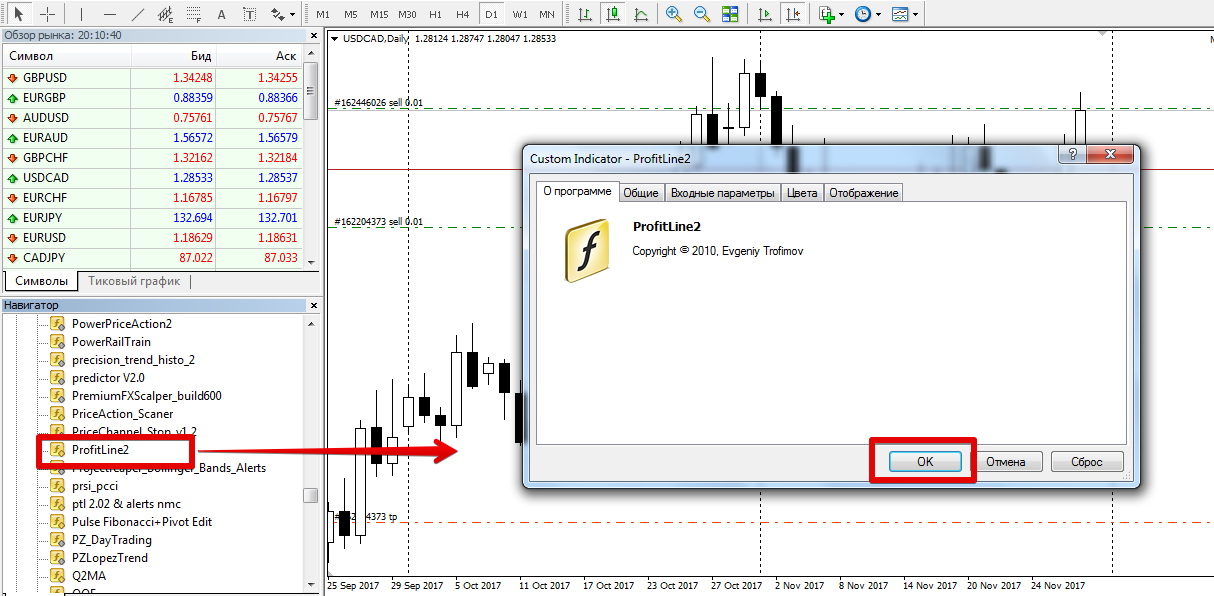
After the update, ProfitLine will appear in the list of custom indicators, and to use it, simply drag the name of the instrument onto the chart of the currency pair for which you have open positions.
Operating principle. Settings
ProfitLine is an assistant that allows you to see the breakeven point on the chart in the form of a horizontal level.
After applying the tool to a chart for which at least one position has been opened, the tool will display a horizontal line, with the line being blue for purchases and red for sales.
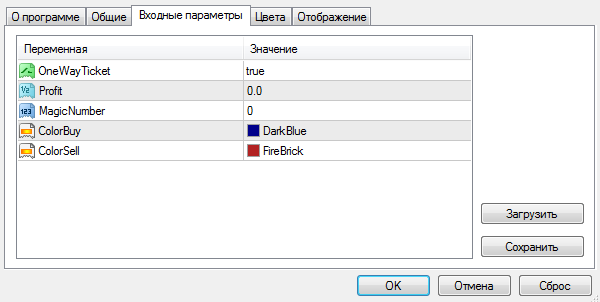
The ProfitLine indicator can operate in one of two modes. In the first mode, the indicator displays breakeven levels for buys and sells separately. If positions are opened in opposite directions on the same instrument, the indicator will plot both levels simultaneously. This mode is enabled by default in the OneWayTicket line.
In the second mode, the indicator will display the breakeven point based on the total positions, taking into account open trades in opposite directions. To switch to the second mode, set the OneWayTicket line to False.
It's also worth noting that ProfitLine can display not only breakeven points but also profit-based order closing points, which are essential when working with grid strategies or martingale. To display this, you must specify the total profit for a series of orders in the deposit currency in the Profit line. The ColorBuy and ColorSell variables allow you to set the color for both buy and sell orders.
In conclusion, it is worth noting that the seemingly simple auxiliary indicator ProfitLine is a powerful assistant for all traders who practice averaging and grid strategies in manual mode and do not use advisers.
Download the ProfitLine indicator.

