SpearmanRankCorr indicator
Today, there are dozens of different approaches to market analysis and thousands of indicators based on them.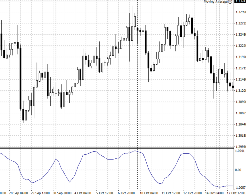
However, almost all technical indicators have one thing in common: they are based on statistics.
One way or another, when using any signal tool, we hope that the situation that previously occurred on the chart will repeat itself again.
Despite this, mathematical and statistical approaches are subject to unhealthy criticism from traders.
At the same time, almost no one disputes the graphical analysis (http://time-forex.com/tehanaliz/graf-analiz).
The SpearmanRankCorr indicator is a technical analysis tool based on complex mathematical calculations. The SpearmanRankCorr indicator is based on the Spearman rank correlation coefficient, which is implemented as a smoothed oscillator.
Installing the SpearmanRankCorr indicator
The script was developed for use on the MT4 trading platform, so to use it, you'll need to download the indicator at the end of the article and then install it on your trading terminal.
To effectively use the indicator, you need to have as much historical data as possible for the currency pair. To fill in any gaps in historical data, go to the "Service" menu and select "Quote History" from the list of options that appears. Then, open the desired tool and download the data from the one-minute time frame.
When it comes to installing the indicator on the trading platform, everything follows a standard procedure. First, you need to access the trading terminal's data directory. To do this, open the File menu in your platform and select "Data Directory" from the list of options that appears.
Next, find the folder named "indicators" and copy SpearmanRankCorr into it. For MT4 to display the script in the list of custom indicators, you'll need to either refresh the navigator panel or restart the trading platform.
After the update, SpearmanRankCorr will appear in the list of indicators. To use it, simply drag the tool onto the chart. If you've done everything correctly, you'll get a chart like this:

Practical application
The SpearmanRankCorr indicator has a variety of uses, ranging from trend-following signals to reversal signals, as well as a main trend filter function.
The first, and most common, signal is based on a change in trend. So, if the indicator line is above the center line, upward trend, and if under the central line – downward trend.
Based on this statement, one should enter the market when trends change. Specifically, if the indicator line crosses level 0 from the bottom up, we enter a buy position, and if the line crosses level 0 from the top down, we enter a sell position. Example:

The second type of signal our tool provides is based on the divergence properties of all oscillators. Divergence is a reversal signal that marks a trend reversal.
The essence of the signal is that if you observe a price peak on the chart that is higher than the previous one, but the indicator determines it as lower than the previous one, it is worth entering a sell position.
If you observe a price trough that's lower than the previous one, but the SpearmanRankCorr indicator shows it as higher than the previous one, it's time to enter a sell position. An example of divergence is shown below:

The SpearmanRankCorr indicator can also be used as a signaling tool based on moving averages. To do this, add a red SpearmanRankCorr indicator with a period of 9 to the 14-period SpearmanRankCorr chart.
A buy position is entered when the red line crosses the blue line from the bottom up, and a sell position is entered when the red line crosses the blue line from the top down. Example:
In conclusion, it is worth noting that the SpearmanRankCorr indicator can perform many tasks, but its main function is to act as a signaling tool.
It is also important to remember that no indicator can provide a stable result on its own over a long period of time, so it should be used in combination with some trend-following tool - http://time-forex.com/indikators?start=11.
Download the SpearmanRankCorr indicator.

