Trend Magic Indicator – A Trend Guide
Many beginners often face the problem of identifying a global trend.  Almost all traders focus on local price movements, mistaking pullbacks for a new trend and vice versa.
As a rule, entering against the market always backfires on us all, because, as many psychologists say, “You can’t fight the crowd.”.
Indeed, there are various tools such as trend lines or channels, but often the market diverges so much in different directions that constructing any figures simply does not give us objective information.
The Trend Magic indicator is a trend indicator whose main task is to show the direction of the trend.
This tool is based on two well-known standard indicators: ATR and CCI. In fact, in the settings, you can find the option to change the periods of these two indicators, which are used to determine the trend. However, before you can begin analyzing the trading signals, you need to install the indicator on the Meta Trader 4 trading platform.
To do this, download the archive containing the indicator at the end of the article. Next, in your trading terminal, go to the "File" tab and open the data folder. Copy the indicator file and place it in the "indicators" folder, then restart MT4. After restarting, open the list of indicators in the "Navigator" panel and drag Trend Magic onto the currency pair chart. If you installed it correctly, the indicator line will appear on the chart:
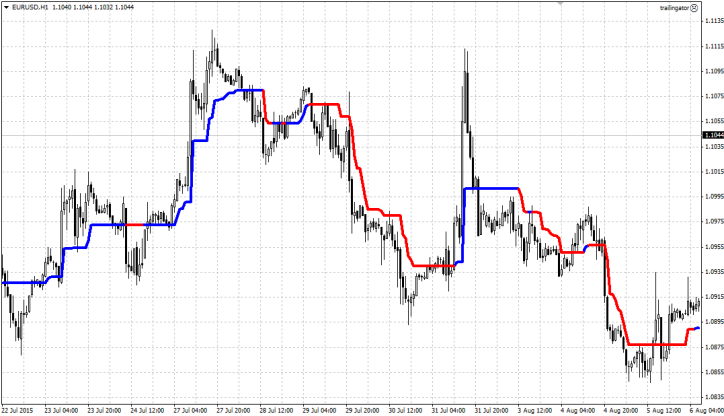
As you can see in the image, a blue and red line will appear. At first glance, the indicator resembles a moving average, although this is not actually the case. The tool clearly identifies the global trend movement and informs us by changing the line's color. A blue line indicates a bullish trend, while a red line indicates a bearish trend.
The indicator's application is based on its key feature of showing trend changes. This tool is often used as a trend filter for the main entry signal. Simply put, a trader buys based on their strategy's signal only if the Trend Magic indicator line is blue, and sells if the line is red. This approach to using the indicator can be found in various trading strategies that take into account the filter for the main trend direction.
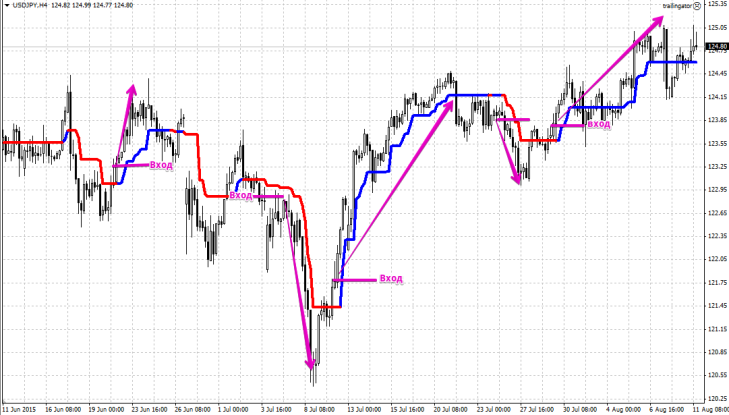
The indicator can also be used for direct position entry. A buy position should be entered when the indicator line changes from red to blue, and a sell position should be entered when the line changes from blue to red. An example of a position entry is shown in the image below:
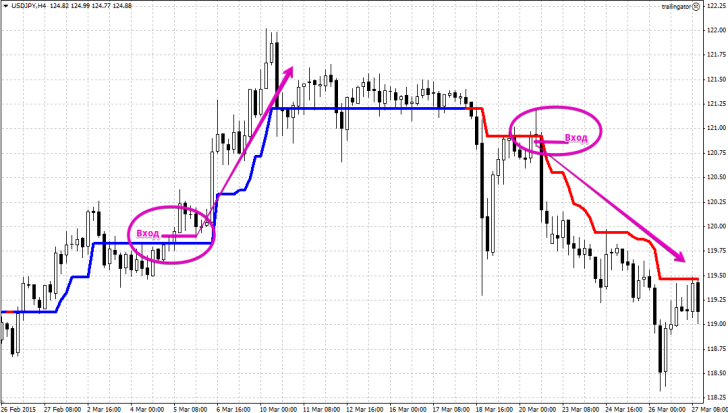
The second way to use the indicator to find an entry point is to enter a position in the direction of the trend after a pullback. A buy signal is a price breakout of the blue line from below. A sell signal is a breakout of the indicator's red line from above. Thus, you enter a position immediately after the price pullback against the trend ends. You can see an example of an entry in the image below:
A significant advantage of the indicator is that it can help you forget about the problem of finding a position exit point. A trade is closed when the indicator line changes color to the opposite of the position entry.
Of course, this method of exiting a position is a bit crude, as all trend indicators have a lagging effect, but it is used by hundreds of traders. In conclusion, I would like to say that this seemingly simple indicator has proven to be a multifunctional and useful tool.

