Zoomer Pro simple scalping
There's no doubt about the appeal of scalping as a trading style in the Forex market, as it allows for the highest returns in the shortest amount of time.
On the other hand, scalping attracts beginners due to its extremely simple and straightforward algorithm. Traders are only concerned with the organization of the process and technical analysis, while fundamental analysis can be easily forgotten.
Despite the simplicity of technical analysis, beginners still make mistakes, dismissing the importance of global trends and the trend itself.
The common belief that scalpers should only be concerned with short-term trends is completely wrong, as higher time frames also play a significant role.
A simple solution to this problem is to use multi-time frame forex indicators. Zoomer Pro is one such tool.
The Zoomer Pro indicator is a trend-based multi-time frame technical analysis tool that allows you to develop scalping strategies, as well as medium- and long-term strategies, based on the principle laid out by Alexander Elder in his "Three Screens" strategy.
Thus, it does not matter what time frame you apply the Zoomer Pro indicator to, since it immediately covers all time frames in your MT4.
It's also worth noting that Zoomer Pro can effectively analyze all trading assets available in your MT4, demonstrating the indicator's versatility and multi-currency support.
Installing the Zoomer Pro Indicator
The Zoomer Pro indicator has been actively used by traders since 2014, but even to this day, the tool has not been published in the official library of MT4 trading terminal developers.
However, the indicator is distributed completely free of charge, and its code is open to curious traders and advisor developers who can automate trading based on it.
Installation of the Zoomer Pro indicator occurs only according to the standard procedure, by downloading and installing the file.
To do this, go to the end of the article and download the Zoomer Pro indicator, then place it in the appropriate folder of the data directory, namely in the folder called Indicators.
You can open the data directory through the file menu in the upper left corner of the open MT4 trading terminal by selecting the appropriate option in this menu.
After you install the Zoomer Pro indicator, you must update your trading terminal, otherwise the tool will not appear in the list.
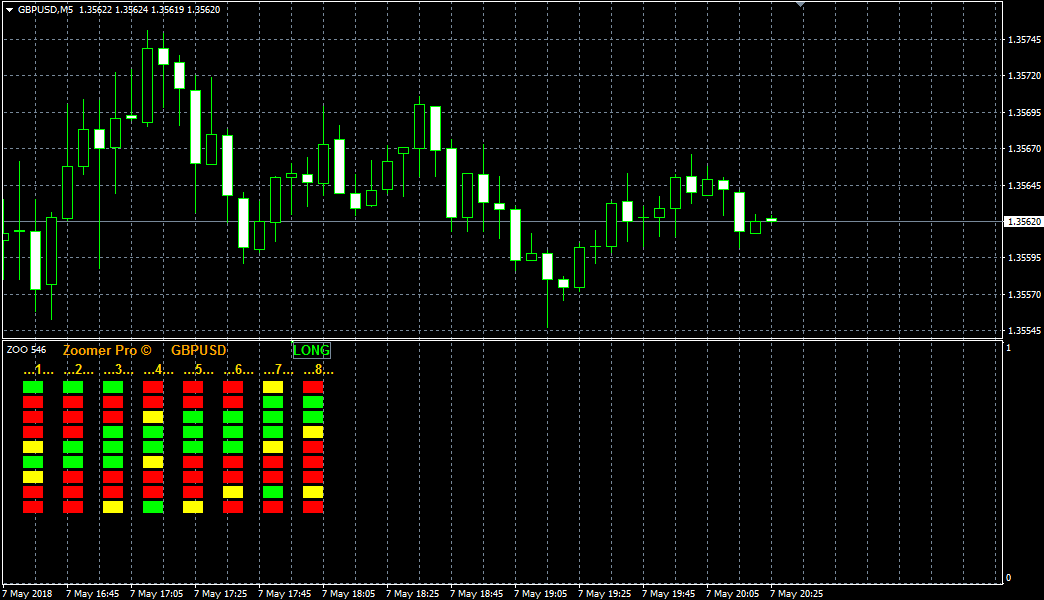
To do this, either refresh the trading platform in the navigator panel by opening the additional menu, or simply restart the trading terminal. To use the indicator, drag Zoomer Pro onto the chart of the selected currency pair. The final view will look like this:
Indicator Algorithm. Application.
The indicator's true algorithm remains a mystery to many traders, although the answer is practically obvious if you look directly at the code. The indicator uses moving averages with different periods for its analysis.
When applying the instrument to the chart, you will see the names of the columns: 1, 2, 3, 4, 5, 6, 7, 8. Each number corresponds to a moving average with periods in the following order: 5; 8; 13; 21; 34; 55; 89; 144.
On the left are nine lines, which correspond in order to the time frame from minute to monthly.
The color of the cube shows us the state of the trend relative to a specific moving average with different periods on the corresponding time frame. Thus, green cubes indicate an uptrend, and red cubes indicate a downtrend. The yellow color of the indicator indicates a flat.
In terms of application, Zoomer Pro can be considered both a filter and a signal tool.
When using it as a filter, ensure that the signal on the current time frame from your strategy matches the trend direction on the higher chart interval. If
using Zoomer Pro as a signal tool, buy positions should be opened if the squares on the current and higher time frames turn green, and sell positions if they turn red. Example:
In conclusion, it's worth noting that Zoomer Pro will be of interest not only to scalpers but also to long-term traders, as the tool captures the full depth of the market and allows for an overall assessment of trends.
Download the Zoomer Pro indicator.
For more information on scalping, visit http://time-forex.com/skalping.

