NEW! High-precision scalping indicators
Scalping or pipsing is used by a huge number of traders worldwide. They are driven primarily by the desire to make a quick buck.
Some traders succeed and eventually become professionals, while others lose several deposits and leave the market.
The point is that scalping strategies are based on technical analysis, where indicators play a key role. They generate entry/exit signals for the trader.
Of course, professional scalpers have their own sets of indicators, sometimes proprietary ones, or with specific parameters customized to their needs.
But what about a beginner trader? There are dozens of indicators in the Metatrader 4 platform alone, not to mention the various paid and free products that flood the internet.
We turned to experts at the renowned international broker NPBFX (NEFTEPROMBANKFX) for help. The company's specialists explained which scalping indicators are a good place to start and shared tips on how to use them effectively.
ZigZag scalping indicator
You won't have to search for this indicator online, as it's already built into the MT4 trading platform. Finding ZigZag is easy: just select "Insert" in the top menu, then "Indicators" => "Custom.".
The indicator works quite simply: it connects the most significant price extremes on a trading instrument's chart with a straight line. At the same time, ZigZag filters out smaller price fluctuations. A key feature of the indicator is its versatility.
It can be used on any market and timeframe. It's important to understand that ZigZag isn't a tool for predicting future price action. It allows you to analyze past events, highlighting significant changes. However, ZigZag is highly effective at assessing current market conditions. Let's take a look at what this technical indicator looks like on a price chart.
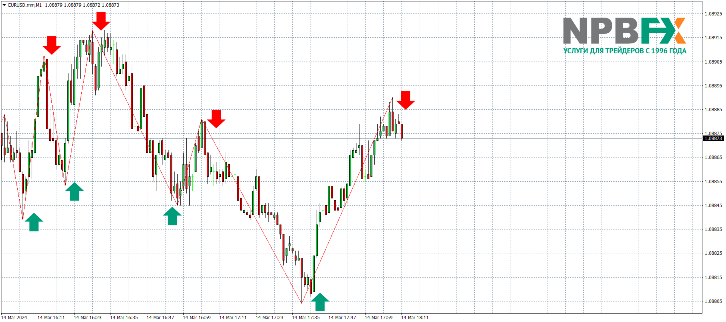
Please note that for this example, we chose the one-minute M1 timeframe, which is most often used by scalpers. The ZigZag indicator, with its basic settings, accurately pinpointed the price extremes where the price subsequently reversed. The trading strategy is quite simple. Buy or sell trades are opened when the indicator draws the next line. As a result, the trader can profit 3-10 pips from the market.
Despite its high efficiency, the ZigZag indicator has one serious drawback. It is classified as a repainting indicator. What does this mean? For example, if the indicator draws a line during a price decline, but after some time the price drops even lower, the line repaints. As a result, the trader, having opened a trade, sees a significant loss. To avoid this, it is recommended to open a trade when the ZigZag line is at least 30-50 pips long, depending on the timeframe.
It's best to avoid high market volatility, such as during significant economic releases. A calmer market is ideal for scalping. This will significantly reduce the likelihood of the indicator redrawing. NPBFX broker experts also recommend pairing it with another technical indicator. It's highly recommended that the second technical indicator not redraw. We'll discuss one such indicator below.
Stay up-to-date with market developments daily, receive investment ideas, and receive accurate trading signals for free by becoming a user of NPBFX's. The portal, a unique ITdevelopment by the broker, offers extensive functionality designed for both beginners and experienced traders. The analytical portal is available 24/7 after registering a personal account on the broker's website.
Stochastic Scalping Indicator
As mentioned above, the Stochastic indicator doesn't repaint data like the ZigZag. Furthermore, Stochastic is a leading technical indicator, meaning it can warn traders of price reversals in advance. Given this, Stochastic is ideal for scalping. The indicator itself is also included in the basic MT4 trading platform package, but is located in the "Oscillators" section.
The Stochastic's primary purpose is to show traders how close the current asset price is to its highs or lows over a specified time period. The indicator has its own workspace where the data is displayed, as well as a value scale from 0 to 100 on the right. The oscillator's range from 0 to 20 represents the oversold zone, while the range from 80 to 100 represents the overbought zone. Two lines move within the indicator's field:
- %K – called the fast or main line. Typically red, it represents a moving average over a shorter period.
- %D – the slow or signal line. This is a moving average over a longer time period. In the oscillator's default settings, it is green.
Now let's look at how the oscillator generates signals that interest us for scalping.
- Buy signal. The fast %K line crosses the %D signal line from below in the oscillator's oversold area.
- Sell signal. The %K line crosses the %D signal line from top to bottom in the overbought Stochastic area.
The signal is considered strongest when both lines, after crossing, begin to leave the overbought or oversold area.
We now propose to consider using the Stochastic Oscillator in conjunction with the ZigZag indicator in a live market. We will use the same one-minute timeframe.
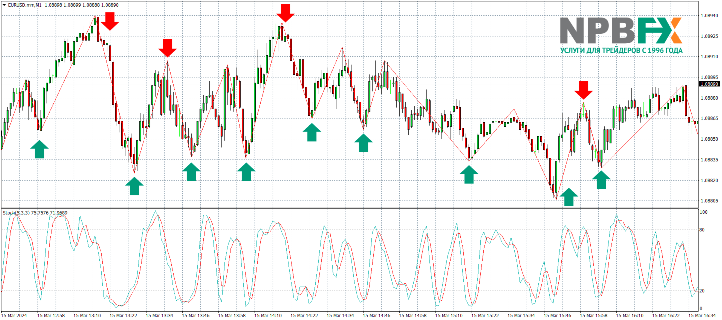
Over four hours, there were 13 matching signals on both oscillators, and five signals that did not match. If you carefully examine all entry points, you'll see that the trader was guaranteed to exit each trade profitably. We can confidently speak of 100% accuracy, at least in this market situation. Yes, the five signals from ZigZag were also quite accurate and could have generated profit, but this is an analysis of a pre-drawn chart. In a real market, when there's nothing ahead, a professional trader will never open a trade if only one indicator has a signal.
Moreover, even 13 trades in four hours is a good profit. Let's do the math. If the average profit per trade is 3 pips, then the trader will earn a total of 39 pips. If each EURUSD trade was opened with a volume of 1 standard lot, then the total profit over four hours would be $390. And you can monitor two or three pairs simultaneously, which would generate even more entry signals.
Conclusion
As you can see, standard indicators built into the MT4 trading platform can be effectively used for scalping. These are classic indicators that, when used correctly, will always yield positive profits. Over time, you'll learn to adjust the indicator settings, adapting them to different market situations to improve the accuracy of your signals.
The role of your broker is also crucial when scalping. In the examples above, you saw excellent price feeds on the minute chart, provided by NPBFX. The company routes all its clients' trades to major Tier 1 liquidity providers (global banks, ECN systems, etc.). Therefore, you won't see price gaps on the minute chart, which can lead not only to indicator errors but also to losses.
Opening a scalping trading account with NPBFX (NEFTEPROMBANKFX) is easy; simply register on the company's official website. Here you'll also find many promotional offers from the broker that will truly help you increase your profits.

