Columns in the MT4 and MT5 market overview: hidden features of the trading platform
One of the most frequently used tools in the MetaTrader trading platform is the Market Watch information window.
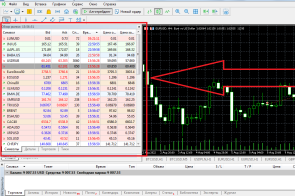
This is where you can find out the current purchase and sale price of an asset, the spread size, and some other parameters.
Moreover, not all traders realize how many parameters can be displayed in the Market Review if they wish, by simply placing checkboxes in the right places.
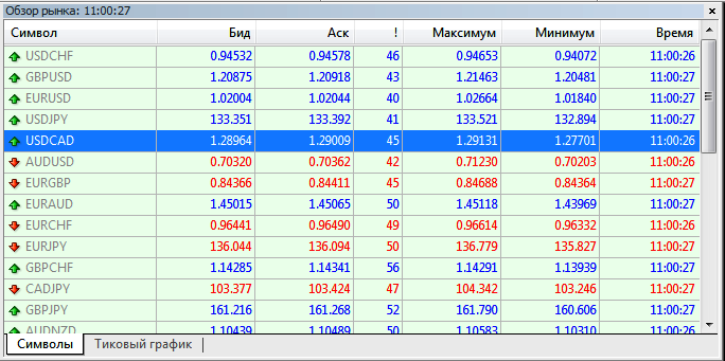
Moreover, the difference between MetaTrader 4 and 5 is simply enormous. In MT4, you can use only 6 indicators, such as Bid and Ask, spread value, Maximum and Minimum prices, and Quote Time:
To activate additional columns in MT5, you will need to use the "Columns" submenu, which opens up a full range of options.
Such complexity is not without reason; in MT5, the list of parameters is several times broader than in MT4. Here you can choose from 46 parameters, the display of which will make the window more than informative:
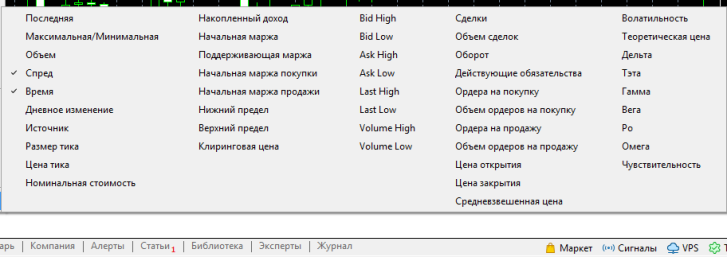
In addition to the 6 indicators already mentioned, 40 more have been added to the MetaTrader 5 trading platform.
Including those that not only display price information, but also characterize the current trend – volatility, weighted average price, opening and closing prices, volumes, daily deviation:
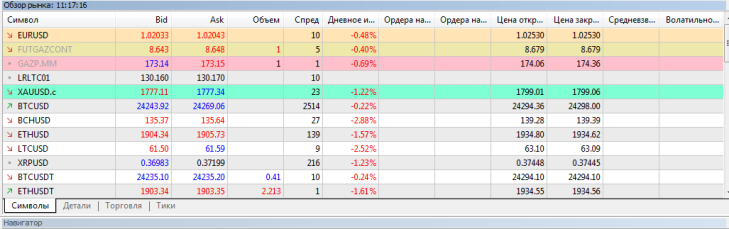
There are also indicators that best characterize the market mood – the number of buy and sell orders, the volume of these orders, and much more.
However, not all indicators are displayed in the information. There could be many reasons for this, ranging from your broker not transmitting this information to the trading platform, to the fact that such information is simply not provided for this asset.
Thanks to these expanded features, you can now customize the Market Watch window to suit your needs in just a few clicks. And there's no need to install additional scripts, which often simply duplicate the Market Watch functionality.

