Installing multiple advisors - solutions
Traders who actively use automated trading strategies, or, in simpler terms, advisors, repeatedly encounter  a number of problems regarding the compatibility of various experts.
This is reflected in the fact that many simply do not know how to install several advisors on one account, in which cases it is necessary to separate robots, and in which cases their joint work is acceptable.
This problem isn't new, but with the understanding of the necessary diversification of risks from advisors, it becomes even more pressing. Any algorithm is only effective in a specific market segment, making your account vulnerable during bad periods.
This is why a portfolio approach to working with advisors, where multiple robots operate on a single account, is increasingly common. This allows traders to hedge risks, since while one robot is losing money, the second and third are generating profit, offsetting losses.
How to install multiple advisors on one account
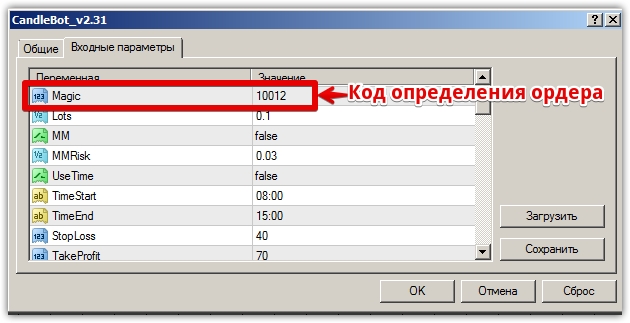
Yes, indeed, programmers often do not specify the so-called "Magic" which is used to determine the advisor's order, which leads to the fact that one advisor can close the orders of another or use trailing.
The same problem occurs with advisors that have built-in order tracking, but programmers, due to a lack of creativity, often specify the same code—for example, for many, it's 1 or 0. Therefore, to prevent advisors from interfering with each other's trading, it's necessary to specify a different order tracking code for each expert.
To do this, go to the Expert Advisor settings and find the "Magic" menu, where you can enter different codes for each Expert Advisor. If your Expert Advisor doesn't have a similar line with an incomprehensible numerical code, you'll need to open a separate account for that Expert Advisor, as it will simply interfere with your other Expert Advisors' trading.
How to install multiple terminals
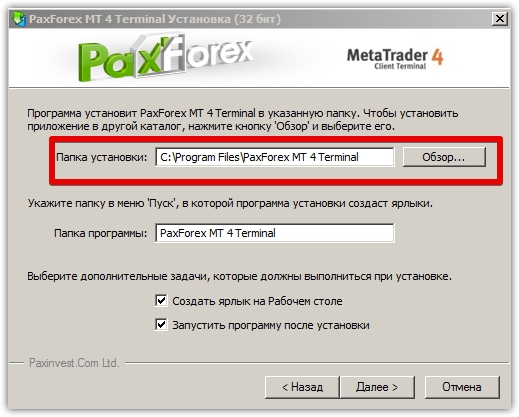
To separate conflicting advisors, it's often necessary to install two or more terminals. A common problem for traders who install multiple terminals from the same broker is that only the first one opens.
The problem is that during the very first step of installation, when the program suggests an installation location, traders forget to specify a different folder, and the program, in turn, automatically replaces the old terminal with a new one.
This way, you don't install a new terminal, but instead, the same program opens when you launch it. To avoid this, specify a different installation path for each new terminal during the very first installation step.
Which advisors can be combined on one account, and which ones should be separated?
Technically, any Expert Advisors that can recognize their orders and have a "Magic" menu can be combined and traded on a single trader's account. However, you should be clear that not all Expert Advisors can be combined on a single account, as the risks are greatly increased.
The first and most important guideline you should take into account when combining Expert Advisors on your account is your balance size and the type of Expert Advisor. For example, combining two Expert Advisors that use martingale or averaging on the same account is very risky.
This is because, during a prolonged trend, martingale opens a large series of orders with inflated lots, which often pushes your balance to the brink of ruin. Now imagine if you have two such experts on the same account, each opening orders against the trend.
Combining martingale and grid-based expert advisors is equally dangerous, as the load on the account is simply enormous. The most ideal option is to combine advisors on an account with radically different trading tactics, for example, a trend-following advisor with a scalping robot , or a trend-following expert advisor with a counter-trend robot.
In any case, the main thing is to select experts who will have radically different trading tactics, and the orders they open should, in most cases, have different directions.
To summarize, installing multiple advisors on a single account shouldn't be a problem; the only difficulty that might arise is properly combining them. However, by following our tips, you'll forever avoid force majeure when trading with advisors in your portfolio.
You can download advisors in the section http://time-forex.com/sovetniki

