Amibroker is a program for maximizing your potential.
We've all encountered situations where we had to spend days testing our trading strategies on various 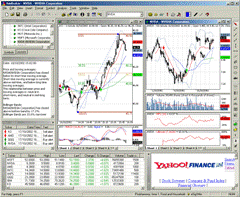 currency pairs. This is because the MT4 trading terminal doesn't allow you to test your strategies on multiple currency pairs simultaneously.
And what can we say about MT4, when you only have a limited set of instruments available for testing? What should a trader do if they want to know beforehand whether they should try their hand at stocks, futures, or index trading?.
Most brokers operating in the forex market simply don't have access to these types of instruments, with the exception of contracts for difference, which are so actively offered as a substitute for stock trading. The forex market is highly chaotic and unpredictable, so most well-known trend strategies simply don't work. For example, when a successful company's stock always follows the company's development direction, leading to prolonged trend movements.
But what should a trader do if he wants to know whether his trading strategy or expert advisor works on multiple assets?
Amibroker is a technical analysis program that specializes in all kinds of market testing and offers extensive opportunities for developing your own ideas. The program is primarily aimed at advanced traders who have repeatedly developed their own strategies and ideas.
However, the language used to write indicators and various trading rules isn't all that complicated, so you can master the basics in just a couple of days. The program also supports the MetaStock data format, so finding and exporting various quotes into the program won't be difficult.
Importantly, you can create your own indicators in AFL, a scripting language designed for traders who actively work with analytical formulas. Therefore, it's much easier to learn than common programming languages.
You can download the program at the end of this article, as well as from the developer's official website. It's worth noting that the program is paid, but you can try it in trial mode with limited features. The installation process is the same as installing a regular program or game.
After downloading, simply run the installation file and specify the folder where you want to install the program. After installation, an icon will appear on your desktop. Launching it will open the program interface:
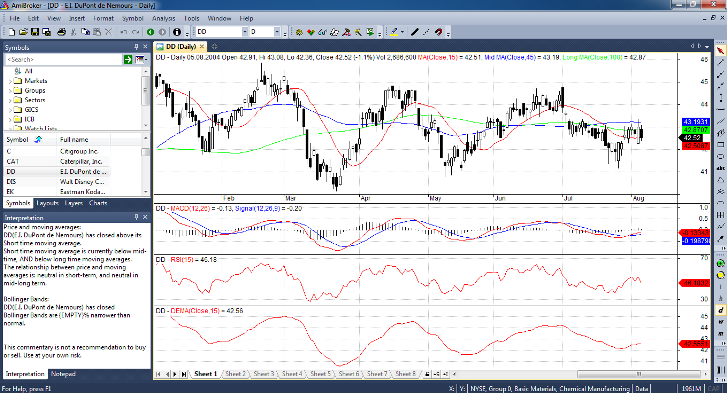 The first thing that catches your eye is the program's distinctive design. In all other respects, it closely resembles the MT4 trading platform, although it has significant differences. The first panel at the top is the main one, as all fundamental chart settings and access to various functions, testers, and editors can be made there.
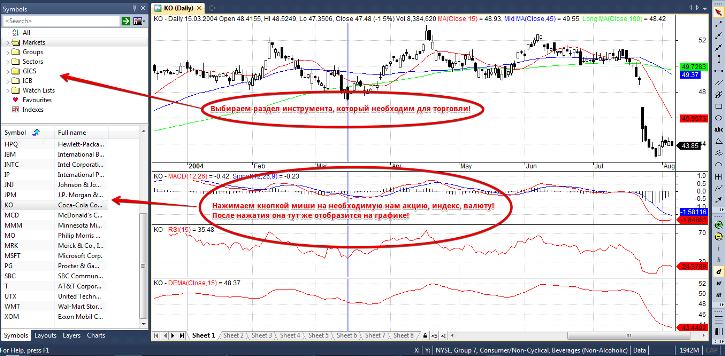
On the left, you'll see an additional window containing tabs such as Symbols and Charts, which you'll be actively working with. In the Symbols tab, you can select the desired instrument (stock, currency, index) for analysis. It's worth noting that all quotes are structured, making finding a specific instrument very easy. To display the stock or index you've selected on the chart, simply click on it.
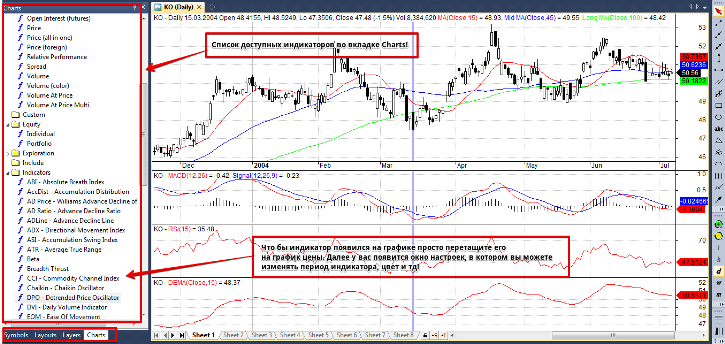
Switching to the Charts tab will open a list of indicators that you can also add to the price chart. All indicators are divided into subgroups, so you can find the tool you need by opening the appropriate subgroup.
I'd like to point out that Amibroker's set of standard indicators is much wider than MT4's. To add an indicator to a chart, simply drag it onto the price chart. Its settings will then appear, just like in MT4.
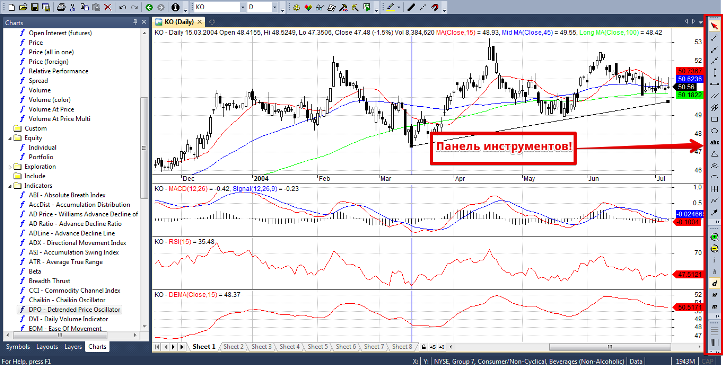
The toolbar is located on the right side of the interface. The technical analysis toolkit is just as rich as in MT4, offering various Fibonacci tools, trend lines, patterns, cycles, channels, Gann tools, and Andrews' Pitchfork. You can also use various markups, arrows, text, and more. Working with them is no different from working with the well-known MT4.
To plot them on a chart, simply select the desired element and drag it onto the chart using your mouse. You can change the color of lines and tools by double-clicking on them. A settings window will then appear where you can make your adjustments.
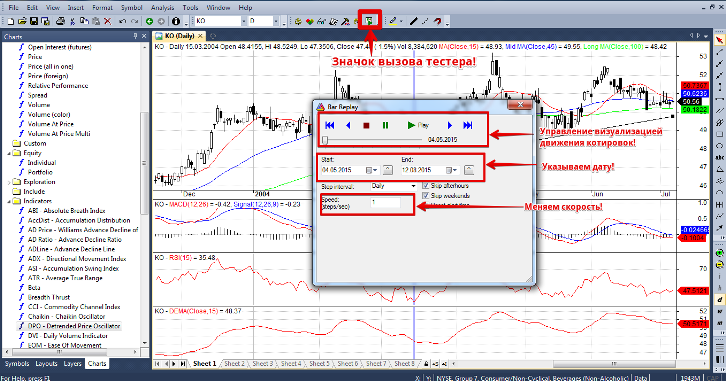
In addition to the standard features in Amibroker, you can enable price movement simulation. Simply put, you can visualize price movements, just like in the MT4 strategy tester. To do this, click the Bar Replay icon directly above the price chart. An additional window will appear, very similar to a regular music or video player.
You can set the quote speed in the "Speed" line (from 1 to 10), as well as the test date (from which date and month to the end date). You can control and pause the quotes as in a regular player, such as rewinding or pausing. Once you start the test, the quotes will actively move, reproducing the historical data you entered.
Once you launch the visualization, you can actively add various instruments to the price chart. This way, you can test your skills on any asset, including stocks, indices, and currencies. You can also test your ideas on multiple currencies by running the tester, but you'll need to know a programming language to enter the formula that will actually run the test.
Now, let's briefly discuss the downsides. First, Amibroker lacks a Russian translation, so understanding its capabilities can be difficult for someone who doesn't speak English. The license price of $279 is also a deterrent. However, you can try the program in trial mode to determine whether it's worth purchasing. On the plus side, it offers a wide range of options for creating your own developments and simultaneously testing them on all the tools you know, saving you a ton of time.

