Make your trading more efficient with a trading analyzer
Many traders change trading strategies, indicators, and programs every day after suffering a loss in Forex.
For some, this search for a truly working algorithm can take years. However, as practice shows, not a single trader who daily puts their next trading strategy in a black box has conducted a comprehensive analysis of their own trading.
In fact, every professional knows that the devil, as always, is in the details, which few realize.
For example, the same Forex strategy can show completely different results on different currency pairs and even at different times of day.
Naturally, to understand the strengths and weaknesses of a strategy, it is necessary to conduct many hours of painstaking analysis.
Trade Analyzer from AMarkets
As already noted, analyzing a trader's trading is a rather painstaking process, requiring perseverance and mathematical skills from the trader.
Understanding the need for self-analysis for a trader, broker Amarkets For our own clients, we've launched a special service, "Trading Analyzer," which can familiarize you with the basic characteristics of your trading in minutes and help you identify the shortcomings of your tactics.
Moreover, unlike similar programs and services, "Trade Analyzer" provides clear recommendations for eliminating any shortcomings in your trading.
The trade analyzer is available to all traders with Amarkets broker accounts. To launch the analyzer, simply click the "Trade Analyzer" button next to your selected trading account in your personal account.
Trade Analyzer Interface
After launching the analyzer for the first time, you will see five tabs: "Monthly Analysis," "Trading Account Monitoring," "Trading Activity," "Deposit Load Indicator," and "Recommendations.".
So, let's take a closer look at each tab and the information it contains.
1. Analysis by month
In this tab, you can select a time period and get data on your trading for each month and day of the year as a percentage.
This tab also allows you to see the structure of your trading assets, as well as the profitability or loss of a particular currency pair.
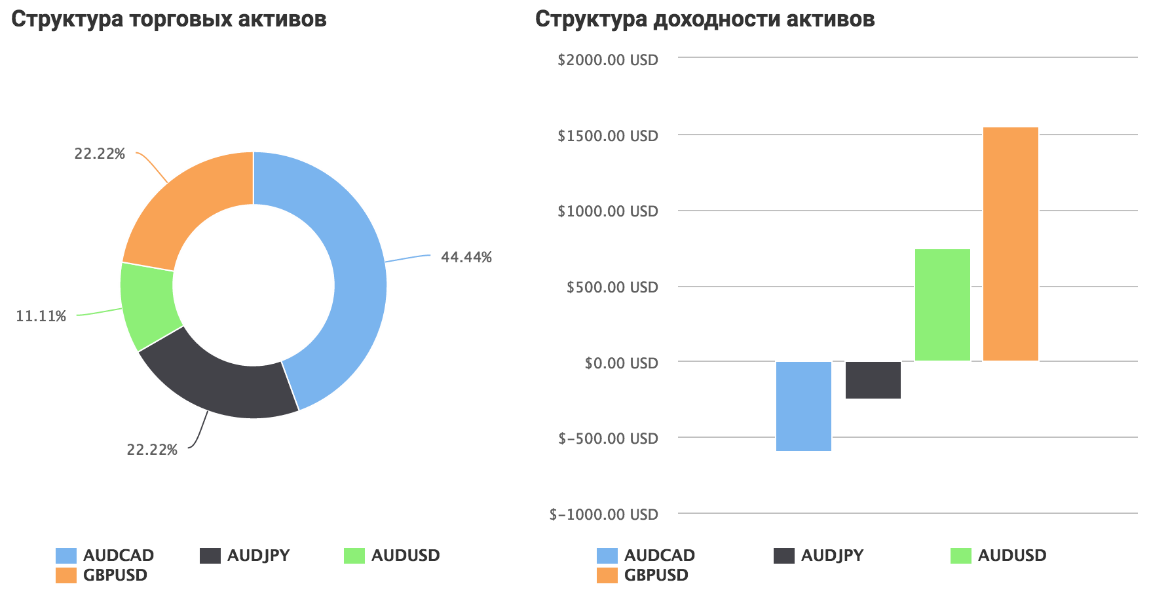
You can also see information about the average holding time and trading volume.
2. Trading Account Monitoring.
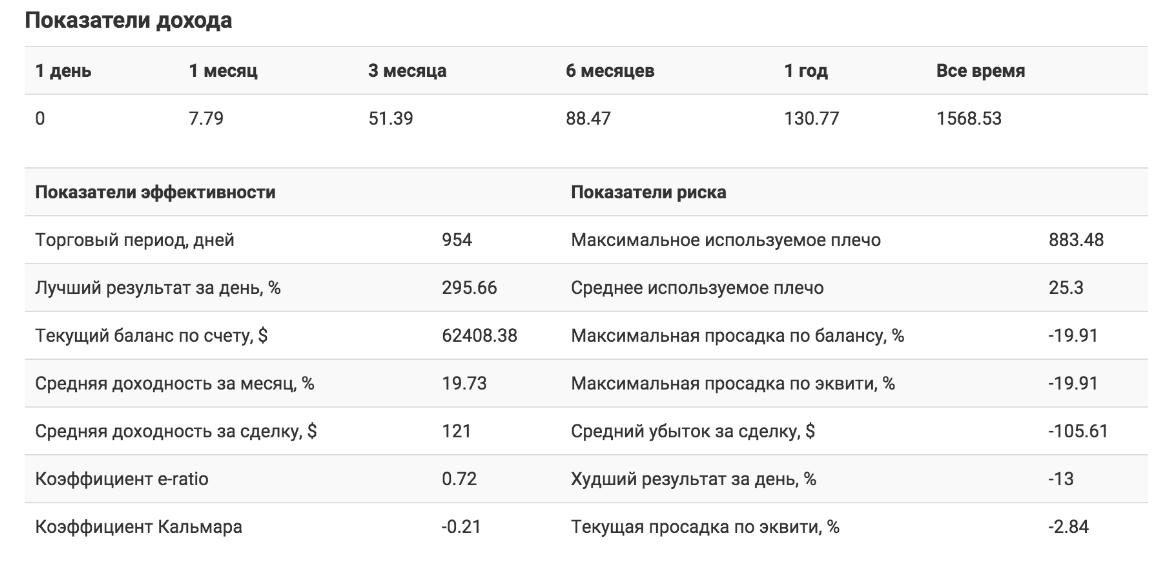
In this tab, you can view data on the leverage you're using, profitability and drawdown data, and a graph of your equity growth as a percentage.
In addition to basic data, the analyzer displays information about the best and worst trades, the average return per trade (both as a percentage and in the deposit currency), the recovery ratio and the Squid ratio, the maximum equity and balance drawdown, and the current drawdown.
3. Trading Activity.
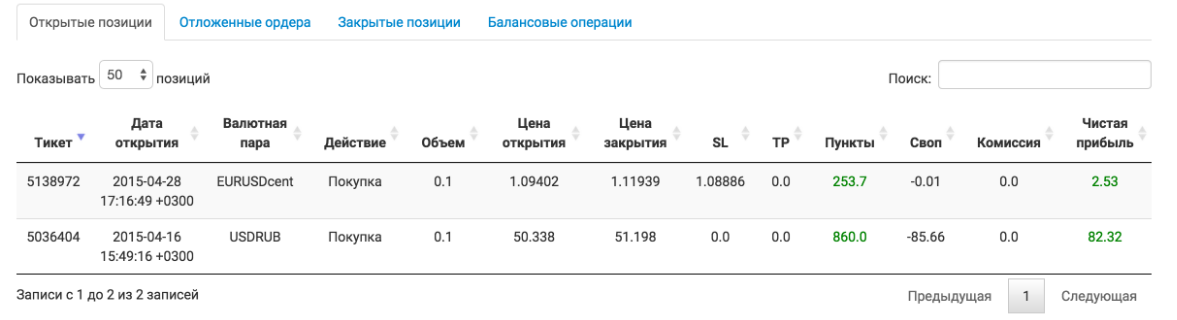
In this tab, you can view a list of your open orders, pending orders, closed positions, and balance transactions (deposits and withdrawals).
It's worth noting that all information is presented in a table, where you can see the opening and closing prices of each trade,
its direction and placement of stops and profits, the trade result in points and deposit currency, as well as the swap value, commission, and net profit from the trade.
4. Deposit Usage Indicator:
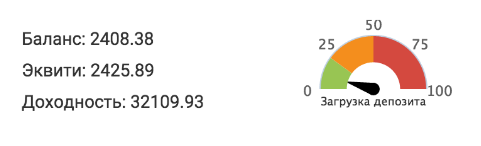
The deposit usage indicator is symbolically designed as a speedometer divided into zones.
This simple tool allows you to see how aggressively you're trading. The further the speedometer needle moves from the green zone, the greater the drawdown you're allowing and the more aggressive your trading.
5 Recommendations
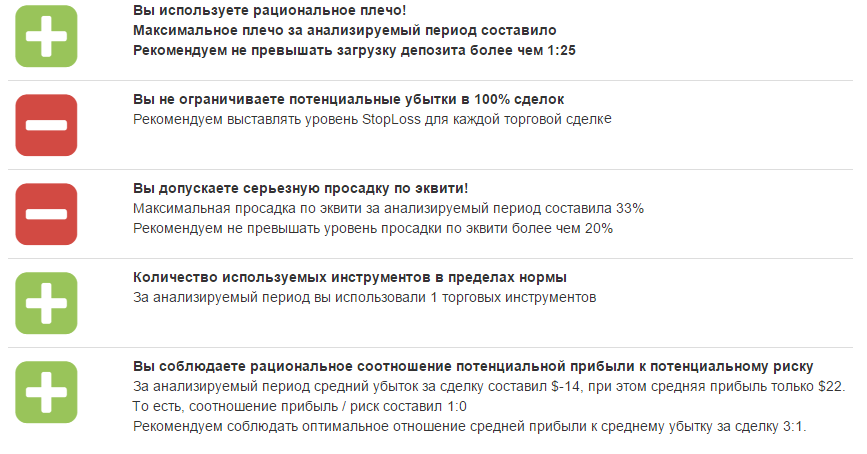
As noted, the "Trade Analyzer" not only provides information but also provides practical advice, highlighting critical points that may impact your trading performance.
It's worth noting that this tab only provides a superficial overview; you should draw deeper conclusions yourself based on the data obtained from the tabs discussed above.
Finally, it's worth noting that the built-in trading analyzer in your Amarkets account makes analyzing your own trading incredibly simple, and the data you receive can easily make your trading more efficient.
You can learn more about this tool at https://www.amarkets.org/laboratory/trade/

