VR Watchlist and Linker – a forex assistant program for multi-currency trading
Before starting trading, any professional trader conducts a market review and then selects suitable assets to trade at that moment.

The fact is that there are over a hundred different trading assets available for contract trading, ranging from currency pairs and crosses to all kinds of CFDs on stocks, commodities, indices, and more.
However, it's important to understand that not all instruments are suitable for trading, as many of them simply lack market activity.
Naturally, the lack of major players means that prices can move no more than 20-50 pips per day, making it difficult for even scalpers to profit under these conditions.
This is why selecting volatile pairs is a necessary preparatory step before starting trading.
In this article, we'll learn about a dedicated advisor assistant that simplifies the process of finding the right assets and allows you to create a separate sheet for monitoring currency pairs.
The VR Watchlist and Linker Advisor is an auxiliary technical analysis tool that allows you to create a professional list of trading instruments based on a number of specified criteria.
This allows you to save significant time when selecting and monitoring trading instruments in multi-currency Forex trading.
The advisor doesn't open orders, but rather creates a separate symbol table, so you can use it on absolutely any currency pair or time frame.
Installing the advisor
The VR Watchlist and Linker advisor is available for purchase on the market for $29. However, the developer provides the option to download a demo version of the expert advisor so that traders can familiarize themselves with its functionality.
This article discusses the demo version of the expert advisor, and there are two ways to install the robot. The first installation method is through the marketplace.
To do this, open the Market tab in the Terminal panel, then enter the name of the expert and perform automatic installation.
If the Expert Advisor has been removed from the Market by the time you read this article, you can install it using the standard installation method. Download the Expert Advisor file at the end of the article and then place it in the appropriate folder in your terminal's data directory.
To access the data directory, launch your trading terminal and go to the File menu in the upper left corner. Then, in the list of options that appears, find and select the line "Open data directory.".
After launching the data directory, a list of system folders will be displayed on your monitor screen. Among them, find a folder called Expert and drop VR Watch list and Linker into it.
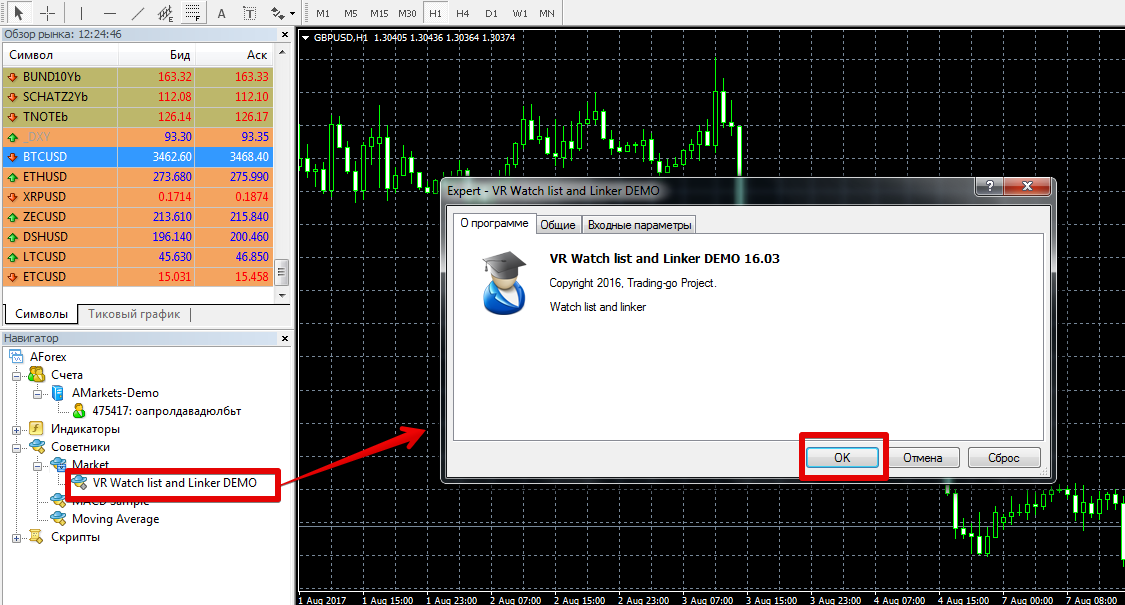
After restarting the trading terminal, VR Watch List and Linker will appear in the list of advisors. To start using it, simply drag the robot's name onto the chart.
Advisor Functionality:
As noted earlier, VR Watch List and Linker is nothing more than an assistant that creates an alternative window to the standard "Market Watch" with expanded functionality.
It allows you to select instruments based on specified filters and create your own list based on criteria. Once applied to the chart, a table will appear in the left corner of the chart.
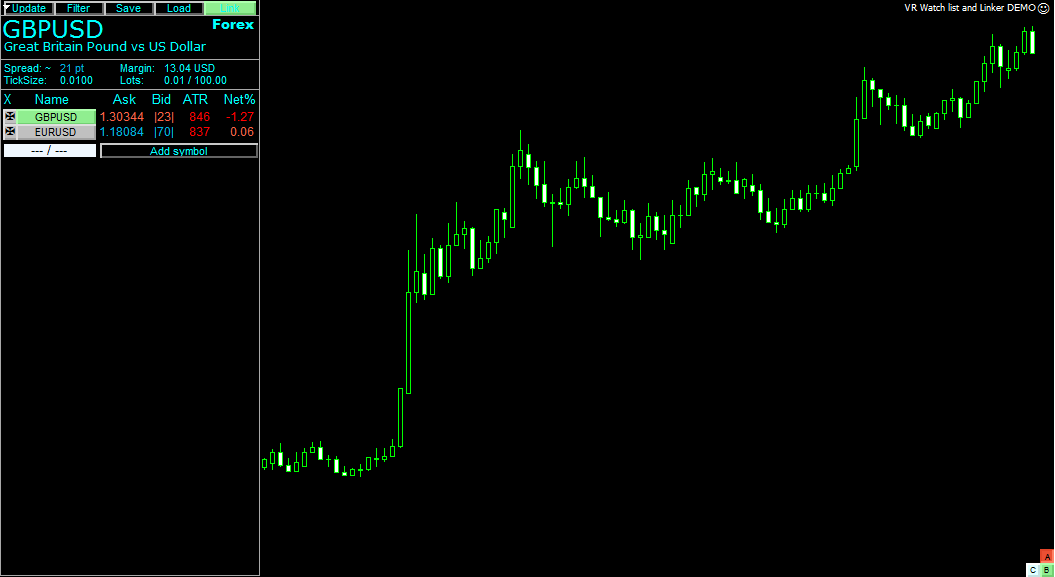
The table will contain a list of all symbols in the Market Watch window.
Clicking a symbol automatically opens a chart, and you can view the spread, tick size, margin requirement for opening a position with a minimum lot, the average number of pips the price moves per day, and the percentage by which the price has deviated from the day's opening.
Using the "Filter" button, you can filter out unnecessary instruments by the number of pips moved per day, by instrument name, by price, and by the margin required to open a Forex trade. The "Save" button allows you to save the selected list of instruments.
VR Watch List and Linker Advisor Settings:
Most of the VR Watch List and Linker advisor parameters control the graphical display and style of the table.
For example, in the X Position and Y Position rows, you can set the table placement along the x and y axes, and in the List Size row, you can set the table height.
The Price Update Speed variable allows you to set the chart update speed, and the Days ATR variable is responsible for the number of days for which the average price movement value in points is displayed in the table.
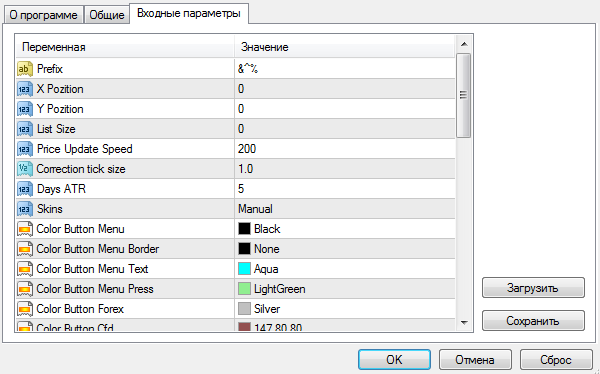
The Skins variable allows you to choose one of four styles for displaying the table on the chart.
Finally, it's worth noting that the VR Watch List and Linker advisor significantly simplifies filtering and searching for the necessary assets for trading, saving time and effort during selection.
Download VR Watch List and Linker.

