Optimal F forex risk management software
There are many different capital management models, but as practice shows, most of them are not used by traders, and either a static lotor a certain percentage of the deposit is used per position.

The most interesting thing is that the most common money management method , in which a trader uses either a certain portion of the deposit or a certain percentage per trade—which are essentially the same thing—can actually lead to the loss of your deposit.
This may come as a shock to many, but the common rule of risking 2 percent of the deposit or $100 per trade has led to the loss of millions of traders.
Unfortunately, most traders, when choosing a particular capital model, don't even consider whether it's right for them, but use it simply because it's required or because most books say so.
Optimal F calculates the optimal share of your capital to risk when opening a position. Using the program, you can find the optimal share value specifically for your trading strategy based on your previous trades.
The program itself allows you to analyze how effectively you attract your funds during trading, which will allow you to further adjust your chosen capital management model.
Program installation and appearance
After downloading the program, you will find that it is designed as a regular Excel spreadsheet, so all you need is Excel and basic knowledge of how to use the program.
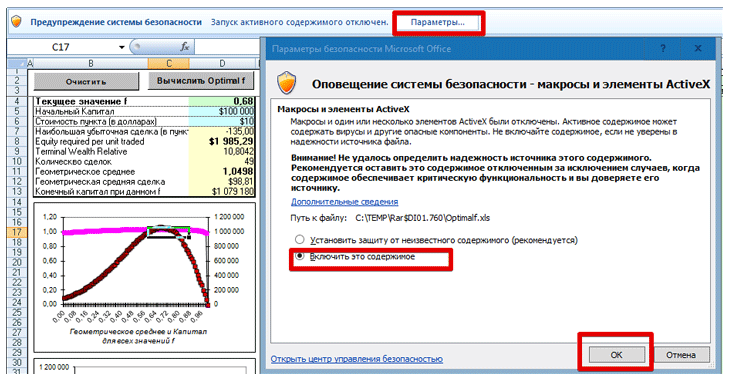
After launching Optimal F, a security message will appear in the top bar, asking you to grant permission to use macros. Once you do, the program will function normally.
Working with the program
: After the first launch, you'll see a table with all trades and the F optimal value pre-calculated. You'll need to clear it by clicking the "Clear" button in the upper left corner. Once you do, all tables will be automatically cleared, and you can proceed with calculations.
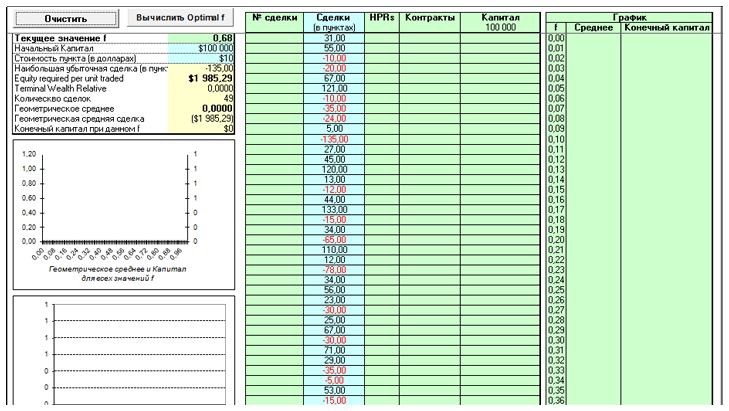
The first thing you'll need to do after clearing the table is to look at the "Initial Capital" and "Pip Value in Dollars" columns in the left corner. Enter your personal deposit amount in these lines, as well as the pip value for the specific instrument for which the risk percentage is calculated.
After entering these values, go to the "Trades in Pips" column and enter the profit for each trade in your history, either positive or negative, in pips. It's crucial to enter the maximum number of trades, as this will allow the program to calculate the optimal percentage of your capital to use in trading for maximum profit.
Once you've entered all the necessary values in the table, click the "Calculate Optimal F" button in the upper corner. The program will automatically fill in all the required values and return the optimal risk percentage per trade for your capital and strategy.
The program will also automatically calculate the maximum losing trade in points, display the geometric mean, the geometric average trade, and the final capital you would have received if you had used the optimal share calculated by the program.
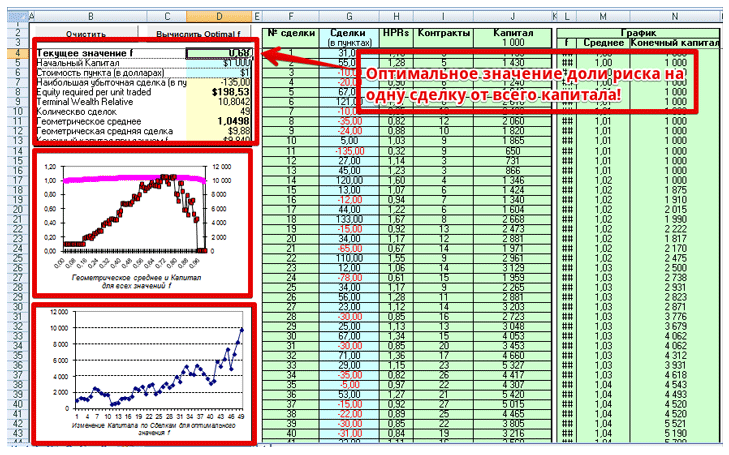
For clarity, the program also plots a graph of the geometric average equity for all optimal share values, as well as a graph of equity changes with the calculated optimal equity share.
Finally, I'd like to point out that the program allows you to determine the optimal risk share specifically for your trading strategy and deposit. However, it's important to understand that this value is dynamic, so as your deposit grows and new trade statistics accumulate, you should regularly perform calculations and adjust this value.
Download Optimal F

