DDSMM money management software
Almost all traders know about the importance of money management, since every book, every educational website, and every stock market channel on TV has repeatedly told us about the correct approach to capital management.

However, as our experience shows, knowing its importance is one thing, but not everyone can apply it. You'll agree that most beginners, chasing profits, completely forget all the rules, known and unknown, increasing and doubling their lots, and then accept the predictable consequences.
More experienced traders, who understand all the nuances, typically complain that they spend a lot of time opening a trade and correctly calculating the lot, so they often resort to using a static lot.
In any case, for both the first and second category of traders, money management eventually becomes a burden due to the banal routine of mathematical calculations.
Installing DDSMM
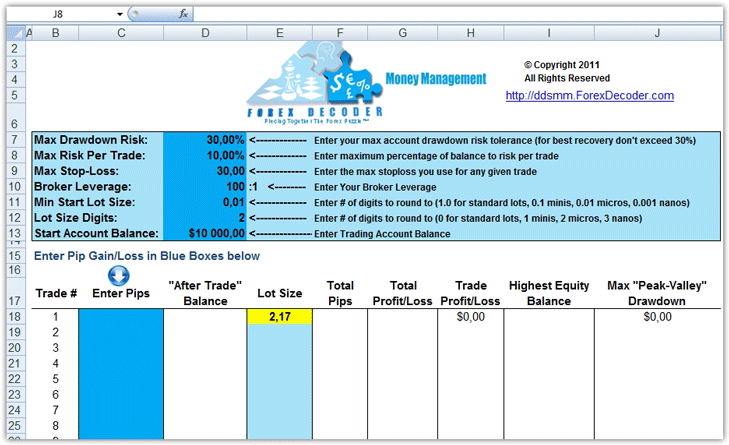
DDSMM is a standard Excel file, so after downloading it, simply run it and the program will be ready to use. If you can't run this file, it's likely that you don't have Microsoft Office installed on your computer. Once you have it installed and run the downloaded file, you'll get a spreadsheet like this:
Setting up the DDSMM program.
When you launch the program, you'll see that the workspace is divided into two windows. The first window, with a blue background, is where you configure settings that will inform the program's calculations. In the second window, you'll enter your profits or losses, and the program will then return the lot size for your next trade. Let's start by focusing on the values in the first additional window.
First, in the Max Drawdown Risk line, you should specify the maximum allowable account drawdown when opening a trade. By default, this value is 30 percent; however, for more comfortable and secure trading, it's recommended to reduce this value to 10-15 percent.
Max Risk Per Trade sets the maximum risk per trade as a percentage of your deposit. The default value is 10 percent per position, which is extremely aggressive. Therefore, set this value to between 2-3 percent.
Max Stop Loss: Enter your maximum stop loss order for your strategy. It's worth noting that each strategy has its own acceptable risk limits before opening a trade. If you don't know your maximum stop loss, consider changing your trading strategy or clearly defining it.
Set the Broker Leverage to the leverage you use to trade your account, and in the Min Start Lot Size field, specify the minimum lot size you can open a trade with on your account.
The Start Account Balance displays your current balance, and the Lot Size Digits line specifies the number of lot digits you'll be trading.
Working with the program:
After setting up the first and most important window, we should begin working with the second window. It's worth noting that if you've configured all the values in the first window, you won't need to change anything else. So, first, enter your profit or loss in the Enter Pips line.
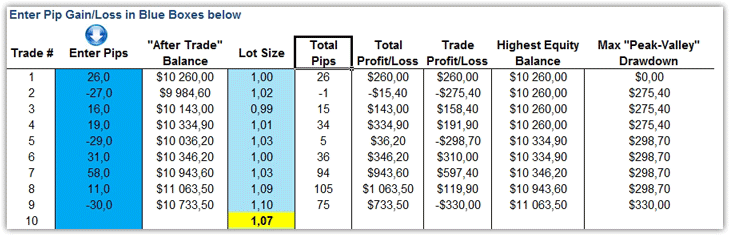
Enter the value in pips: if you're making a profit, enter the number, and if you're making a loss, enter the value with a minus sign. After you enter the number in the After Trade Balance column, the program will automatically calculate your balance.
The Total Pips column will show the number of pips earned or lost from trades, and the Total Profit/Loss column will show your profit or loss in dollar terms. The Trade Profit/Loss column displays the profit or loss in dollars for the last trade, and the Highest Equity Balance column displays the highest deposit value.
For example, we entered a series of profitable and losing pips, and in the Lot Size line, the program indicated the next lot based on account changes.
In conclusion, I would like to note that the DDSMM money management program is a simple yet effective assistant that will forever free you from the constant tedium of lot calculations.
The simple dynamic lot calculation system allows you to increase the lot size for profitable positions and decrease your trade size for unprofitable positions. This way, you can see the fastest possible growth of your deposit with minimal risk.
Download the DDSM program

