THV Cavemanager Assistant Advisor
Monitoring open positions is no less important than opening a trade itself. During trading, an active trader faces a myriad of tasks, from setting stop orders and taking profit, dragging stop orders along the price movement, to closing and monitoring orders.

Typically, for traders who prefer medium-term trading, managing orders presents no problems.
However, for scalpers, who may have up to ten trades open simultaneously, and the total number of trades per day can exceed several dozen, numerous difficulties and errors arise that can have a fatal impact on daily performance.
The THV Cavemanager advisor was developed specifically for trading using the THV scalping strategy, and its main purpose is to monitor open orders and manage risks through various stop-loss and take-profit order placement models.
Installing THV Cavemanager
Before we begin examining the EA's basic parameters and capabilities, you should install it in the MT4 trading terminal. After downloading the files at the end of the article, you'll need to install the indicator required for the EA to work along with the EA.
To install it in the trading terminal, open the File menu in MT4 and navigate to the "Data Catalog" section. Once the data catalog is open, find the "expert" folder and drop the EA into it. Also, find the "indicators" folder and drop the indicators into it.
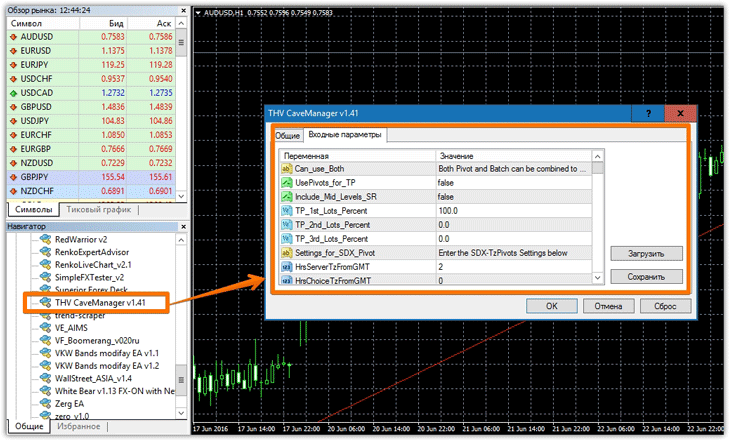
After restarting the terminal, go to the "Experts" section and drag it to any timeframewhere an order is open. It's important to note that the EA only affects the orders it's assigned to.
Basic Features and Settings
As we've already stated, THV Cavemanager is a helpful tool that uses various order processing options, which you'll learn about as we go through the settings. It's worth noting that the author has included a large number of variables, so you can tailor any strategy to this expert advisor.
The first variable, "UsePivots for TP," allows you to enable or disable profit targeting based on Pivot levels, and the "Include Mid Level SR" line allows you to add additional levels. In the "TP 1st Lots Percent" lines, you can specify a percentage of the entire position to close when the price reaches a certain pivot level. This function allows for partial closing of orders.
You can also select a specific pivot point calculation method within the expert advisor: a standard formula or Fibonacci. So, if you enter 1 in the "Show 1Daily 2FibonacciPivots" line, the standard calculation will be used, while 2 will use Fibonacci.
The UseTP By Batch variable allows you to close a position in stages, namely based on a certain percentage or number of pips. If you enable this feature, you will need to specify either a percentage or number of pips for each stage. The same applies to stop orders, so you can enable a stepped stop order based on a certain number of pips or percentage in the UseLoss by Batch line.
This expert advisor has the option to move a position to breakeven in the UseNoLossAfterPips line. You will need to specify the number of pips in the NoLossAfterPips line after which the expert advisor will move the stop order.
In addition to the stepped stop order, the Use ATR Stop Loss line allows you to enable stop orders based on the ATR indicator, which accurately measures market volatility. You can also change the indicator's period in the ATR Period SL line, and directly influence the stop order size using the ATR SL Factor multiplier. In addition to the stop loss, you can also enable the ATR indicator-based profit target in the Use ATR Target Profit line.
In addition to special settings, the EA also includes basic variables. You can enable a trailing stop, and set the trailing level in the Trailing Stop Pips line.
The EA also allows you to enable trailing based on the percentage of the completed profit in the UseTrailPriceByPercentage line, specifying the percentage of the profit in the PercentageTrailBehindPrice line.
In addition to the two trailing options discussed above, you can use trailing based on the ATR indicator (by first enabling this feature in the Use ATR TrailingStop line), as well as trailing based on the High/Low of the last candle.
Overall, THV Cavemanager is an excellent assistant, offering a wealth of functionality for managing open orders and allowing you to choose the method that suits you and your trading strategy. The THV Cavemanager advisor is an indispensable tool if you use scalping or pipsing.
Download THV Cavemanager

