Crane Scalper indicator
One of the most common mistakes made by novice traders is using indicators in markets that are not appropriate for them.

The most popular and profitable trading method, scalping on Forex, requires the use of specialized technical indicators designed to overcome market noise.
The Crane Scalper indicator is a technical analysis tool designed for short time frames and serves as a signaling tool.
It's worth noting that the Crane Scalper indicator was first publicly released in 2016 by an active Forex forum participant and is distributed completely free of charge.
The indicator itself is universal and can be used on any currency pair or time frame, but it's important to understand that its primary use is for trading on short time frames.
Installing the Crane Scalper indicator
Download the Crane Scalper indicator file at the end of the article.
Installing the Crane Scalper indicator follows the standard procedure and is no different from installing any other custom technical analysis tool. You'll need to copy the downloaded file to the appropriate folder in your terminal's data directory.
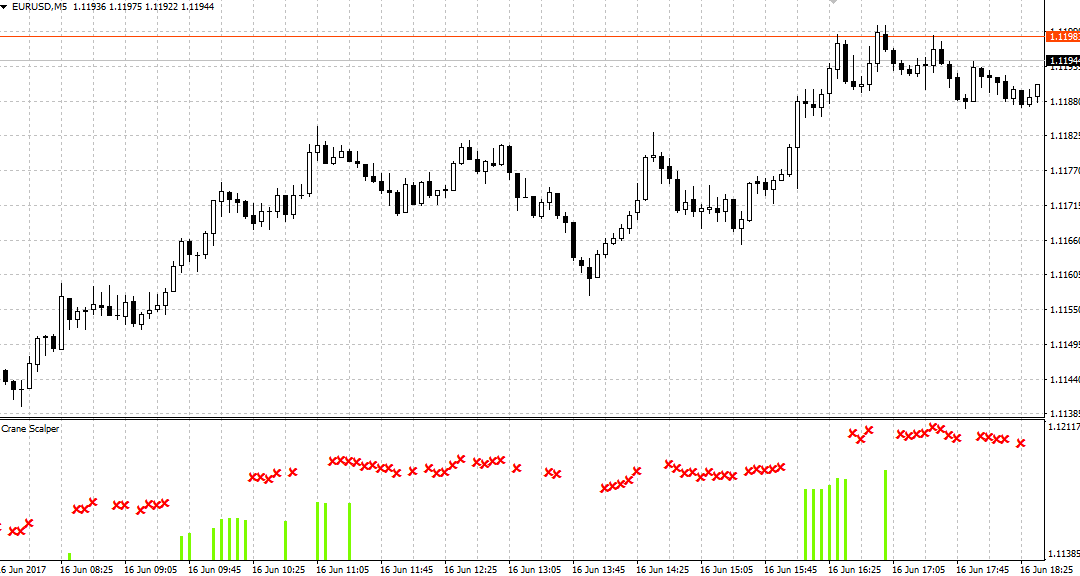
After restarting the platform, Crane Scalper will appear in the list of custom indicators. To use it, simply drag the instrument name onto the five-minute chart of any currency pair you choose.
The principle of using the indicator. Settings:
The Crane Scalper indicator combines two tools: a signal histogram, which is used to open a position, and a flat filter, which the indicator displays as red crosses.
The most important and basic rule for using the Crane Scalper indicator is that trading is prohibited during a cross, which symbolizes a flat market on Forex !
Even if the signal indicates the direction of the trade, if a cross appears above the histogram, trading is prohibited.
The principle of using the indicator is very simple: if a green histogram bar appears, open a buy position, and if a gray histogram bar appears, open a sell position. It's also important to understand that the darker the bar, the stronger the indicator's signal.
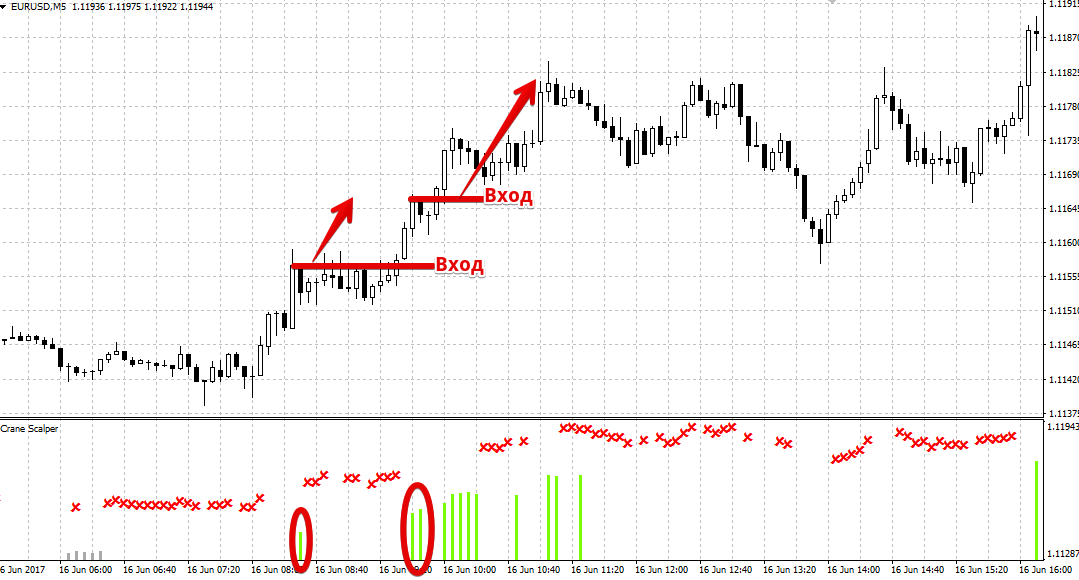
Crane Scalper Indicator Settings:
Using the indicator settings, you can influence both the flat filter and the signal tool itself, allowing you to customize the tool based on market demands.
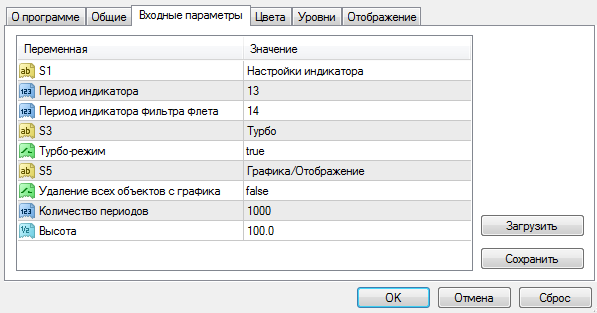
In the "Indicator Period" line, you can change the number of candles used to calculate the histogram, and in the "Trend Filter Indicator Period" line, you can set the number of candles used to calculate the filter (red crosses on the chart).
It's worth noting that increasing the indicator calculation periods will cause the tool to reject market noise, and signals will become less frequent.
Decreasing the periods increases the indicator's sensitivity and generates more signals.
In the "Turbo Mode" line, you can enable a special mode that will allow the indicator to find more signals, but their reliability will be significantly reduced.
Setting "Remove all objects from chart" to True automatically removes all other technical and graphical analysis tools from the chart.
In conclusion, it's worth noting that the Crane Scalper indicator is a professional and highly specialized technical analysis tool; however, to avoid false signals against the main trend, it should be used in conjunction with another indicator - http://time-forex.com/indikators.
Download Crane Scalper indicator.

