The best place to take profits is EasyTakeProfit
Many traders focus excessively on their strategy's entry system rather than exit points. As strange as it may sound, the number of traders who change their trading tactics over and over again is simply thousands, while those who actually consider the reason for their deposit loss are few and far between.
Often, two trivial parameters such as profit level and stop level can radically change the statistics Forex strategies.
Thus, giving in to emotion, many beginners set excessively large stop orders or abandon them altogether. In the first case, a large stop order disrupts the balance, which subsequently leads to the strategy's failure.
In the second case, the absence of a stop order leads to the accumulation of a huge loss, which sooner or later will have to be closed.
With the increasing popularity of scalping, many traders have begun to set stop orders that are too small due to a reluctance to lose too much in a single trade.
The vast majority are also afraid of losing their profits and either set their profit levels too low or close their trades early. This approach also disrupts the balance between profitable and losing trades, which steadily leads to the loss of their deposit.
The only solution to this problem is a systematic approach to setting stop orders and profits, which will always follow the same rules.
The EasyTakeProfit advisor is a universal assistant that, thanks to a special algorithm, will always indicate the zones where you should place your take-profit and stop-loss orders. The advisor doesn't initiate trades itself; it merely serves as an informant, highlighting the best zones on the chart where the price is most likely to reach and take your profit.
The advisor can be used on any time frame and currency pair, but the method itself is primarily designed for intraday trading.
EasyTakeProfit Installation and Settings
The EasyTakeProfit Expert Advisor is designed for use on the MT4 trading platform and is a custom tool, so it will need to be installed on the trading terminal. After downloading the Expert Advisor file at the end of this article, access the terminal's data directory via the File menu. A list of system folders will appear. Find "Expert" and copy EasyTakeProfit into it.
After you update the installed file in the navigator panel or restart the trading terminal, EasyTakeProfit will appear in the list of advisors. To start using it, drag EasyTakeProfit onto the chart of the currency pair you plan to trade.
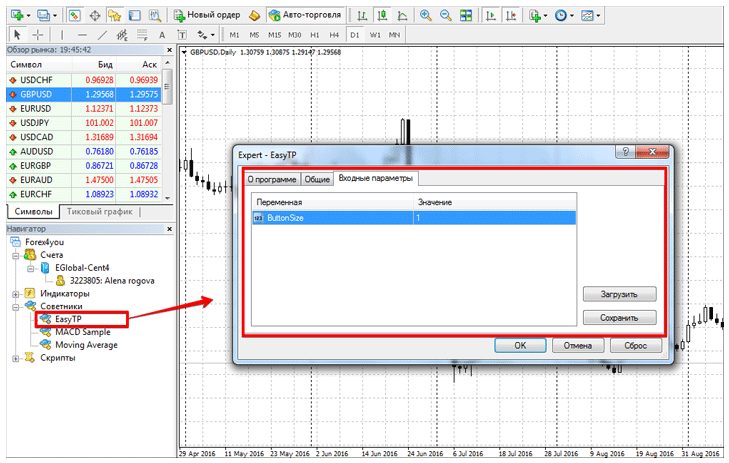
In the expert settings, you will find only one variable, ButtonSize, which is responsible for the size of the two buttons that are displayed directly on the chart.
EasyTakeProfit Working Algorithm and Application
The developers of this algorithm conducted a simple study and found that the overwhelming majority of successful traders trading using technical analysis use a standard method when placing a stop order and taking profit ATR indicatorThe ATR indicator, in the form of an oscillator, displays the current market volatility as a numerical value.
Thus, using special coefficients and volatility readings, the EasyTakeProfit developers have identified specific zones. The essence of a profit zone is to show the trader the possible price movement toward profit based on market volatilityThe stop order zone displays the area where, given volatility, the price should not trigger your stops.
To use the advisor, click the SELL or BUY button in the upper right corner, depending on the direction of the trade you're opening. After you click, EasyTakeProfit will highlight the chart zones in green for your profit placement and in orange for your stop loss.
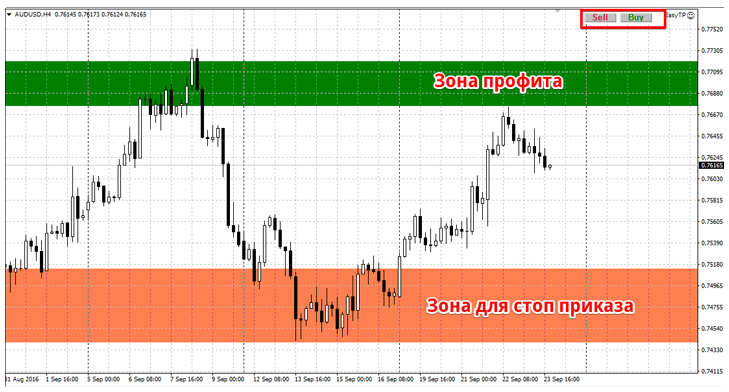
The advisor does not open orders automatically, so you must do this manually by dragging your stops and profits to the appropriate zones.
In conclusion, I'd like to note that EasyTakeProfit is an excellent tool for beginning traders. It's worth noting that it's less effective on smaller timeframes, such as M1-M15, compared to M30-H4.
Download EasyTakeProfit

