How to write a script for Forex trading
Modern trading is already quite difficult to imagine without automation. Moreover, with today's level of computer technology development, not just simple programs, but even artificial intelligence capable of self-learning are entering the exchange.

However, while complex programs are affordable only for large hedge funds, banks, and other financial institutions, simple software solutions like scripts are affordable even for students, and in most cases, you can find a script tailored to your needs completely free.
A script is a program designed to perform a one-time action. For example, if you've used trading advisors, you probably know that these programs perform specific tasks as long as they're on the chart.
A script, on the other hand, differs from an advisor in that it executes a command only once when it's applied to the chart. Therefore, a script can perform a task that an advisor can't.
For example, if you want to close only profitable trades from a series of open orders, applying a script to the chart will only close profitable trades once, while the advisor would do this continuously.
You need to set pending order network, delete unexecuted orders, or instantly close all trades without any unnecessary fuss, or maybe reverse a position or open a double lot?
All these simple tasks we perform day after day, which in turn take up our time, can be easily automated with simple trading scripts. Analytical scripts allow for accelerated analysis.
For example, if you want to plot support and resistance levels, a Fibonacci grid, or other elements of technical and graphical analysis, these types of scripts are perfect for these tasks.
Writing a script
To write your own script, you first need to define the task it should perform. It's important to understand that the task the script performs must be identical to an action you can perform manually or, more simply, implement yourself.
Once you've defined the clear purpose and functions of your future script, the next step is implementing it. There are only two ways to implement or write your own script: by hiring a developer skilled in programming or by writing it yourself using the built-in editor in the Metaquotes trading terminal.
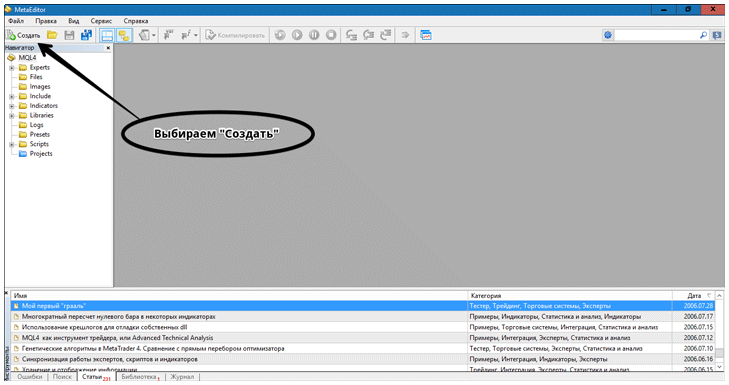
If you're familiar with programming or have decided to use the tutorial to write your first script, launch the editor using the dedicated icon on the MT4 toolbar or by pressing F4. Once the editor appears, click the "Create" button in the upper left corner.
A window will appear in which the editor will offer you the option to create a program type, including an Expert Advisor, a Script, a Library, a Custom Indicator, and others. Select "Script.".
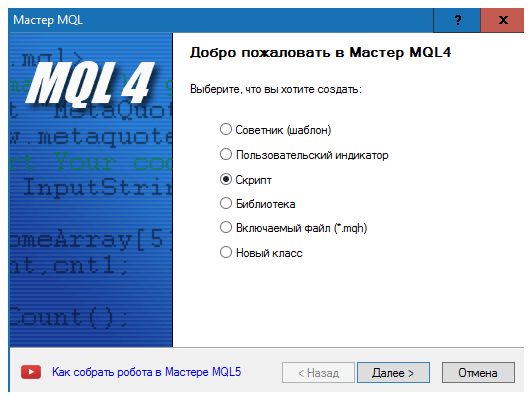
After you select the program type and click Next, a new program window will appear in front of you, in which you will need to indicate the name of your development and also add certain parameters.

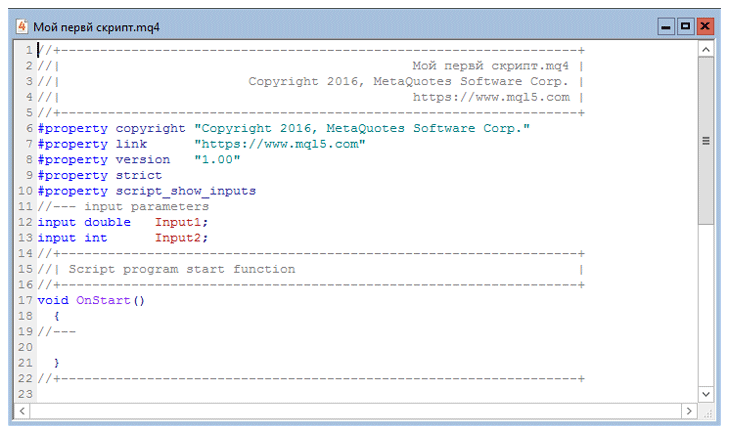
Once you click "Done," the script will automatically be generated and will appear in the text editor, where you will then implement your idea using special code.
Preparing a Task for a Programmer When Creating a Script
A script, unlike an Expert Advisor, is an auxiliary program for manual trading, so its implementation doesn't require much time or effort from the programmer. Before contacting a specific contractor, try to write clear terms and conditions, and don't hesitate to illustrate them with a picture. You must clearly understand that a programmer is not a trader, so discard all your typical professional jargon like "take a figure," "hit a moose," and the like.
After you've created a clear task, you need to agree on the price and deadline. It's important to understand that a simple script contains a few lines of code and is a simple program, so you shouldn't pay the same amount for it as developing an Expert Advisor.
In conclusion, I'd like to note that scripts are very useful and in-demand programs, which is why they are often created by various traders and shared on Forex portals. You can also find many useful scripts on our website, so before ordering anything, check if your idea has already been implemented on our website.
http://time-forex.com/skripty

