Script that reverses positions
During trading, every trader encounters deceptive market maneuvers, when a seemingly clear trend changes direction in a matter of seconds.
Many traders accept their defeat and wait to exit the forex market via a stop order.
But it is also possible to reverse the position, which will provide the opportunity to profit from the new trend, and the size of the profit directly depends on how quickly the reversal is made.
The Revers script is an excellent solution for traders who practice position reversals. Unlike many similar scripts, the script automatically remembers the volume and number of previously opened orders and performs the reversal with exactly the same lot size.
It's worth noting that this script is a universal tool and performs a one-time action, which does not overload your trading platform.
Installing the position reversal script
To use the script, you need to download it from the link at the end of the article, and then install it on the MT4 trading platform.
The script installation procedure is no different from installing an indicator or other extension; you'll need to drop the downloaded file into the appropriate folder in the data directory.
To access the data directory, launch your terminal and select the "File" menu in the upper left corner. A list of options will appear, including "Open Data Directory" and select it.
After launching the directory, you will see a list of system folders on your monitor screen. Among them, find a folder called Scripts and drop the previously downloaded file into it.
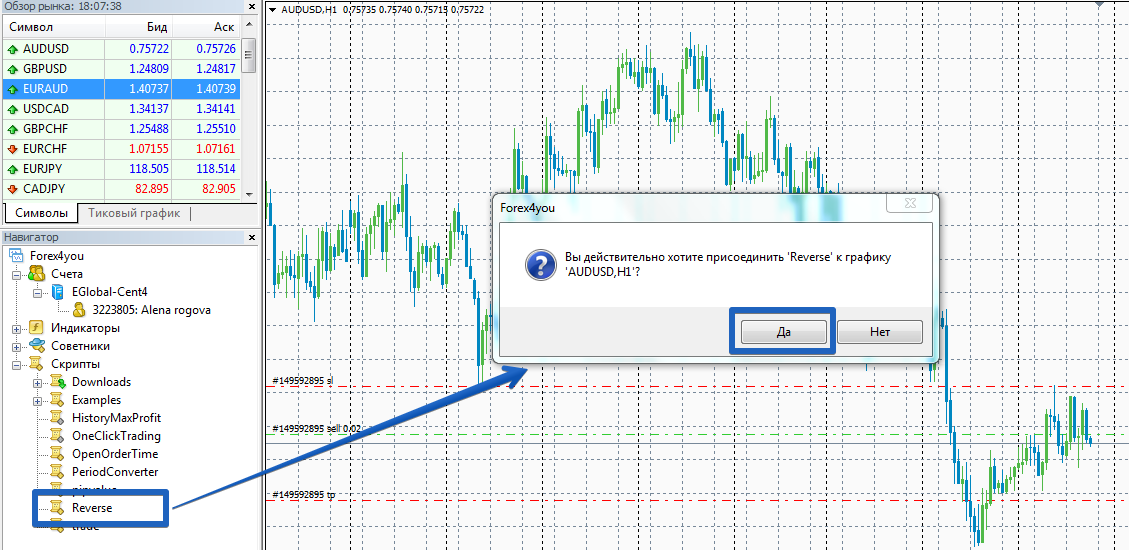
After installation, you need to update the platform in the navigator panel or simply restart the platform, after which the script will appear in the list. To use it, simply drag the script onto currency pair chart, on which your positions are open.
Script settings. Application
The script that reverses positions, like all scripts, only performs a one-time action, so every time you need to reverse positions, you should drag it onto the chart.
To speed up order execution, the script's settings were moved to the program code. They can only be changed through Meta Editors. To do this, open the script in your MT4 editor.
From the options list, you can set the profit for the reversed position in the Takeprofit line, as well as a stop order in the StopLoss line. By default, the script only reverses the positions it's placed on.
To ensure that the reversal occurs for all positions, set the CurSymbolOnly line to False. The Slippage and NumberOfTry variables allow you to set the maximum slippage and the number of attempts to open an order.

In conclusion, it is worth noting that the position reversal script is an excellent solution for experienced traders, thanks to which you will get rid of the constant routine of closing and reopening Forex orders.
Download the script for reversing positions.

