Metatrader Alerts - Setting Up Signals in the Trading Platform
Most trading strategies require complete immersion in the trader's trading process. However, for many, trading is nothing more than a supplementary source of income.
Therefore, as much as we may not want to, we have to devote minimal time to trading compared to what a real strategy requires.
It's also worth remembering that the trading process itself is quite routine, as the most difficult part isn't actually opening trades, but waiting for the exact moment when the necessary conditions are met.
Experienced traders use indicators with built-in alerts for such purposes, or commission them from a programmer.
However, many people don't know about one feature of the Metatrader trading terminal: the ability to enable sound alerts when certain price conditions are met, which you can set yourself.
How to enable Alert in the terminal
An alert is a signal or notification about the fulfillment of certain chart conditions, which a trader can customize.
It's worth noting that both Metatrader 4 and Metatrader 5 support this feature; furthermore, the functionality and setup process are identical.
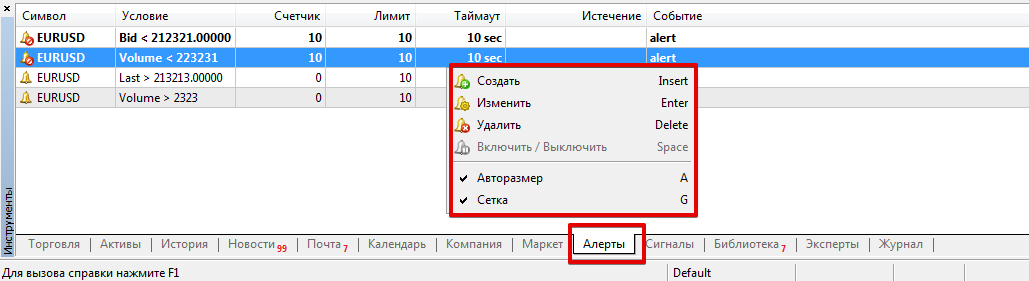
To set up an alert, navigate to the bottom of the platform, to the window where balance changes are monitored and information on open trades is displayed.
At the very bottom of this window, you'll see a row with options such as "Trading," "Assets," "History," and several other options, including "Alerts." Your task is to open this tab.
After you open this tab, you'll see a blank area. Right-click on this blank area to bring up an additional menu. You'll only have one working option, "Create," which you should click.
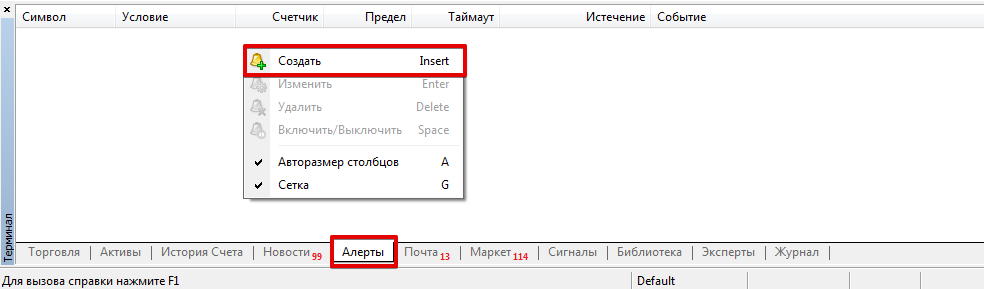 After these steps, the Alerts window should appear in the platform, where you can set conditions for sound notifications.
Here, you can choose how to notify you of an event. You can choose a standard sound alert, an email, or a push notification to your mobile phone.
You can then select the symbol for which you want to receive notifications. Only the symbols present in the Market Watch window are displayed in this window.
Sound alerts can be configured for currency pairs, CFDs , and even real stocks (if using MT5 on the stock market).
You can also select a signal source and replace the standard buzzer with your favorite melody by specifying its path on your computer. In this same section, you can also set a timeout in seconds and how often to repeat the alert.
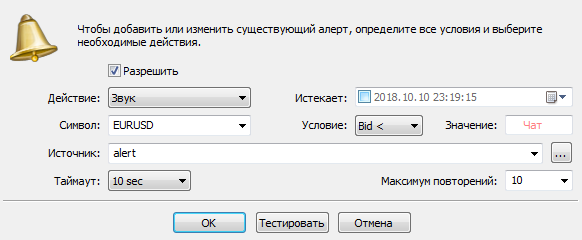 The right side of the menu is more important for traders, as it allows you to specify the expiration date, the alert, and, most importantly, the conditions.
There are several conditions. First, you can specify a value greater than or less than the Bid or Ask price. This means that if the Bid or Ask price rises above the specified price, a notification will be triggered.
Second, you can specify a value greater than or less than the previous price and compare it with the price you set in the settings. The principle is identical to that of the scene, comparing the Bid or Ask with the specified value.
Third, you can specify volume values, specifically, an equation according to which, if the current market volume falls or rises above the specified value, the selected alert type will be triggered.
There's also a kind of alarm, as you can link your signal to a time; when the clock hand reaches the specified time, the terminal will notify you. This feature allows you to not miss transitions between trading sessions or the publication of a specific news item.
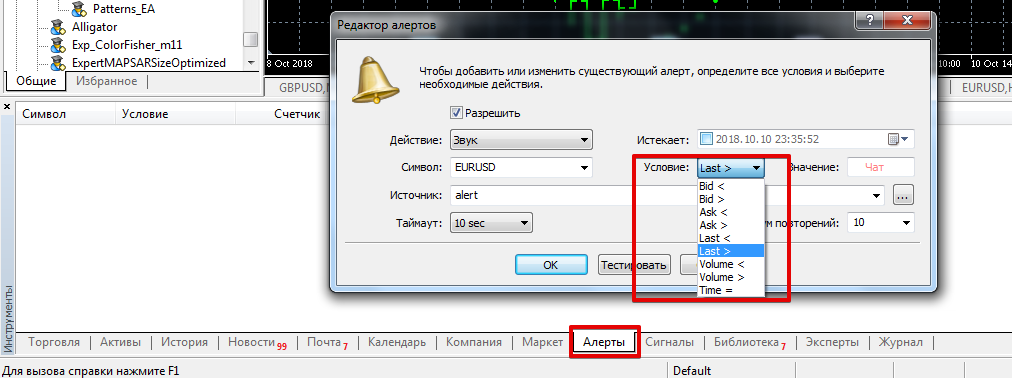 After creating an alert and setting all the necessary conditions, you can test it before deploying it. All sound alerts you've created will be located in a window called "Alerts."
There, you can right-click to open an additional menu and delete, edit, or simply pause the sound alerts you've created.
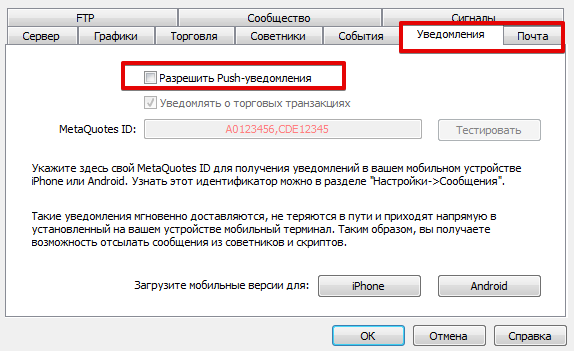
 If you decide to use not only sound notifications but also receive push messages and email notifications, be sure to enable and configure these features in the platform settings. Access the settings through "Service," with the former enabled in the "Notifications" section, and the latter in the "Mail" section.
Alerts, like alarm clocks, allow us to not miss important events and goals that we have personally noted, and this significantly increases the efficiency of stock trading.
And because this functionality is built into the platform, in most cases there is no need to use complex advisors or scripts designed to accomplish these tasks.
As an alternative to signals, you can also use special scripts - http://time-forex.com/skripty

