One-click trading – using the terminal's full capabilities
A novice trader, like a sponge, absorbs irrelevant information, forgetting the most important. 
Indeed, at first, a trader is eager to dive right in and learn the practical side of analysis, which is usually what they do first.
However, in their pursuit of knowledge, newcomers neglect the trading platform's functionality, which leads to traders limiting their actions.
They are unaware that these features, from the very beginning, can solve many problems and challenges they may encounter.
One such feature, which every trader has seen but doesn't fully understand, is One Click Trading.
One Click Trading is an auxiliary feature of the MT4 and MT5 trading terminals that allows you to bypass the standard process of opening a trade with multiple confirmations and execute trades with a single click directly on the chart.
One-click trading use cases
1. Implementation of pipsing and scalping strategies
Pipsing is a trading style or strategy whose target values are several points.
More information about scalping - http://time-forex.com/skalping/pipsovka-1
A characteristic feature of this style, which allows you to profit from minimal price changes, is the incredible precision of the entry point, which typically occurs only when a momentum in one direction or another arises.
Consequently, a scalping trader doesn't have time to call the standard position opening window, as the order execution point can shift significantly.
With scalping, the trader has slightly more time to execute the trade, as the target benchmarks vary significantly. However, when using a scalping strategy on multiple trading assets simultaneously, delaying the standard position opening scheme can lead to you simply missing signals.
2. Implementing strategies on the news
The publication of strong news never goes unnoticed by the market, leading to sharp price surges. However, these surges occur so quickly that they can last only a few seconds.
News Strategy - http://time-forex.com/strategy/torgovlya-na-novostyakh
Therefore, the One-Click Trading function allows you to take advantage of any price surge during news releases.
It's also important to remember that global news triggers activity on multiple currency pairs simultaneously, and the One-Click Trading module allows you to open trades on several pairs simultaneously in seconds.
3. Ideal Locking for Two-Way Grid Trading:
One popular trading approach is to build order grids and trade in both directions simultaneously.
However, this approach has one minor drawback: opening two opposing orders to create a lock using the standard method can result in a large negative lock.
Using this function, you can easily open the lock, resulting in the only difference between the positions being the spread.
4. Setting a stop loss and profit with one click on the chart.
Previously, to set a profit loss and stop loss for your position, you had to either update the order or set these values when opening the position.
By activating this feature, you can drag these orders to the desired points directly on the chart with one click.
How to enable the module. Pros and cons.
One-click trading is a feature available to all traders using MT4 or MT5, regardless of the broker they trade with.
Enabling it is very simple: simply open the auxiliary menu directly on the chart and click "One-click trading."
A window should appear in the upper left corner, displaying two direction buttons for buying and selling, and allowing you to set the trade size in lots.
Incidentally, the first time you open a trade using this module, the platform will ask you to grant permission to fully activate this feature.
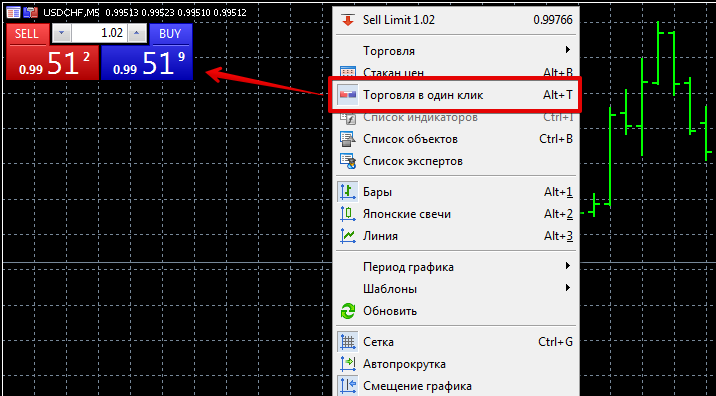 Regarding the disadvantages of One-Click Trading, it's worth noting that you can't set both a stop order and a profit target in points; you have to specify at least a static value in the settings.
While this functionality seems to speed up the trade opening process, you'll also have to drag and drop the stop order and profit target on the chart.
This will also take time. Furthermore, you should be aware that when using the module on news, there's a chance the price will move significantly against you before you can set a stop order, even with a single click.
Download useful scripts - http://time-forex.com/skripty

