Alpari's Trader's Calculator
During trading, almost every novice trader encounters a situation where, while opening a position with the same volume in the same direction with the same stops and profits, but on different currency pairs, you receive dramatically different profits or losses in the deposit currency.

This situation typically leads to an imbalance in trading, because even though a strategy may yield 60 percent winning trades in multi-currency trading, you simply don't cover the loss with a new profitable trade, despite the profit in points being almost equal to or even greater than the stop order.
Thus, a seemingly successful strategy in multi-currency trading systematically drains the trader's deposit. You're probably wondering why this happens.
The fact is that many traders, both experienced and novice, often ignore all the minor nuances when calculating a lot.
Also, many traders who hold a position for more than 24 hours often don't understand why they are charged an additional commission, which varies for each currency pair and can even be accrued rather than debited.
Many people use a trader's calculator to calculate the entire commission, swap, see the pip value for a specific lot, and calculate profit or loss. One of its most convenient features is Alpari's trader calculator, which allows for calculations to be made adjusted for the trading conditions of a particular account type.
Working with the Alpari Trader's Calculator
To get started with the calculator, go to the Alpari website, open the FOREX section, and select "Trader's Calculator." You should see a simple calculator like this:
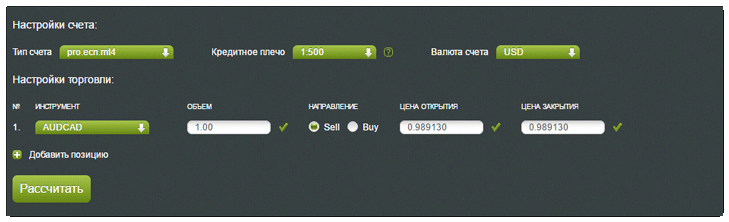
To obtain the necessary information, you'll first need to select your account type. The calculator offers a choice of nine different account types, with fees already taken into account.
Once you've selected your account type, specify the leverageyou have set for your account, as well as the account currency. The calculator can calculate in dollars, euros, and Russian rubles.
After you've set the basic settings, select the instrument (specifically, the currency pair for which you want to calculate) and the volume (trading lot) of the position you want to open. Next, be sure to specify the trade's opening and closing prices (calculate the trade's closing price based on profit or stop loss).
To speed up calculations, you can select the "Add Position" option and calculate five trades simultaneously. Once you've entered all the information, click the "Calculate" button.
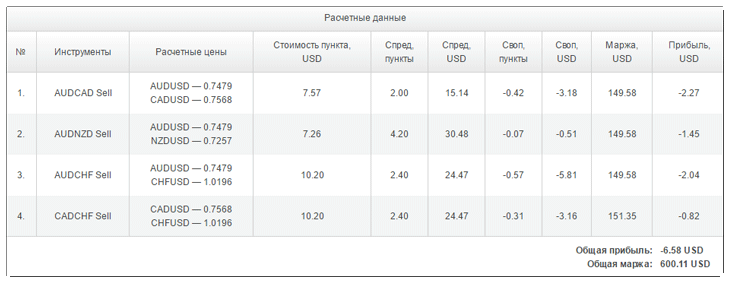
As you can see, the table calculator calculated the pip value for each currency pair in the deposit currency for your lot, indicated the spread in pips and in the deposit currency, the swap amount in pips and in the deposit currency, the margin required to open a position, and the profit in the deposit currency.
In conclusion, I'd like to point out that this indicator will be especially useful for both beginners and professionals trading with Alpari. You can also use this calculator if you trade with another broker, but the trading conditions of Alpari and your broker are the same (as a rule, trading conditions on classic accounts are almost identical everywhere).

