How to optimize an advisor
Unfortunately, there are virtually no trading advisors in the financial markets that can consistently deliver stable results and don't require reconfiguration or optimization.
For many beginners, the concept of optimization may conjure up something complex and incomprehensible. In reality, optimization is simply adjusting parameters to current market conditions.
So, when a trader adjusts a certain indicator on history, he is also engaged in optimization, but it just looks a little different.
Why is it necessary to conduct optimization?
The fact is that the market moves in cycles of sorts and tends to pick up certain paces and maneuvers that have been repeated before.
Thus, many beginners, and even professionals, often encounter a situation where a forgotten draining advisor suddenly begins to bring in huge profits, while the latest development, on the contrary, begins drain the deposit.
While a trader can adjust their strategy weekly based on their observations and historical visualizations, the situation is entirely different with expert advisors. For optimization, a strategy tester is used, which includes a genetic algorithm feature that can significantly speed up the optimization process.
Selecting an optimization model
If you've worked with a strategy tester, you're probably aware that it performs both testing and optimization using one of three models. The first model, which is also the least accurate in both testing and optimization, is "Checkpoints.".
The essence of the model is that at the moment of price formation, data is taken from the nearest time framea. Naturally, due to a lack of data, optimization using this model is simply impossible.
The second model available in the strategy tester is called "Opening Price." Unlike the previous model, it uses significantly more data, as it uses already formed bars. Unfortunately, if your advisor opens positions based on the price and can close within the bar itself, this approach is not for you.
If you are absolutely sure that your advisor opens a position only at the close of the candle, then this model is right for you, and it is very fast.
The third and most accurate model is called "Every Tick." This model uses data from all time frames when processing parameters, ensuring accurate optimization for intrabar trading experts (scalpers and pipsers). This optimization method offers the highest accuracy, but is also the most time-consuming.
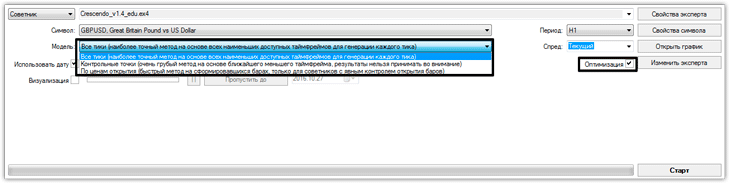
You can select a testing model using the pull-down menu in the strategy tester next to the "Model" form. Also, to start optimization, be sure to check the "Optimization" box.
The correct algorithm for optimizing an advisor
Many beginners who are new to optimization make the huge mistake of optimizing for the current moment. This approach is comparable to playing roulette, as you have no way to check your settings, as they are already tailored to the Forex market.
Instead, professionals use the forward testing method. The essence of this approach is to split the historical period into optimization and testing. So, if the historical period is 100 percent, then the settings are optimized over 709 percent, and the remaining 25 percent are used for forward testing of your resulting settings. This way, you can see how your chosen parameters might perform in the future.
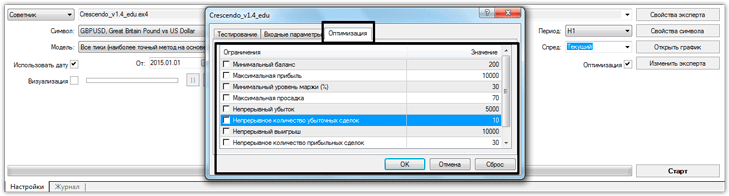
To begin the optimization process, you need to set up a number of criteria to help eliminate unrealistic optimization results. To do this, go to the Expert Advisor settings in the strategy tester and switch to the "Optimization" tab. In this tab, you can set the minimum balance, maximum profit percentage, minimum margin level, maximum drawdown, continuous loss, and continuous number of losing trades, as well as continuous wins and the continuous number of winning trades.
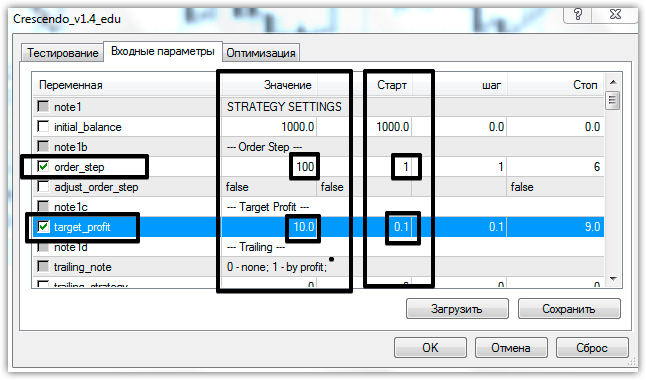
Then go directly to the advisor's input parameters. As you can see, the settings have two columns: Value and Start. For optimization, specify the minimum optimization value for the parameter in the Start row and the maximum in the Value row. Also, be sure to check the box next to the row whose settings will be optimized.
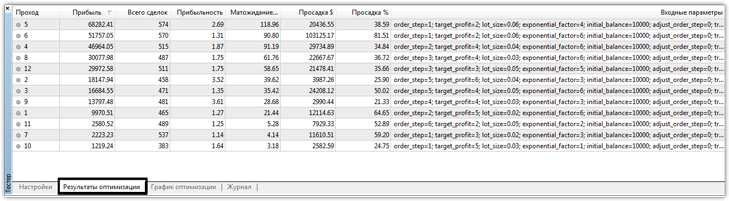
Next, click "OK" and begin optimization. Once the tester starts, it will display information about the time and number of samples. Once optimization is complete, go to the "Optimization Results" section and select a couple of acceptable results.
Once you've selected acceptable parameters, run a forward test on history. If it's satisfactory, you can confidently apply these settings. Remember, the longer the period over which you optimize, the more stable the settings will be. You can download expert advisors in the section http://time-forex.com/sovetniki

