Setting up order opening in MetaTrader
The most popular trading platform used by most traders is MetaTrader, versions 4 or 5.
Its operation is intuitive, with many default settings sufficient for most strategies.
However, there are trading options that require more fine-tuning to make trading more convenient and efficient.
For example, the new order opening settings slightly expand on the standard settings.
In the order settings, you can set parameters such as one-click trading, the volume of trades opened, the asset for which the position will be opened, the deviation size, and so on.
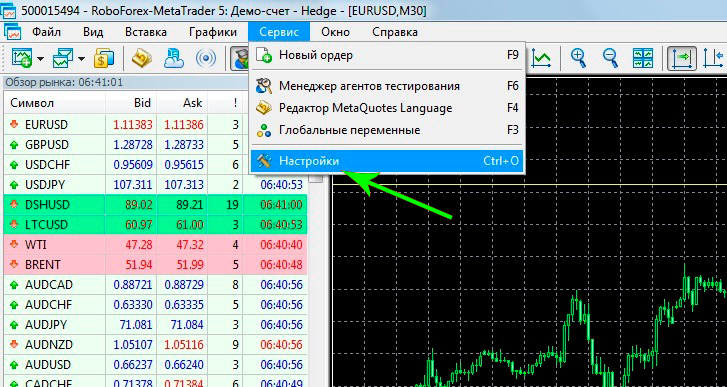
Then, in the window that opens, select the "Trading" tab, where you'll see everything you can change.
The settings themselves are fairly straightforward, but to save you time, I'll briefly explain the customizable indicators:
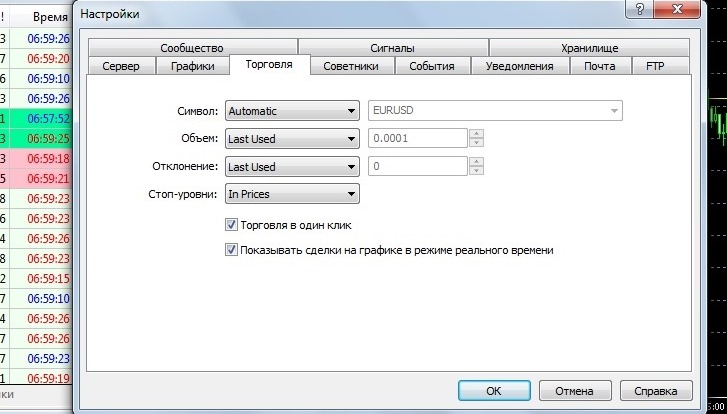
Now, let's take a closer look at what you see in the image above:
Symbol – select the asset you want to trade. Three options are available:
Automatic – select the asset whose chart you currently have open.
Last Used – select the currency pair used in the previous order.
By Default – select the default asset for the new order.
Volume – allows you to set the volume for new trades. There are only two options: a specified volume or the last used volume.
Deviation – a parameter designed to prevent requotes during rapid trend movements. By specifying the deviation size, you agree to open the order even if the price does not match the one you opened the position at.
For example, you open an order to buy euros for dollars at 1.11500, but by the time the order reaches the server, the price has dropped to 1.11505, and you receive a rejection.
By Default – set the deviation size you agree to in pips, preferably no more than a few dozen.
The last option used is if we want orders to open only at the price we saw when opening them.
Stop levels are a rather interesting option to choose how your stop loss and take profit: in points or in the asset price.
One-click trading – allows you to close orders with one click. Enable by checking the box, disable by unchecking it.
Show trades on the chart in real time – if you check this box, your orders will be displayed on the chart as arrows.
Fine-tuning is especially useful when trading strategies that require quick action, such as scalping and pipsing. Pre-setting parameters allows you to save precious time and improve trading efficiency.

