We customize order opening in the MetaTrader 4 platform and make trading more convenient
Most traders trade on the MetaTrader 4 platform for years without using all its capabilities.

But sometimes all it takes is a couple of mouse clicks to make your work more comfortable and easier.
Today we'll talk about what the "Trading" tab is, and more specifically, how to configure some of the necessary parameters.
You can access the settings through the top menu of the trading platform - "service", then from the drop-down menu select "settings" and the corresponding window will open.
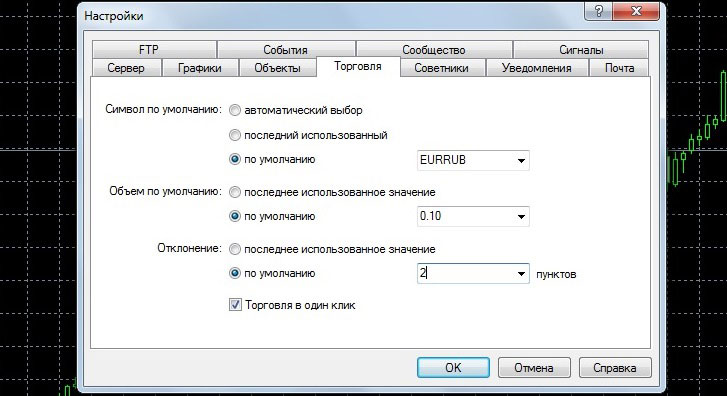
There are not many parameters here, or to be more precise, there are only 4 of them:
Default Symbol – a currency pair or other asset that will be set as the default when opening a new order. You must select from the following options:
Automatic selection – the asset in the new order opening window corresponds to the chart that is currently open.
Last used – the one that was used when opening the previous trade.
By default – set in river mode of your choice, after which, when opening a new order, the asset you selected will always be displayed.
The default volume is a very useful setting, as it allows you to quickly open trades of a specified volume without wasting time changing this parameter each time you open an order.
Deviation is a parameter that specifies the deviation of the order price from the market price if the rate changes during opening.
The higher this indicator, the less likely requotes when opening trades, but the price is less favorable. Typically, this is set to a couple of points.
One-Click Trading – Enabling one-click trading allows you to execute trades in a single action. Acceptance of the disclaimer is required before enabling.
Pre-set trading settings in the MetaTrader 4 trading platform are useful for scalping or pipsing, when every second counts.

