Setting up SMS messages from MetaTrader
Traditionally, trading is perceived as constantly monitoring the trend on a computer screen.
This monitoring allows one to spot when the price will make a sharp jump or reach a certain level on a currency pair's chart.
But in reality, it's not necessary to spend all your time in front of a computer screen; it's enough to record specific price movements and open trades at those moments.
To automate the process of receiving signals, the MetaTrader trading terminal features the "Alerts" feature.
This feature allows you to notify about a specific event with an audible signal or even send a message to an email address.
However, the former requires being at home to hear the audible signal, while the latter requires a working internet connection on your smartphone or iPhone.
It turns out that this isn't difficult at all; it only takes a couple of minutes, and you'll always and everywhere know as soon as the price reaches a specified level.
Setting up notifications about new emails
So, if you've already set up MetaTrader Alerts so that signals received in the terminal are sent to your email address, you can now move on to the email settings themselves.
How to set up alerts - http://time-forex.com/sovet/alerty-metatreyder
This is fairly easy, except for one thing: not all email services allow sending SMS messages about new incoming emails. For example, I couldn't find this feature on gmail.com, and according to support, it simply doesn't exist.
However, mail.ru does have this feature, and you can activate it in a few clicks. To receive SMS, you only need a phone number from a Russian operator (MTS, Megafon, MOTIV, AKOS (Rostelecom) or a card from these operators.
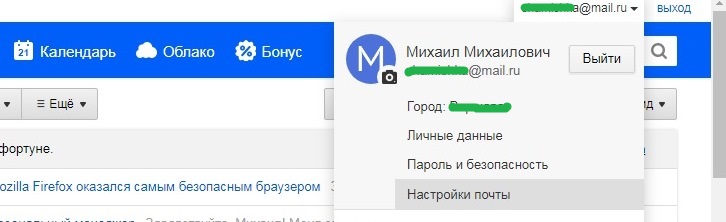
After that, you can proceed to the settings themselves. To do this, open your email inbox on your PC and click on your email address in the upper right corner. Select "Mail Settings" from the drop-down menu:
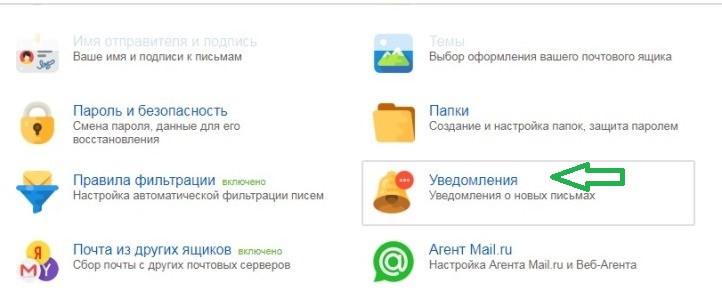
 On the page that opens, go to the “Notifications” folder. Notifications about new emails:
 Then select “SMS Notification Settings” and activate this function on the tab that opens:
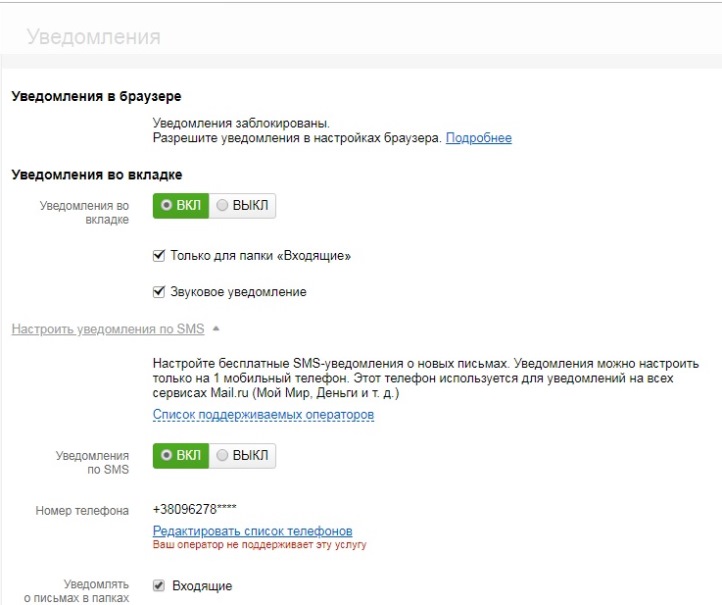
From the additional settings you can select:
- Which folders will be notified about emails sent from? Notify about all incoming emails, or set up a filter and notify only about emails sent from MetaTrader.
- The time when you can send SMS messages - around the clock or during a certain period of time.
- How often – every half hour or every hour? Unfortunately, you can only receive messages once every half hour.
- Your time zone - some previous settings are based on this.
This option is only suitable if you do not have a stable mobile Internet connection. Otherwise, it would be more effective to immediately install a mail agent or a mobile trading terminal.

