Advisor for small deposits - "Squid"
Many beginners, switching from manual to automated trading, often encounter the simple problem of a lack of funds. Of course, most brokers offer cent accounts , and you can try your hand at this with a small risk.
Unfortunately, sometimes things aren't so simple. Sometimes you need to change brokers, losing money on commissions, or the trading conditions on classic accounts are simply much more favorable than on cent accounts.
The "Squid" advisor for small deposits is a unique trend-following advisor that enters a position during large trend movements. The advisor calculates a period using a specific formula, and if the price exceeds it by a certain number of points at any point, it enters a position.
The robot doesn't use risky methods such as position lockingor martingale. For full functionality, you only need $100 on a classic account or $1 on a cent account. As you can see, the EA can be tried by anyone, regardless of income, from schoolchildren to retirees.
Installing the small deposit advisor is very simple. To do this, open the data directory in the MetaTrader 4 trading terminal. Place the advisor downloaded at the end of this article in the "expert" folder, and place the library file in the "Libraries" folder. Then, restart the terminal. Find the advisor with our name in the list of advisors and place it on the screen. A settings window will open where you can change some settings.
The advisor works on the EUR/USD, GBP/USD, AUD/USD, and USD/CHF currency pairs. The working time frame for the EUR/USD pair is M5, and for all other pairs, M15.
Setting up an advisor for small deposits.
Squid has two risk management options. If you want the EA to calculate its lot based on the risk percentage, simply enable true in the Increasing Lot field. The Risk field specifies the risk percentage of the deposit per position. You can also work with a fixed lot. To do this, enter your fixed lot size in the StartingLot field. In the Magic Number field, you can enter a special number so that the EA tracks only its own orders. In the Slip field, you can specify the maximum slippage at which the EA can enter a position. The MaxOpenOrders field controls the maximum number of open positions on a single currency pair.
I decided to run the first test of the robot with the default settings on the EUR/USD pair. The test was conducted from January 1, 2015, to April 30, 2015. The first mini-test result can be seen in the image:
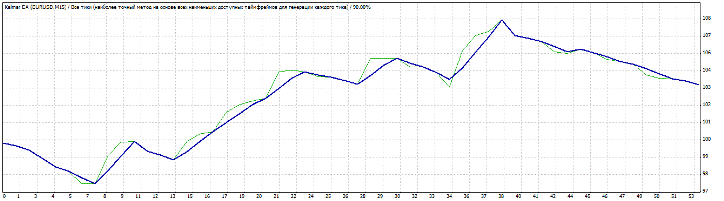
To be honest, I wasn't very impressed with the results. Over four months, the profit was only $3.63, with a drawdown of just over 3%. I decided to disable the automatic lot calculation feature and set a fixed lot size of 0.01. The graph with the results is virtually identical.
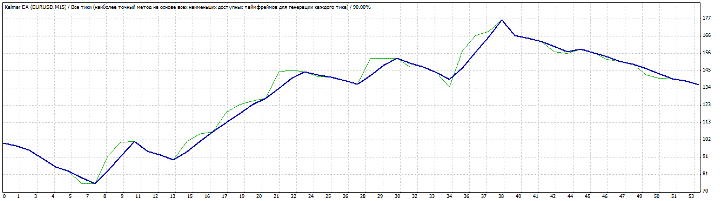
In this scenario, the drawdown increased to 22 percent, but the profit was 36 percent, which is much better. The authors didn't provide us with any optimization settings, so we can only change the money management. Because of these good results, I decided to run a test for the entire 2014 and to this day with a standard lot. You can see the result in the image below:
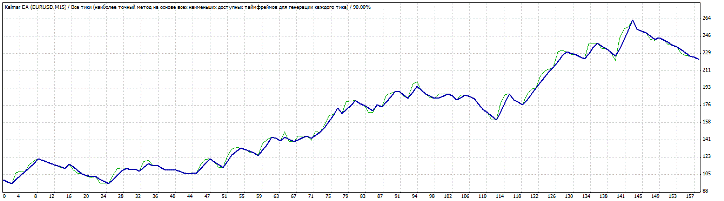
The chart speaks for itself. With a standard lot size of 0.1, the profit over a year and four months was 122%, with a drawdown of only 21%. This result inspired another test with risk management enabled, and I decided to set the risk, like all classics, at 2% of the deposit. You can see the result in the image:
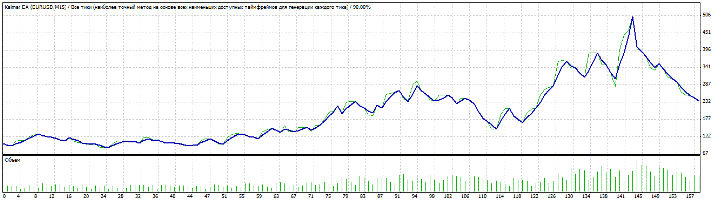
The result was weaker than the previous one, because with the same profit, the drawdown in this test reached 55 percent, which is very critical. After such tests, it's best to use a fixed lot size when working with the advisor. Although the potential income is lower, the curve growth is more stable.
The advisor has proven itself to be excellent and is suitable for trading with a small deposit. Before using it on a live account, be sure to test it on cent accounts; Amarkets and RoboForex.

