Ilan 1.6 Dynamic
Ilan 1.6 Dynamic is probably the most popular trading expert advisor I've encountered on the Forex market in the last seven years.  This robot first appeared in 2007, winning a Forex Expert Advisor competition.
Since then, discussion of the advisor has continued unabated, and new modifications appear every year, more functional and profitable. I've already posted a couple of modifications of this expert advisor on the website.
For example, the SILENT ILAN, OBOS DIVERGENCE, and SWB advisors. All of these advisors, along with hundreds of paid and free ones you know, are simply modifications of the Ilan 1.6 Dynamic advisor.
The essence of the advisor's algorithm is that for each losing position, it opens a new position a specified number of points later with an increased lot size. This algorithm calculates that sooner or later the price will reverse in our favor, and our final order with an increased lot size will be able to cover the losses of the previous orders. This method is actively used in casino roulette and is called martingale. Yes, that's right, this whole saga with Ilans and a bunch of monkeys began in 2007
Installing the Expert Advisor is very simple and takes no more than two minutes. To use the Expert Advisor, download it from the end of the article and place it in the "expert" folder in your terminal's data directory. After restarting the terminal, the Expert Advisor should appear in the list. Then, simply apply the Expert Advisor to the chart.
As I mentioned above, the advisor is based on the martingale principle. As you've probably already realized, using this method requires a fairly large sum of money, as movements of 300-500 points are very common, and a series of losing orders will accumulate until you simply run out of funds. Therefore, I recommend using the advisor on a demo account, where, for example, $10,000 would be equivalent to $100 on a cent account.
Among the EA settings, I'd particularly like to highlight the LotExponent column, which controls the lot multiplication factor for the next position in the event of a losing order. The DefaultPips column controls the number of pips after which the next order will open in the event of a losing position. In the Lots column, you can set the initial lot size for the first position. The EA uses the standard RSI indicator for position entry. It buys when the RSI line is between 0 and 30 and sells when the line is between 70 and 100. This allows you to optimize these levels in the EA settings.
I'll run the first test for the entire year of 2014 on the EUR/USD currency pair. Incidentally, the EA is multi-currency and can be used on any time frame. The results of the first test are shown in the image:
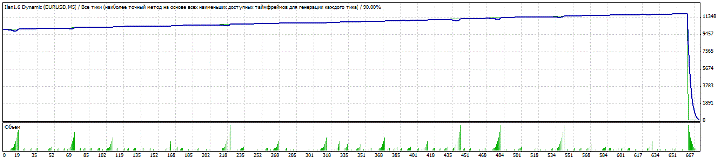
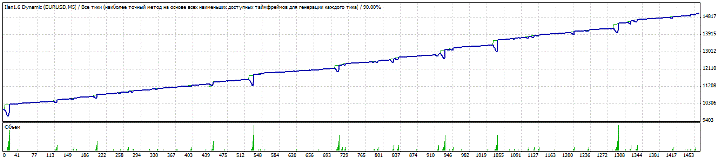
As you can see, a typical situation occurred where the EA simply didn't have enough funds to cover a series of losing positions. After reviewing the settings, I decided to visually adjust the LotExponent parameter from 1.4 to 1.6 without optimization, and also increased the distance between orders to 40 points. You can see the result in the image:
I also decided to run a test with the same settings on the GBP/USD pair. You can see the results in the image:
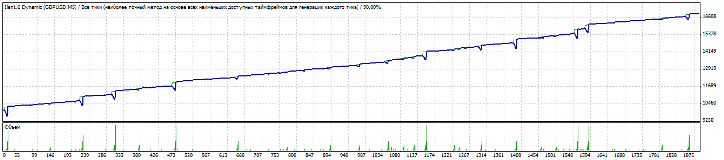
In both cases, the drawdown reached 60 percent, while the profit barely crept over 40 percent. I'd like to point out that I didn't perform any optimization; I just adjusted the settings based on my experience. Overall, the EA can show a decent profit, but you should understand that it can drain your account at any time, so I recommend withdrawing your profits at the first opportunity. Thank you for your attention, and may the trend continue, traders!
The advisor works great on terminals of traders such as Amarkets and Roboforex.

