Advisor Money STANOK ver 2
Money STANOK is a unique development by a Russian trader based on simple trading principles.  The expert advisor was created in 2012 and sold for $150. However, after some time, the author began actively distributing it through an affiliate program, which quickly brought it to various forums, where it began to be publicly discussed.
Why did I say the expert advisor is based on simple principles? Because what you're looking at is a typical martingale, with a moving average as the filter for positions.
Initially, the author marketed the expert advisor for trading the GBP/USD currency pair on a five-minute time frame, but after some time, the expert advisor began to be used on various currency pairs. The question is, why did the author start distributing the expert advisor through affiliate programs? The answer is very simple.
The author managed to optimize and reconfigure the classic martingale so well that it opened dozens of positions per day, allowing him to earn significant profits from the affiliate program. However, as you know, it only takes one person to lose their hard-earned money, and the expert advisor becomes publicly available that same day and is subject to our review.
To get started, you need to install the Expert Advisor on your MT4 trading terminal. To do this, download the archive containing the Expert Advisor and indicator. Launch your terminal, open the data folder, and place the indicator in the "indicators" folder, and the Expert Advisor in the "expert" folder. After restarting the terminal, go to the list of experts and drag Money STANOK onto the GBP/USD chart. You'll see a settings window, which we'll discuss below:
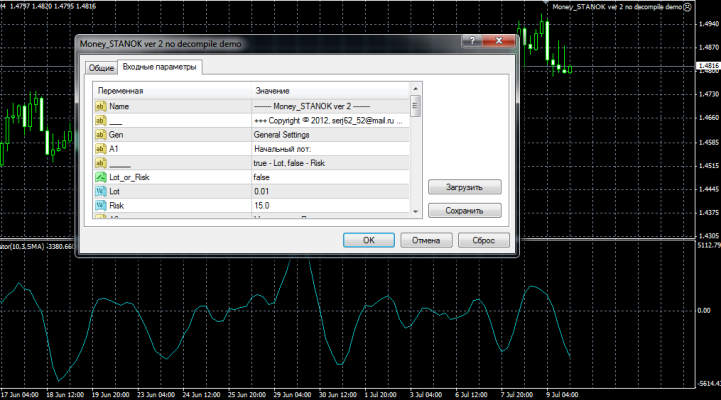
For some reason, the author of the Money STANOK expert advisor didn't even include a description of the settings in his instructions. But we're smart folks, and if he says "martingale," we'll figure it out. So, if you set "Lot or Risk" to "true," the expert advisor will trade with the standard lot specified in the Lot line.
If you set this to false, the EA will calculate the initial lot based on the risk you specify in the Risk field. In the lotMultiplacator field, you can set the multiplier for the next lot when the martingale is triggered.
In the Step line, you can change the distance between orders in points, and in the Maximum Trades line, you can set the maximum number of simultaneously open orders. All other expert advisor settings are self-explanatory, so you shouldn't have any difficulty setting it up.
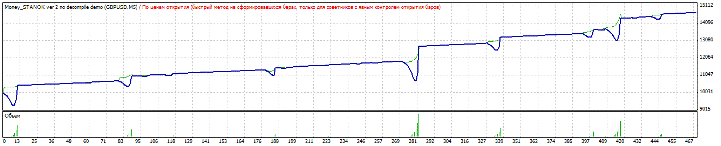
When testing the expert advisor with the author's settings, it showed good results. The first test was conducted on the GBP/USD currency pair on a five-minute time frame. The test period was from January 1, 2015, to June 20, 2015. The test result with the default settings is shown in the image below:
I decided to conduct a second test on the EUR/USD currency pair. In the settings, I changed the order step to 30 pips. The test results for the same period are shown in the image below:
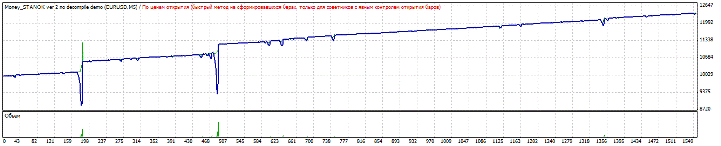
Overall, based on the testing results, I can say it's high-risk, but the profits are also immediate. We'll be testing the expert advisor on our server in the future, so be sure to check out the Expert Advisor Test. Thank you for your attention, and good luck!

