Advisor Traffic Light
The use of moving averages is extremely popular among traders; moreover, this simple tool has found its place in hundreds of different trading strategies and Forex advisors based on them.

However, to this day, there's no definitive answer as to the optimal moving average period.
Increasing the value results in a partial signal lag and a complete disregard for short-term trends, while using small values completely ignores global trends, resulting in a huge number of false signals in Forex trading.
However, the author of the "Traffic Light" advisor took a completely different approach, managing to build an algorithm based on a moving average channel.
In addition to the channel itself, the advisor uses three other moving averages with different periods, allowing the robot to evaluate medium-, long-, and short-term trends.
The Traffic Light Advisor is a fully automated trading expert, based on the trend a strategy called "Traffic Light", which in turn is an example of the harmonious use of several moving averages simultaneously.
The strategy itself, like the advisor, is not picky about a specific time frame, but at the same time, the effectiveness of trend indicators truly manifests itself on higher time frames, namely from hourly and above.
The "Traffic Light" robot can be used on absolutely all types of assets, since the trend phase is inherent to all currency pairs, stocks, and indices, making the robot multi-currency.
Installing the advisor
The "Traffic Light" advisor became publicly available in 2016, when its author publicly posted his creation in the official MT4 library, accepting comments and making edits to improve the robot.
Therefore, the expert can now be installed in two ways: using the standard method through the data directory, or through the library directly in MT4 itself.
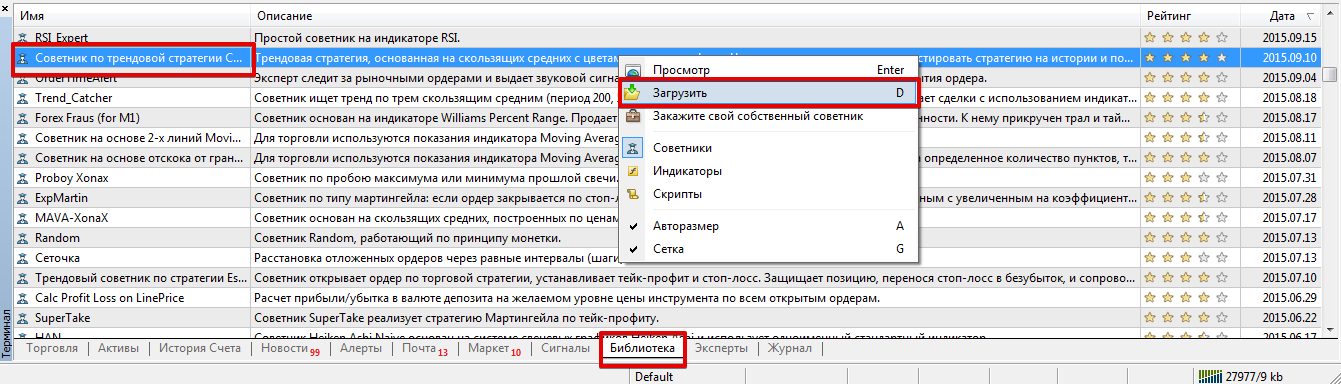
To install via the library, launch your trading terminal and go to the "Terminal" panel. Then, go to the "Library" tab and use the simple sorting feature to display only Expert Advisors.
Find the robot's name in the list and, as shown in the image, upload the file using the additional menu.
If installing via the library caused any difficulties, you can install the Expert Advisor using the standard installation method.
To do this, you'll need to download the robot file at the end of the article and then copy it to the appropriate data directory folder, as shown in the article at http://time-forex.com/praktika/ustanovka-indikatora-ili-sovetnika.
After updating the trading terminal in the "Navigator" panel or restarting it, the Svetofor Expert Advisor will appear in the list of robots. To start trading, simply drag the robot's name onto the hourly or higher chart of the currency pair.
Trading Strategy. Settings.
The Expert Advisor is based on the "Svetofor" indicator strategy, which is built entirely on moving averages.
Initially, the robot determines the trend direction using the moving average channel, then waits for three moving averages with different periods to line up one after another.
This signal indicates a strong trend, as the short-term, medium-term, and long-term trends are all pointing in the same direction. The advisor does not use martingale, but clearly sets stop orders and profits for positions.
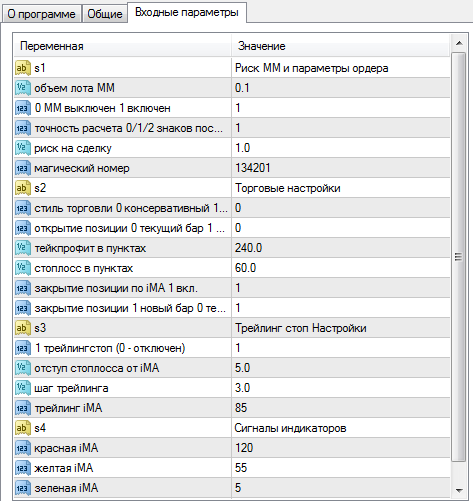
The "Traffic Light" EA contains numerous variables that allow you to fully customize its algorithm and perform extensive optimization.
For example, in the "Red iMA," "Yellow iMA," "Green iMA," and "Blue iMA" lines, you can change the periods of the four moving averages that form the basis of the trading strategy.
The EA supports two trading lot calculation options. To use dynamic calculation, you must specify the percentage you are willing to risk per position in the "Risk per Trade" line.
You can also change the stop loss and profit in the corresponding lines. The EA also features trailing stop based on the moving average.
Robot Testing:
It's worth noting that the settings are clearly outdated as of early 2018. As an experiment, we decided to conduct a pilot test for 2017 with the default settings on an hourly chart of the EUR/USD currency pair.
The results are shown in the image below:
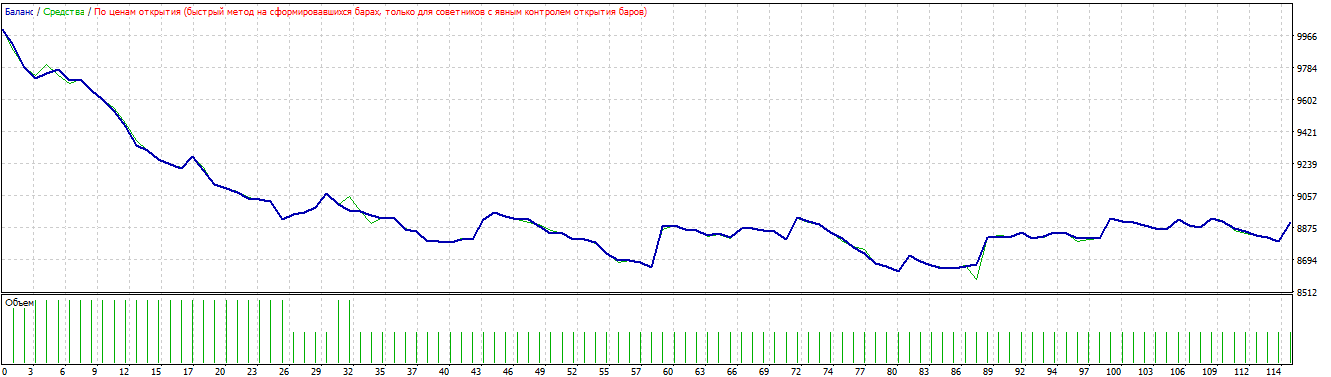
As you can see, the test results with the outdated settings were more than expected.
Therefore, a simple optimization of the key parameters was performed, followed by a retest. The test results after optimization are below:
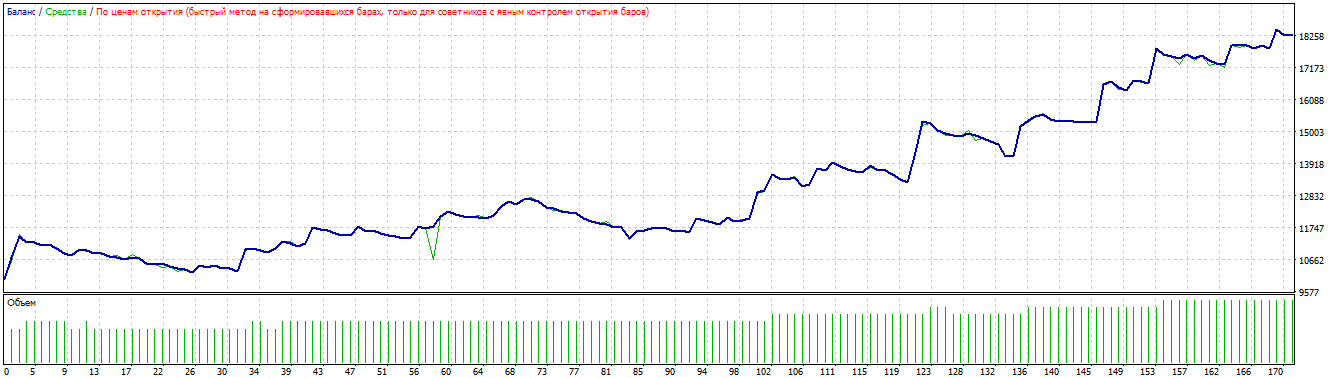
In conclusion, it's worth noting that the "Traffic Light" advisor is a conservative trend-following robot that offers enormous potential and can be successfully applied to accounts with small capital.
Download the "Traffic Light" advisor.

