Trend Scraper – scrape profits according to the trend
A trend is a gold mine for every trader. It's during periods of trending movements in the most  popular assets that traders, renowned hedge funds, and banking institutions experience off-the-charts profits.
A strong trend is extremely rare in today's reality, but even the slightest hint of one signifies significant profits.
Trend Scraper is a modern expert advisor, an automated trading tool designed entirely for trading trending markets.
It is based on signals based on simple trading tactics using trend indicators, namely the moving average.
Installing Trend Scraper
Before reviewing the Expert Advisor, you must install it on the MT4 trading platform. To do this, access your platform's root directory via the File menu in the running program and open the data directory.
In the opened directory, find the folder named "Expert" and place the advisor you downloaded from our website into it. After you've placed the file, go to the "Navigator" panel and update the installed file.
You can also simply restart the terminal, after which the Trend Scraper advisor will appear in the list of experts. After the update, simply drag the Trend Scraper onto the currency pair chart and enable trading. You'll see the following settings window, which we'll discuss in more detail below:
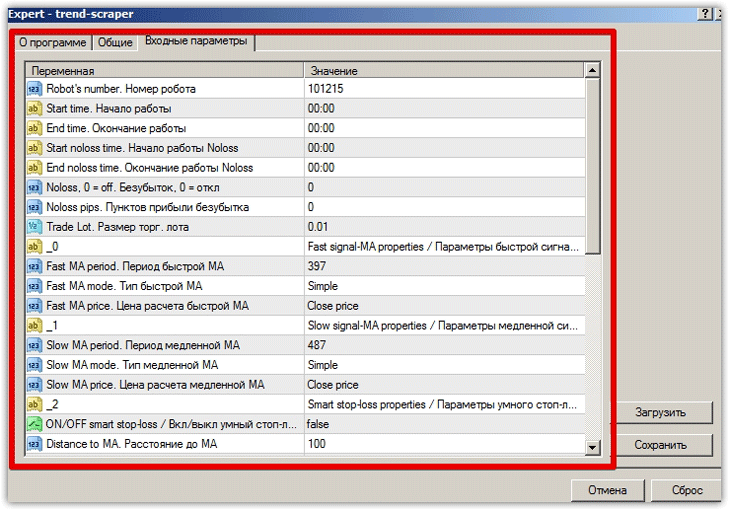
Advisor settings
The seller's page features a video of the robot allegedly trading profitably in the strategy tester. Based on the video, it appears the EA operates using three moving averages, one of which serves as a filter, while the other two, when crossed, provide an entry signal.
Now that we've covered the strategy, let's move on to the Trend Scraper settings.
The first thing you'll encounter when entering the advisor settings is a time filter for when the advisor should start and when it shouldn't. The Star Time line specifies the start time, and the End Time line specifies the end time.
The Star Noloss and End Noloss settings operate using a similar time limitation algorithm. In the Noloss line, you can enable the EA to breakeven, but in the Noloss Pips line, you must specify a specific number of pips of profit after which the EA will move the stop order.
In addition to capital management and filter settings, the developers have also broken down the ability to configure fast and slow moving averages.
So, in the Fast MA period line, the period of the fast moving average is set.
In the Fast MA Mode line, we indicate the type of moving average, namely exponential, linear, and so on.
The Fast MA Price line specifies the prices at which the moving average is calculated, namely, closed candles, open candles, average candles, and so on.
The settings also contain a similar block of settings for the slow moving average, the difference in the settings is only in the name of the variables, namely, instead of Fast, it says Slow.
Additionally, you can enable or disable a smart stop order, which is calculated based on the offset from a moving average, the settings of which you can change. These are the main settings that need to be adjusted or optimized.
Testing the Trend Scraper Expert Advisor
According to the author, this trend-following advisor provides a rather weak profit, so it is recommended to use it on 4-6 currency pairs simultaneously, with a recommended deposit of $300 in the account.
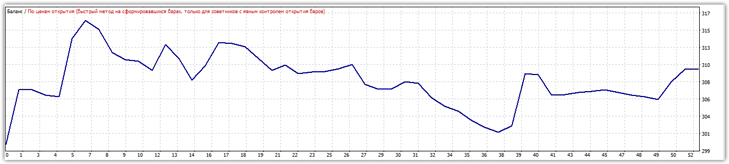
To understand whether it's worth the risk with various currency pairs, we'll conduct a test for 2015 using default settings for two main instruments. Here are the results of the test on the EUR/USD currency pair:
The result of a similar test on the GBP/USD currency pair:
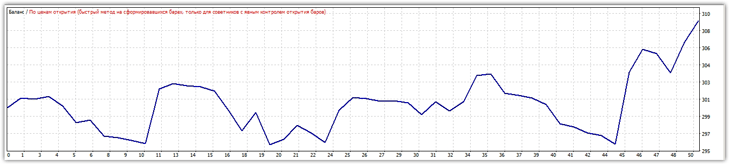
Based on testing results, in both cases, the advisor was able to earn only $10 on each currency pair over one year, with drawdowns reaching 3-5 percent. In addition to currency pairs, the author recommends using the advisor on CFDs on major indices and stocks.
In conclusion, I'd like to point out that Trend Scraper is no good as a $177 advisor, as its 3% return on deposit is significantly lower than the safer bank option, and if you combine 5 different currency pairs, the risks will be significantly higher than the potential income.
Therefore, we do not recommend purchasing this advisor anywhere, especially since Trend Scraper was unable to show the required profit even in the strategy tester, let alone in real trading.

