What is the Taxes tab for in the Metatrader trading platform?
When working with the Metatrader trading platform, you sometimes don't notice the emergence of new features in this software.

This time, too, not all traders paid attention to the "Taxes" tab that appeared in the MetaTrader 4 trading platform.
This new feature lets you know in advance how much tax you'll have to pay on your profits from Forex trading.
The Taxes tab is not always displayed by default; sometimes you need to hover your mouse over the trading area (trade tab) and right-click to make it appear.
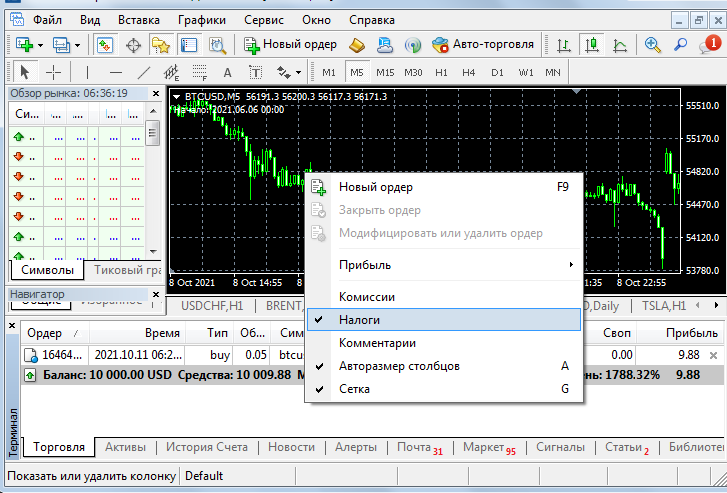 After this, check the box next to the "Taxes" label. As a result, in addition to the usual columns in the trading area, you will also have a column that will display the accrued taxes.
In fact, your broker is responsible for enabling this function; it is they who configure its operation and set the tax percentage.
Technically, it looks like this: you are a resident of the Russian Federation and your profits are taxed at 13%; the broker sets this parameter in your account settings.
Learn more about forex taxation at https://time-forex.com/info/nalogi-s-zarabotka-na-forks
Once you've opened an order and started receiving profit, the accrued tax will be calculated automatically. The tax itself will only be debited when you withdraw this profit from the broker's account to your personal bank account.
That is, you have accrued $200 in profit on your order, which means 200*13%/100 = $26 in tax. If you close the order with this profit and try to withdraw it, then instead of $200, $176 will be available for withdrawal.
But why does some trading platforms still show 0 in the “Taxes” column even when making a profit?
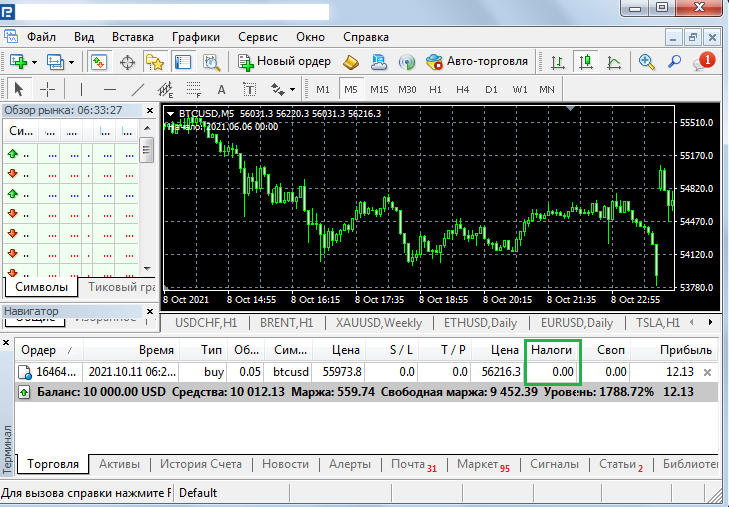
There is no need to be surprised, there are several possible answers:
The broker does not arbitrarily configure this function in your trading account, but you will still have to pay taxes when withdrawing funds.
The broker is not subject to Russian jurisdiction and does not charge taxes on its residents. You will be paid the full amount of your profit, and you will pay taxes yourself at your discretion. Examples of such brokers: https://time-forex.com/spisok-brokerov
In this case, on the “Trade” tab, the “Taxes” column will always display a zero value, so this column can be hidden.
It can be said that calculating taxes in the trading platform has no practical meaning; it is more of an informational amount, since the final profit can only be calculated at the end of the month, taking into account all open transactions and paid commissions.

