BUY SELL MAGIC – a complex indicator with simple signals
Developing a trading strategy is one of the most painstaking processes every trader goes through.  The main problem is that in today's unpredictable markets, it's virtually impossible to use just one specific analysis tool.
That's why we encounter trading strategies online that are heavily loaded with various indicators and that solve specific problems.
In order to avoid additional overload and the creation of confusing and varied trading conditions, traders began combining several indicators into one large whole, which allowed them to cram complex trading strategies into a single arrow indicator.
The BUY SELL MAGIC indicator is a completely foreign product and is actively sold to this day on various trading platforms.
The indicator is usually used on higher time frames, namely from the thirty-minute to the daily chart.
Although the author claims in his instructions that this tool is suitable for scalpingon five-minute and one-minute charts, the experience of various traders and a sea of reviews suggest otherwise.
The indicator is multi-currency, which means you can apply it to any currency pair or CFD.
Installation BUY SELL MAGIC
BUY SELL MAGIC is more than just an interesting indicator; it's a complete trading strategy consisting of two components and a template. To use the tool, you need to install it on the MT4 trading platform. To do this, download the archive containing the template and indicators.
Next, enter the main directory of your terminal through the file menu by clicking on the data directory line.
In the opened directory, find the "indicators" folder and paste the downloaded indicators into it. Also, find the "Template" folder and paste our template there. After the initial installation, open the "Navigator" panel in the trading terminal and update the components.
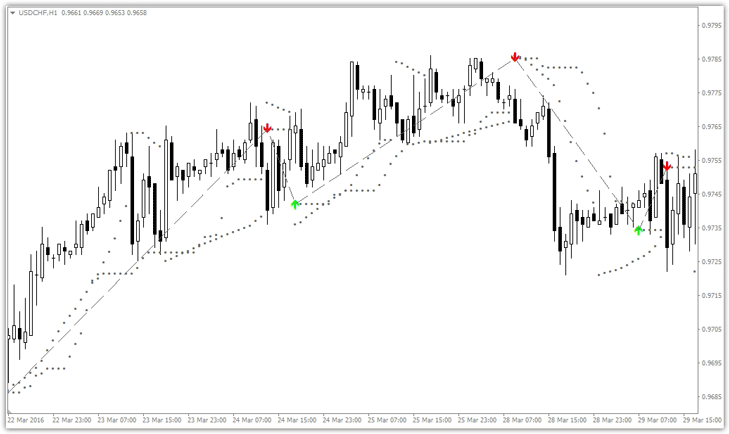
After the update, you can safely run the template. To do this, right-click on the chart, open the additional menu, and select BUY SELL MAGIC from the template list. You'll see a chart like this:
BUY SELL MAGIC component settings
If you look at the number of indicators displayed on the chart, you'll notice there are two of them: Indicator 01 and Indicator 02. The first indicator is a standard Parabolic SAR, with settings that allow you to change the step and maximum. The second indicator is a proprietary one that draws entry arrows and also indicates a stop order.
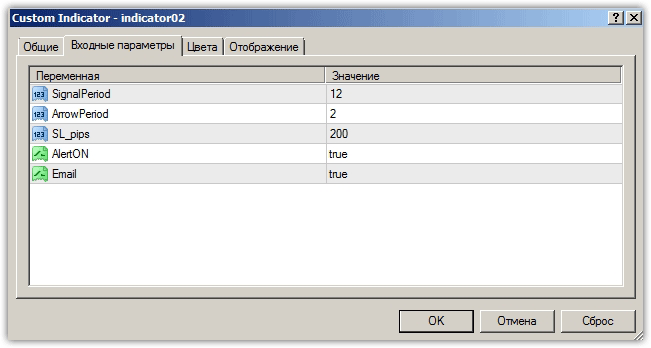
The SignalPeriod line specifies the indicator period. It's important to understand that setting the period too low will result in a greater number of signals, but at the expense of their quality. Increasing the indicator period significantly reduces the number of signals, but they become more accurate and meaningful.
In the AlertON line, you can enable a sound alert when a signal appears, and in the Email line, you can enable sending a message about receiving a signal to your email.
The SL_Pips line specifies the number of points that are added to the Hight/Low of the candle to calculate the stop order; the value is for five-digit quotes
Indicator signals
Trading according to the strategy boils down to entering the market according to the arrows.
Buy signal:
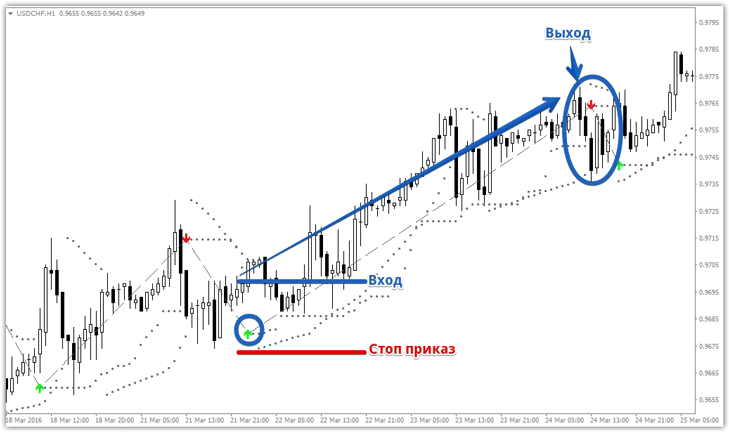
1. The indicator draws a green arrow pointing up.
Enter a position only on a closed bar. It's crucial to set a stop loss as indicated by the sound alert in the additional window. You can also set a stop loss at the Parabolic SAR indicator dots. Exit the position when an arrow appears in the opposite direction.
Sell signal:
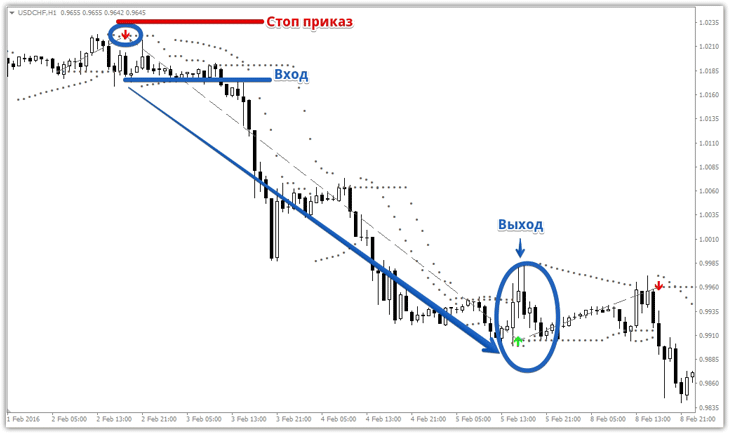
1. The indicator draws a red arrow pointing up.
Enter a position only on a closed bar. It's crucial to set a stop loss as indicated by the sound alert in the additional window. You can also set a stop loss at the Parabolic SAR indicator dots. Exit the position when an arrow appears in the opposite direction.
In conclusion, it's worth noting that the BUY SELL MAGIC indicator has proven itself not only in the Forex market, but is also actively used in binary options trading with expiration times of an hour or more.

