Breakout Indicator – Trade on a Breakout of the Overnight Flat
It's no secret to many traders that during the night, specifically during the Asian trading session, activity in major currency pairs  significantly decreases.
Firstly, this is due to the fact that in Europe and America it is night time, so the main investors do not conduct their trading.
Secondly, during the Asian trading session, the Japanese yen is more active due to the regional location of the exchange, while the dollar and euro fade into the background.
Thus, it is at night that we can observe a rather interesting picture, when the price moves in a narrow range, which, according to all technical analysis signs, resembles a flat.
The Breakout indicator is a technical analysis tool that displays breakout levels. It can be used on any time frame or chart, as the levels are fully tied to hourly timeframes, specifically the Asian trading session.
It's worth noting that the indicator has flexible settings that allow for significant optimization of the tool.
Installing the Breakout Indicator
To use the Breakout indicator, you need to install it on the MT4 trading platform. To do this, download the indicator from the end of this article and place it in the data directory folder named indicators.
To access your trading terminal's data directory, open the File menu in the running trading platform and select Data Directory. After you've moved the indicator to the appropriate folder, you'll need to perform an update.
To do this, you have two options: restart the trading terminal or manually update the navigator panel. After restarting MT4, the indicator should appear in the list of custom indicators.
Simply drag it onto the chart and leave everything as default. You should end up with a chart like this:
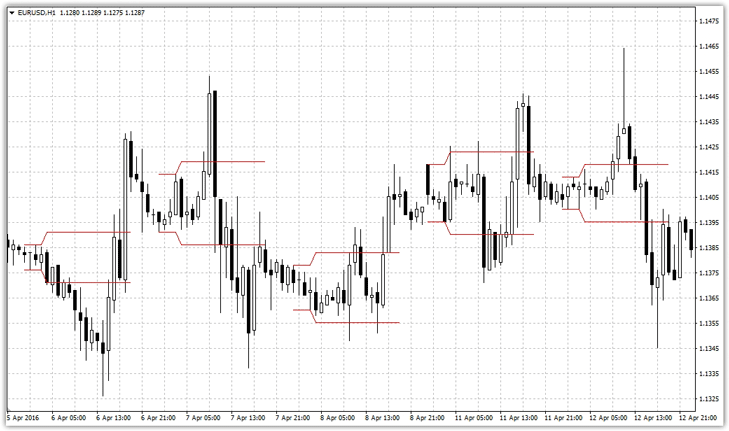
Breakout indicator settings
It's important to remember that we may be located in different regions, and our brokers may have significantly different terminal times and time zones. Therefore, it's important to be more vigilant with the indicator settings to avoid seeing daytime flat zones instead of overnight ones.
So, in the LocalTimeZone and DestTimeZone lines, time zones are specified, and in the PipsforEntry line, the number of points of indentation from the night flat when constructing the horizontal levels of the indicator is specified.
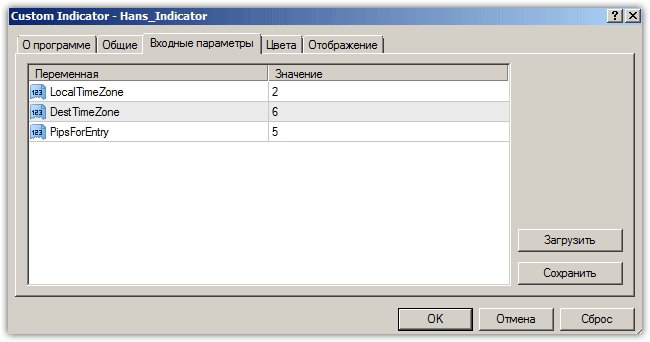
Breakout Indicator Signals and Strategy Options
As mentioned at the very beginning, the Breakout indicator identifies an overnight flat zone with defined boundaries. Naturally, the strategy itself is built around breaking through these levels.
There are two options for using this indicator: trading with pending orders or trading on the market. If you choose to trade with pending orders, place a buy stopand stop pending order at the lower boundary.
The stop order should be calculated based on half the overnight flat range. However, don't confuse placing a stop order at the middle of the indicator's range, instead calculating the number of points from the entry point. See the example below:
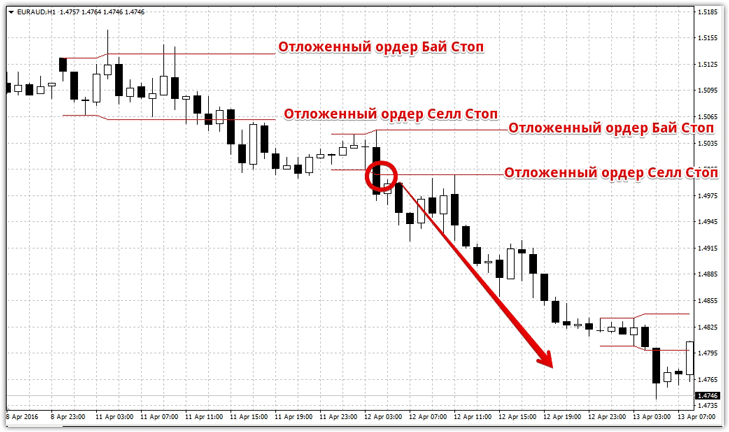
If you don't want to work with pending orders, then the principle of working with the indicator comes down to opening a buy position when the upper limit is broken, and opening a sell position when the lower limit is broken.
In conclusion, I'd like to note that the Breakout indicator provides quite interesting and strong breakout signals. However, it's important to understand that this indicator alone is not sufficient for making trading decisions, so it's best used in conjunction with other indicators that will filter out false signals.
By the way, if you enter a position only after a candle has formed beyond one of the boundaries, you will filter out a large number of false signals, so even such a simple filter will allow you to use Breakout more effectively.

