Trend channel indicator.
A fairly simple script that allows for automatic construction, and the word 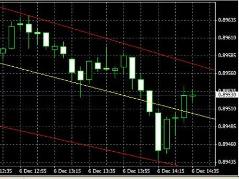 "simple" is not a disadvantage of this tool, but only refers to its ease of use.
The trend channel indicator allows you to quickly and easily plot a price channel on the desired time frame without any additional settings. To get started, simply download and install the script in your trading terminal
Download the trend channel indicator.
After you install and launch this technical analysis tool, three lines will appear on your chart.
The support line is the first from the bottom and runs along significant price lows.
The resistance line is the topmost line and marks significant highs on the Forex trading timeframe.
The center line is a trading aid; in the photo, it's yellow and runs down the middle.

The indicator has only three settings: the duration of the time period over which the analysis is carried out, "Period", and the colors of the trend lines - sup_line - support and resistance lines, main_line - middle line.
The main advantage of the trend channel indicator is the ability to dynamically redraw the channel, taking into account changes in the forex market situation.
A trading strategy using the trend channel indicator is familiar to almost any forex trader and is also distinguished by the simplicity of receiving entry signals.
Long trades - a trend reversal at the support line and an upward movement.
Short trades - a reversal at the resistance line and a gradual decrease in price.
Closing trades - the recommended option is at the middle line, more profitable and risky at the opposite border of the trend channel.
This indicator can also be used in almost any forex strategy.

