Info indicator for intraday trading
A key problem for newcomers to the market is a complete lack of understanding of what they're doing, why they're opening a trade, and the underlying principles behind certain forex indicators. 
In fact, all market analysis is based on identifying and implementing patterns.
One such fundamental pattern is price activity at specific times of day, as well as the formation of strong levels and ranges by traders.
Trading sessions and price behavior during each session can form an excellent foundation for building an intraday strategy.
In today's article, we'll look at a script from the category of forex indicators for intraday trading, which allows us to visualize a particular trading session on a chart.
This is done based on the minimums and maximums during a particular trading session.
Session HiLo v4 is an indispensable tool for virtually all day traders. Moreover, the levels it creates can serve as an excellent foundation for creating various strategies based on breakouts and rollbacks.
The indicator itself is universal and can be successfully used on all currency pairs and time frames where a direct correlation can be found between price activity and the trading session.
Setting up the Session HiLo indicator
Session HiLo is a time-tested indicator that has about five different modifications and has been used by traders around the world since 2016.
However, despite the fact that it is not a commercial product and is distributed completely free of charge, it was still not placed in the official MT4 developers library.
Thus, it can only be used after the standard installation scheme via the data directory.
To install the info indicator for intraday trading, you will need to obtain the tool file, which can be downloaded at the end of the article.
Then, in your open terminal, go to the File menu in the upper left corner and select "Open Data Folder" from the list of options that appears. Next, find the folder named "Indicators" in the list and move the downloaded Session HiLo file into it.
Once the installation is complete, be sure to restart the trading terminal or refresh it in the navigator panel, otherwise Session HiLo will not appear in the list of custom indicators.
To use it, drag the name onto the chart of any time frame for the asset you're interested in. Here's what the indicator looks like:
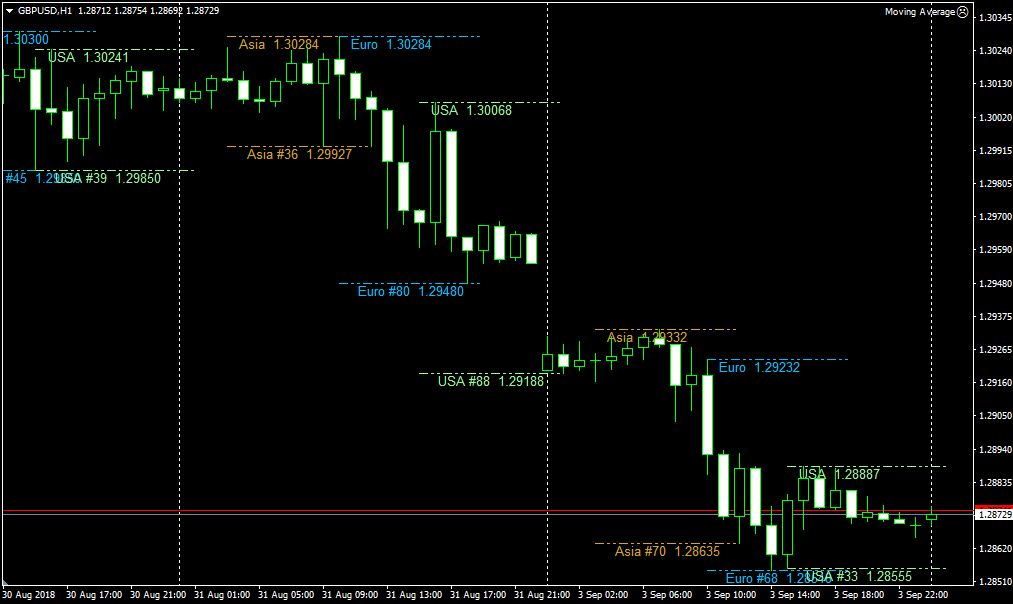
Practical Application. Session HiLo Settings
is primarily an informational indicator, as it primarily allows you to see the trading session and the price range during one of them.
Consequently, the indicator allows you to select more advantageous trading opportunities based on a particular trading session.
As for its signaling function, the drawn boundaries actually represent strong support and resistance levels, which are repeatedly tested and broken when traders become active in another region.
Consequently, the most popular approach is trading on breakouts of the drawn boundaries. For example, a breakout of a range formed during the Asian trading session is called a "London Breakout."
Traders can also use the ranges of any other trading session if a certain pattern is present for the selected asset.
Therefore, a buy position should be opened if the upper boundary of the range is broken upwards, and a sell position should be opened if the lower boundary of the range is broken downwards. For convenience, you can use pending ordersby placing them at the boundaries.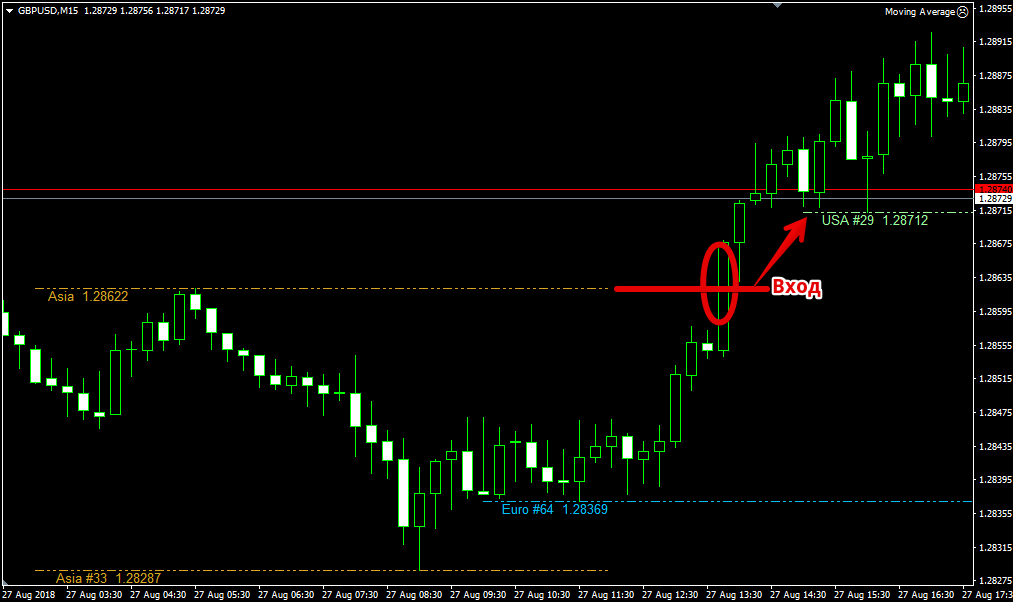
The indicator has very flexible settings that allow you to customize trading session times and even disable unused ones.
For example, in the ShowAsianSession, ShowEuroSession, and ShowUSASession lines, you can disable the display of the Asian, European, and American trading sessions.
The Start and End variables allow you to set the start and end times for each trading session, and the ShowAsiaZoneFilled variable enables range filling.
In conclusion, it's worth noting that Session HiLo is an extremely popular info indicator for intraday trading, as the trading session ranges it draws can be used to create dozens of different breakout trading systems.

