Days of the week indicator
Trading in financial markets, and especially the Forex market, is based in one way or another on the search patterns.
The unique appearance of a candle, the intersection of indicator lines, the breakout of a level, the opening of a position at a certain time of day, and so on – all this is the development of discovered patterns.
One of the most obvious patterns is the movement of an asset's price at a certain time of day, day, or even month.
Traders have added the concept of seasonality to some assets, as the price abnormally increases its activity during certain months of the year.
However, searching for such patterns takes a lot of effort, so traders resort to auxiliary indicators that create markings on the chart.
With their help, you can see not only the days of the week on any selected time frame, but also the minimum and maximum levels of the day for use in breakout strategies.
The indicator itself is universal, so you can apply it to absolutely all trading assets available in MT4, as well as to all time frames.
Installing the Trade Day indicator
The Trade Day indicator is a custom development and is popular among more experienced Forex market participants.
Since this is an auxiliary and specific tool, the developers did not include it in the trading terminal by default. To use it, download the indicator file at the end of the article and then install it on your trading platform.
Installing the Trade Day indicator follows a standard procedure and is no different from installing any other custom tool. You'll need to copy the downloaded indicator file to the appropriate folder in the terminal's data directory.
For detailed information on installing technical indicators, advisors, and scripts, please follow the link http://time-forex.com/praktika/ustanovka-indikatora-ili-sovetnika.
After installing the indicator and updating the trading terminal in the Navigator panel or restarting the trading platform, Trade Day will appear in the list of custom indicators. To start using it, simply drag the instrument name onto the currency pair chart.
The principle of using the indicator. Signals
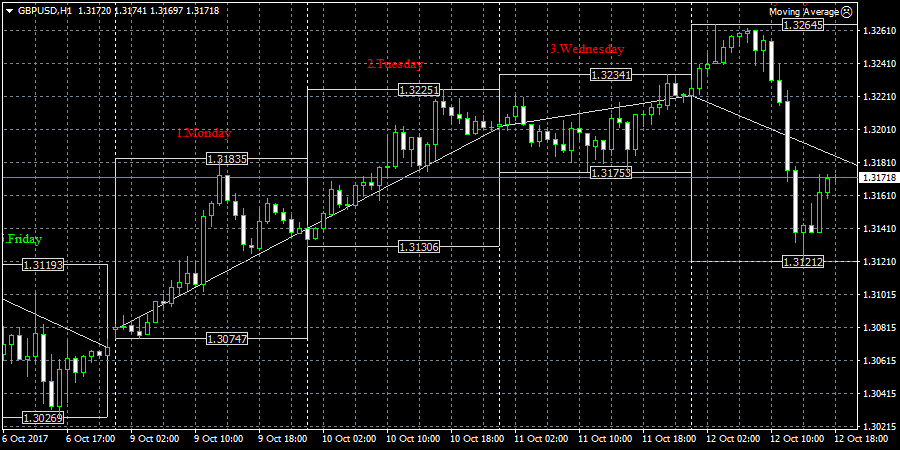
Once you apply the tool to the chart, you will see rectangular areas on the chart that are drawn from the minimum to the maximum of the day.
Directly above the highlighted areas are the names of the days of the week in English, as well as the minimum and maximum prices of the day.
The Trade Day indicator can be used both as an assistant, for visually studying the activity of values on certain days of the week in historical and real-time mode, and as a signal indicator.
When it comes to signaling, traders often use the previous day's highs and lows as support and resistance levels, and when those levels are broken, a position will be opened.
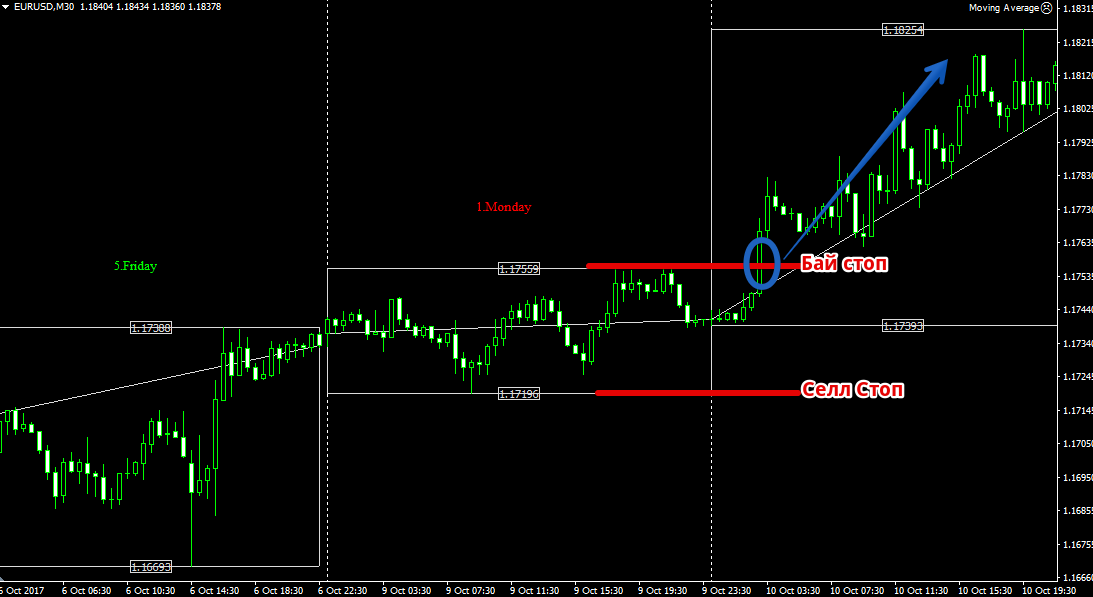
For ease of working with breakout strategies, pending orders Buy Stop and Sell stop.
Thus, a pending buy stop order should be placed at the day's high (upper box line), and a pending sell stop order should be placed at the day's low (lower box line). Example:
In conclusion, it's worth noting that the Trade Day indicator is an excellent assistant that makes historical analysis as easy as possible.
It's also worth remembering that Trade Day is also an excellent signaling tool and can be useful for a large number of traders who use breakout strategies based on the daily high and low.
Download the Days of the Week Indicator

