Futures in the MetaTrader terminal
For the vast majority of forex traders, the MetaTrader trading platform is  the only tool they use for trading. It so happens that almost all brokers in the forex market exclusively provide access to this platform, as it combines two key criteria: quality and a competitive license fee.
Many beginners don't even realize that MT4 and MT5 can be used not only for trading currencies and metals, but also for the well-known futures and stocks.
The program doesn't care which asset the trader is trading; all available instruments depend solely on the broker you choose. If the broker doesn't offer futures trading, you won't see them in the list of instruments, which also applies to stocks and indices. Therefore, if you want to trade futures, I recommend carefully reviewing the broker's trading conditions.
Let me remind you that a futures contract is a financial instrument in which, when you, as a trader, purchase a specific asset, you agree with the owner of that asset to repurchase a pre-agreed amount at the price agreed upon at the time of the transaction on a specific date after the contract's expiration. To put it more clearly, by purchasing a specific futures contract, you agree to repurchase its full value at the end of the contract's expiration.
If the futures price rises by expiration, and you entered into the transaction at a lower price, that's your profit. In theory, the definition of futures goes something like this, but in reality, traders try not to wait for the contract to expire, but rather profit from the slightest changes in its price.
Practical aspects of working with futures on the MetaTrader trading platform.
Now let's consider a situation where you've opened an account with a broker to trade futures, but for some reason the instruments aren't appearing in the trading terminal's toolbar. To add them, hover your mouse over the list of instruments and right-click to select "Symbols.".
Brokers typically list categories, so you need to find the "Futures" section. For example, InstaForex has categorized all futures, including metals (gold, silver, platinum, copper), energy (oil and its grades, gas, gasoline), agriculture (soybeans, corn, wheat), and commodities (sugar, cotton, cocoa). Once you've opened the desired category, simply click on the instrument you want, and it will appear in the main list on the MetaTrader toolbar.
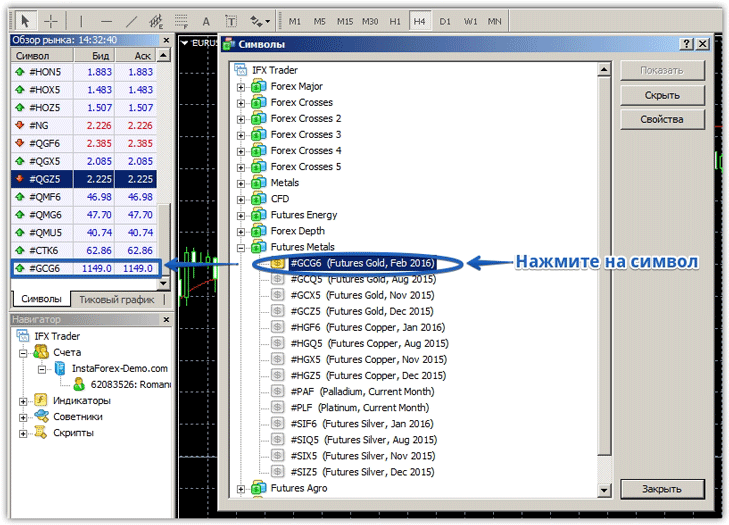
Futures trading is slightly different from traditional currency trading, as while currency pairs can be traded 24/7, futures trading is limited to a specific trading session.
To view the session schedule for each instrument you've selected, select a specific contract from the symbol list and click Properties. A window will appear with detailed contract information, including margin, tick value, and the daily trading session schedule.
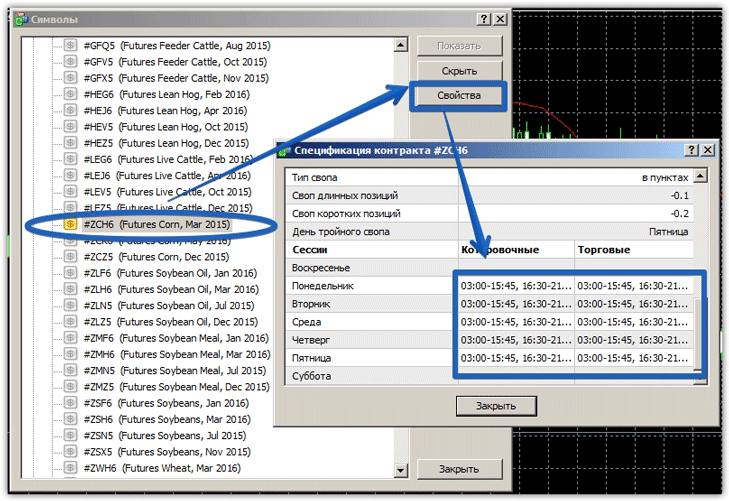
In general, futures trading is no different from your usual currency pair trading. However, to trade this instrument in MetaTrader, you should inquire about its availability and detailed trading conditions, such as spreads and commissions, before opening an account with your broker.

