Lacus TstopandBE. An MT5 assistant that's hard to imagine a scalper without
Intraday trading requires a trader to act quickly, as it is necessary not only to quickly open a trade, but also to place a stop order or use a trailing stop.

Scalpers, in particular, face particular difficulties when working with orders, as positions are sometimes held for less than a minute, and during this short period of time, money management must be kept in mind. Grid
traders also face challenges, as locking in profits requires simultaneously closing a series of orders, a process that takes a significant amount of time manually.
This is why professional traders use auxiliary Forex programs—expert advisors—to automate the entire routine trading process.
They can be accompanied by a trailing stop or closed entirely if additional conditions are met.
A notable feature of LacusTstopandBE is the ability to close a series of orders when a certain profit is reached, making it suitable for grid traders.
LacusTstopandBE is primarily an assistant, meaning it can be used on absolutely any trading asset and timeframe in MT5.
Installing LacusTstopandBE:
Despite the MT5 trading terminal being offered by many brokers for several years now, and the platform having undergone numerous upgrades, the platform's current functionality still leaves much to be desired.
LacusTstopandBE, developed in 2018, fully covers the needs of the average trader. Moreover, the robot is distributed completely free of charge and is published in the official MT5 developer library.
Therefore, you can install LacusTstopandBE in two ways: through the MT5 library or through the standard data directory.
To install a robot via the data catalog, launch your MT5 trading terminal and go to the "Tools" panel, where information on open orders is also displayed.
Then, open the "Library" tab and perform a simple sort to display only expert advisors. Find LacusTstopandBE in the list and download it using the additional menu as shown in the image:
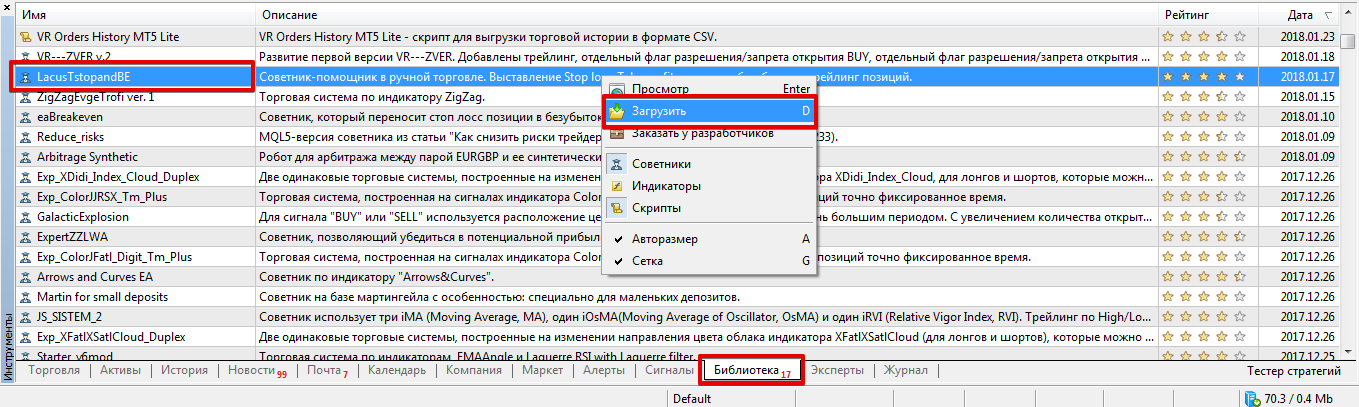
If installation via the library was unsuccessful, you can install it using the standard procedure.
To do this, scroll to the end of the article and download the robot. Then, simply copy the downloaded file to the appropriate folder in the terminal's data directory.
After installation, you must update the trading terminal in the navigator panel or restart the trading platform, otherwise the expert advisor will not appear in the list.
To start the robot picking up your orders, simply drag it onto the chart you use to open your positions.
Assistant Settings
As we've already noted, the LacusTstopandBE expert advisor is a standard assistant that simply follows traders' trades, closes them, and performs actions according to the settings you specify.
The robot does not open trades itself; it only picks up those you open manually or with another expert advisor.
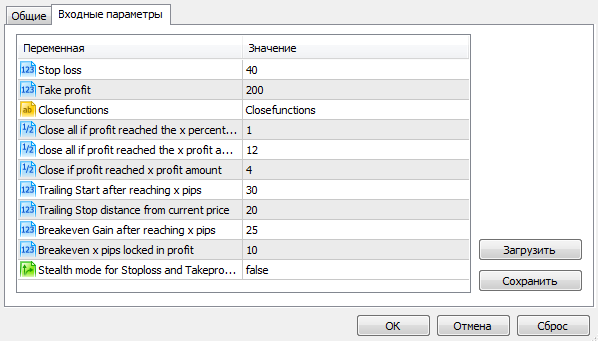
So, in the Stop Loss variable, you can set the stop order value in pips, and in the Take Profit variable, the profit value in pips.
With the Close all if profit reached the x percent of balance variable, you can specify a percentage of the deposit at which the EA will close all your open trades at once.
The Close all if profit reached the
x profit amount in currency variable allows you to specify the amount in the deposit currency after which orders will be closed. The Close if profit reached x profit amount variable allows you to close a single position on which the EA is running if the profit total for all open orders reaches the value specified in the variable.
The Trailing Start after reaching x pips variable allows you to specify how many pips after the price has passed before trailing begins, with the trailing step specified in the Trailing Stop distance from current price variable.
The Breakeven Gain after reaching x pips variable allows you to specify how many pips after the price moves toward profit the position will be rolled over to a breakeven point. The number of pips in profit is specified in the Breakeven x pips locked in profit line.
Finally, it's worth noting that the LacusTstopandBE assistant is an auxiliary expert advisor whose functionality more than covers many scripts that can perform only a few of the tasks listed. If you need classic Forex advisors, download them here - http://time-forex.com/sovetniki
Download the LacusTstopandBE assistant for MT5

