TSTester 2.30
Sooner or later, we all reach a point where we need to test our own  trading strategy for profitability.
Many test their own or others' developments in real time on a demo account, while the more daring immediately try their experiments on real trading accounts.
However, both methods are typically very time-consuming, especially since to say a trading strategy is effective, it must be tested on various instruments for at least six months.
TSTester is a program that helps you test your own trading strategy in the strategy tester, implemented as a standard expert advisor.
With TSTester, you can test indicators and strategies in visualization mode in your MT4 and learn to trade on any instrument and timeframe supported by your trading terminal.
Before beginning the detailed review, you need to install the program in the MT4 trading terminal. To do this, download the archive containing the Expert Advisor and indicator at the end of this article. Open your platform and use the File menu to open the data folder. Next, copy the Expert Advisor to the "expert" folder and the indicator to the "indicators" folder, and restart the trading terminal.
The next step is to update the historical data for the currency pairs you'll be testing on. To do this, go to the Service menu in the top panel, then open the quote archive and load the minute data for the selected currency pair.
This is necessary so you don't have to reload quotes every time you want to test on a different time frame. Remember, this step is crucial, as the reliability of your initial data greatly affects the objectivity of your testing.
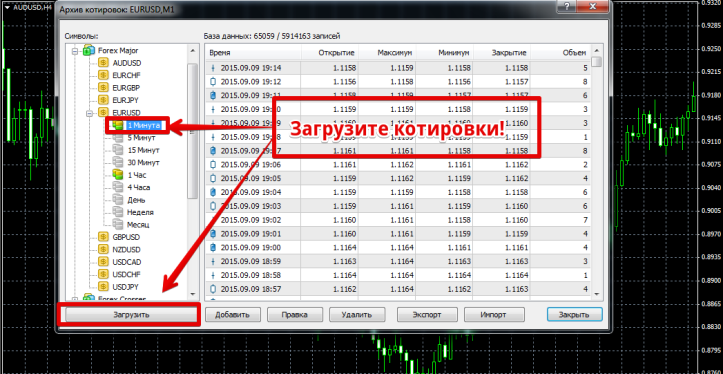
After updating the quote data, open the strategy tester and select TSTester in the Expert Advisor selection field. Next, select the currency pair to test on and the time frame.
It's crucial to check the "Visualization" box at this stage, otherwise the test will fail. Once you've completed all the steps, click Start, and a new window will open showing the live chart and order management panel:
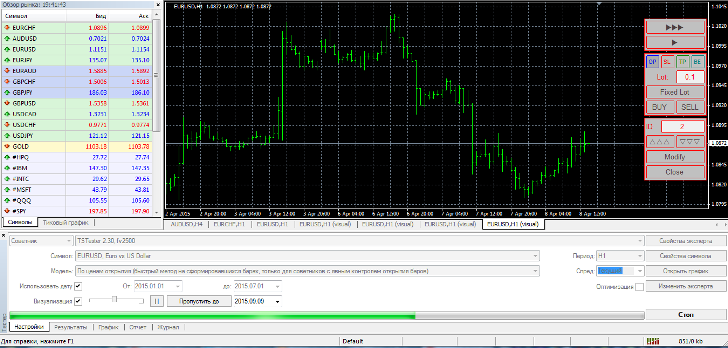
When you first launch the app, three lines will appear on your screen. These lines represent stop orders, profit, and pending orders. First, you need to remove them.
To do this, click the Sl, TP, and Op buttons on the order management panel. To open a buy order, click Buy, and to execute a sell order, click Sell. In the lot line, specify the lot you want to open the trade with.
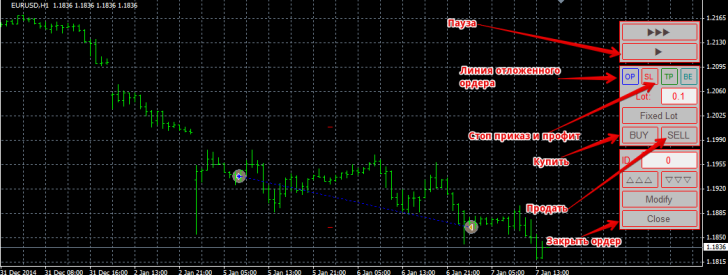
After you've opened a position, you can set a stop loss. To do this, click the SL button on the control panel. A red line will appear, which you can drag to the desired level.
You can take profit by clicking the TP button on the control panel. A green line will appear, which you should place at the profit-taking level. After you've set your profit and stop loss levels, click the Modify button, after which your levels will be set and locked in. If you need to close a position, simply click the Close button.
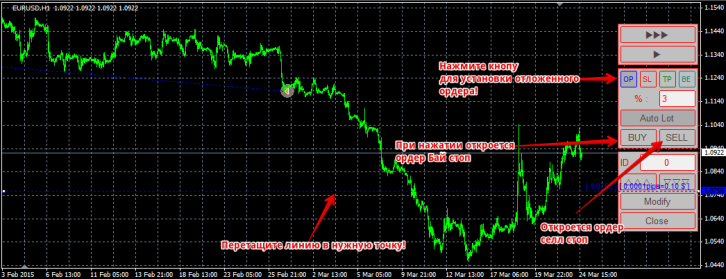
In addition to standard trade opening, you can set pending buy-stop and sell-stop orders. To place a buy-stop order, click the OP button on the control panel.
A blue dotted line will appear, which represents the pending order. Set it to the desired level and click BUY, and the buy-stop order will be placed immediately. A sell-stop order is placed in the same way, the only difference being that after setting the desired level, you must click SELL.
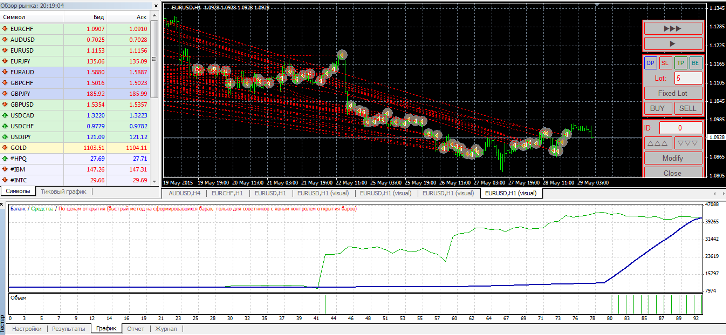
As with testing a regular Expert Advisor, you can view the history of your trades in the tester's Result tab, see a balance growth chart in the Graph tab, and access a full report on drawdown, profitability, profitability, and other key metrics in the Report tab.
While writing this article, I tested a simple TS, the results of which you can see in the image below:
Finally, I'd like to add that you can add any indicators, graphic elements, and symbols to the screen, switch chart types, and even zoom in and out.
Overall, TSTester is an excellent training tool where you can hone your skills and test the profitability of various Forex indicators and trading strategies in a short period of time—and it's free. Thank you for your attention, and happy testing!

